C100: Interlacing 30PsF Issues

I wouldn't think that a small Ninja 2 or similar would be in the way.

Actually, the Ninja 2 is next on my wish list but I needed the 70-200mm f/4 L first. If I decide to w8 a few months on the BMC, I'll consider the Ninja 2 a top priority. But, the CS6 PPro Ultra Key did an okay job for me with the C100 AVCHD under some less than pro location lighting. I did spring for that new "foam" green screen material and the deep wrinkles and big shadows are a thing of the past now.
 
Yea, AE skills are a real weak spot with me. The Ultra Key is doing a pretty good job and once I get it set, I save a preset and just apply it to all the takes. It's pretty quick and painless. It has a 16 point garbage matt but I haven't been needing it since I got the new green screen material.
 
Just wanted to add a little support...

Solid write up Matt!

Yes, we shouldn't forget that shooting against a green screen, we are maximizing use of technology since the C100 (C300) has two geen channles separated by half a pixel at readout. The green channel is strong, and I'm sure this is helping with keying.

The clip I tested today, and if I understand correctly - what was posted here, struggled with the Red channel.
 
I couldn't download the linked file before (I see Noel fixed that now), but I did a short test on my C100 (video to look at) and wrote a short article about the issues at hand here: http://www.productionfactory.se/files/where420breaks.html
Thanks for sharing this. However, the problem you show with 4:2:0 subsampling (blocky reds) isn't due to the subsampling itself. It's the fault of the software reconstructing RGB from YCbCr. What you see there is a lazy and entirely unacceptable way to recover RGB from YCbCr, ignoring completely the need to smoothly interpolate 1/4 resolution chroma to full res. You'd see the same problem with 4:2:2, just only in one direction (4:2:2 is subsampled in the X direction only, whereas 4:2:0 is subsampled in both X and Y).
 
Last edited:
Thanks for sharing this. However...

Hi Thomas, thanks for your comment!

I'd like to maintain that the jagged/torn diagonal comes from the fact that the internal recording is 4:2:0 (it had not been there on a 4:4:4 signal), but it might be prudent to point out, like you say, that even 4:2:2 is subsampled.

Gary Huff from the forum here also commented on Vimeo that I did not compare to a C300 and that it might also show similar tendencies, despite 4:2:2. On a theoretical level it's easy to see that full 4:4:4 resolution is best, 4:2:0 worst and 4:2:2 splits the difference.

Looking at my footage I think its hard to say wether or not 4:2:2 would have been sufficient to smooth that edge over. I welcome C300 owners to do further testing—it would be cool to see how big the difference is in real life.

Thomas: you peaked my interest saying that software should do a better job reconstructing the YCbCr into RGB. I take it you expect the NLE to handle this, and if so, do you feel some NLEs are better than others?

I always like to know what's what, but this is strictly out of curiosity now. We're firmly into pixel peeping here, and I don't feel that I have to change my workflow.
 
Excellent write up AndreeOnline. Although I' ve gone through this in theory before this is the first time I've personally seen the effects of a 4:2:0 limitation. I'm hoping that Thomas' 5dtoRGB software will be a good fix. However I'm still not able to access the files in the software. How do I find the .mts file that 5dtoRGB is looking for. I only see the folder called "private" and it is greyed out and not accessible. How do I use 5dtoRGB with the c100's files?


Bob
 
I'd like to maintain that the jagged/torn diagonal comes from the fact that the internal recording is 4:2:0

Not really. Why do I say that? Because the jagged edges never existed until 4:2:0 was converted to RGB so you can look at it.

The thing that makes dealing with subsampled formats so incredibly fun is that you never actually look at them. What you see is an RGB representation of them, which is created by your NLE. Yes. Your NLE is responsible for making 4:2:0 (or 4:2:2) look like something, and no two methods for doing this are the same. That's why H.264 looks like crap in Final Cut Pro 7 but looks fine in Adobe Premiere CS6, even though video data is the same.

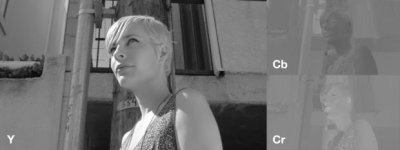
So... what the hell does 4:2:0 really look like? This:

ycbcr_example.jpg

This is what is in your MTS file. That's full res Y (luma), 1/4 res Cb (blue minus luma) and 1/4 res Cr (red minus luma). No jaggies or blockies in any of that. The jaggies happen later.

So this mess of unprocessed data is what the H.264 decoder gives the host application. It says, "Here. I've done my job, so here's your luma and chroma. It's your problem now. It's not in my job description to matrix decode and reconstruct this to RGB." The NLE is now thinking, "Crap. This lazy H.264 decoder did some half-assed decoding job (even though it didn't), now I have to do all this extra work to make it look like something recognizable." A good, hard-working NLE who cares about his reputation will go the extra mile to turn this half-finished job into something that looks pretty. On the other hand, the beat-down, sick of his own life, chain-smoking caffeine-addicted NLE will do the bare minimum amount of work to get 4:2:0 into RGB. This NLE thinks, "Eh, I don't feel like taking the extra time to do proper chroma upscaling. It's good enough. Nobody will notice." And he'd be right. Just ask any FCP7 user.

So the point is that it's not the camera's fault, and it's not the fault of the subsampling. It's the fault of the NLE for not taking the time to reconstruct this raw YCbCr data into RGB like a champ.
 
Last edited:
However I'm still not able to access the files in the software. How do I find the .mts file that 5dtoRGB is looking for. I only see the folder called "private" and it is greyed out and not accessible. How do I use 5dtoRGB with the c100's files?
Bob, can you try copying the files out of the private folder an into another directory?

I'm unfamiliar with the directory layout of the C100, so this is tough to troubleshoot. If someone can get me a card out of the camera, I'll have a look.
 
Why do I say that?

Nice post Thomas =)

But can we say with certainty that no jaggies is good? Isn't that just smoothing? Once the signal is encoded to 4:2:0, it's not like we're going to re-generate original data... I'm only thinking out loud here...

Is the jagged line or the smooth line more true to life? Or at least actual data...
 
But can we say with certainty that no jaggies is good? Isn't that just smoothing? Once the signal is encoded to 4:2:0, it's not like we're going to re-generate original data...
No jaggies is definitely good. And yes, the elimination of jaggies is a result of smoothing. And nope, we can't get our original RGB back from 4:2:0, but we can try to get close! :smile:

Is the jagged line or the smooth line more true to life? Or at least actual data...
Well if you want to get technical, the jagged line I guess is more true to the actual H.264 data since it's only 1/4 resolution in the chroma channels. But, the smoothing makes the image look closer to the original RGB (or de-bayered RGB, to be accurate) that came off the camera's sensor.
 
Hi,

I had the same Issue with Red Areas in the Frame and Final Cut...5DtoRGB is solving it for me quite well.. I now bought the full Version but it doesnt convert sound.. And that of Course is an Issue.. Is this normal?
 
I had the same Issue with Red Areas in the Frame and Final Cut...5DtoRGB is solving it for me quite well.. I now bought the full Version but it doesnt convert sound.. And that of Course is an Issue.. Is this normal?
Try again without selecting a frame rate (leave the frame rate box as "Source"). When you select a frame rate that differs from the original, sound is automatically disabled.
 
On another thread, there's been a similar mention of the 'it looks kinda interlaced in places' meme.

It caused me to spend a boring wait between interviews pixel peeping my latest shots. Like you do.

I'm sure, surely sure, I can spot little 2-4 frame periods of localised interlacing around eyes, lips and teeth. Yes, this is on PSF25 and I've set the override to progressive on a progressive project timeline - this is one or two layers of pixel peeping beyond that, where not even the wife (purveyor of 'common sense') believes me.

It's cropping up in medium movement areas (eye blinks, plosives and consonants around the mouth) in areas of detail, not edges. It's subtle, but I'm seeing more and more of it.

I need to recreate this and try recording on the PIX too, but the problem is probably not in the camera (phew). It may be the AVCHD format, it may be the way the AVCHD format is being interpreted (this is probably the best starting point). Direct import into FCPX is currently the most 'reliable' method, as I'm having a bad time with ClipWrap. BUT the interlace problem is less in the ClipWrapped files - though it's still there, and the CW files don't seem to enjoy being in FCPX as much as the FCPX versions.

5DtoRGB seems to nail most of it, but... sigh... I don't think it's gone completely. 2-3 frames in every 250 might have a slight 'interlaced' tonality to small areas of it (now you can understand why wife is of the opinion I should get a life - these interlace blemishes are almost invisible and you don't see it at video playback).

When I'm done today, will also check the 'Transcode' options in both CW and FCPX, it would be odd if that cured it. Then I'll do the PIX recordings in ProRes LT, std and HQ (there was talk from the Sony PMW-EX1/3 days that only HQ has a 'beneficial effect' on temporal aliasing).

If the HDMI feed is clean, Atomos are going to be very happy!
 
Last edited:
Thomas Worth - this is really an interesting thing.

My english is not perfect, sorry. I made an easy test with AvidMC and with C100. The problem with colors is present and visible on the preview at NLE (orig clips are ok in win media player), but after reexport (in this case in HDV) it looks ok (in win media player). I will try to repeat the test with some effects (applied in the MediaComposer) because I don't know if NLE internally works at YCC (or if the NLE temporally works at RGB for some efects - in this case the reexport would be with a color's problem).

1/ crop_AvidMC.tif
http://www.videoproduce.cz/images/chroma_NLE_problem04a_crop_AvidMC.tif
2/ reexport_HDV_freeze_win_mediaplayer.tif
http://www.videoproduce.cz/images/chroma_NLE_problem04b_crop_reexport_HDV_freeze_win_mediaplayer.tif
 
@Thomas

:) thanks alot.. that was it..

@mattdavis
I actually was surprised of how hard it is to find anything on the Internet about this Issue.. Its like not many people have it..
In my Case i can clearly see horizontal Lines in in the Red Areas.. without Pixelpeeping.. just watching it.. and not just me also my Clients..
And interesting enough its just in the Red .. i film mainly cars.. and every Time there is a red Car to Film = :-( .. but 5dtorgb is my solution to this problem so i am happy now...
 
I did the another test in AvidMC (WIN7 64bit, AvidMC 6.5.2).

I make a conversion during import AVCHD C100 files to XDCAM EX HQ (35Mbps) and it's solve the problem.

I hope that Canon and Avid will work on repair this issue (AVCHD from C100 and Avid MediaComposer6.5/Symphony 6.5. don't work correctly with red saturated color). I see the same problem on AVCHD clips from Canon G10 camera.
 
Last edited:
The interlacing artifacts on saturated color areas are definitely an PsF problem. On true progressive AVCHD clips from Panasonic AC160 there are smooth transitions between color areas even when it is 4:2:0 subsampled. When I play PsF clips from C100 in VLC or After Effects (after reinterpreting as progressive), there are no artifacts, but in Vegas Pro 12 and Edius 6 there are that artifacts even after reinterpreting as progressive footage. I will check the 5DtoRGB software.
 
Just want to say that this isn't a case of pixel peeping or being overly critical. Seems there is a real issue here regarding oversaturated PsF footage. 5DtoRGB seems to solve some of it but why it's there in the first place in an issue for Cannon to address. I haven't been too impressed at how Cannon is working on known problems or how it sees it's responsibility once the camera is out the door. Just wait and buy the C100A and they might fix it then.
 
Back
Top