In The Field SDHC Storage/Backup

Why back-up as you go ?

...The big advantage of the HMC150 is that the SDHC media is so cheap that you can easily afford to own 8+ hours of media, so you can keep shooting the whole day and then offload the cards when you're done.
 
Maybe for redundancy? Nothing worse than getting back to the studio only to find you have a corrupted SDHC card. You'd have a backup.

I'd look at a netbook for backup.
 
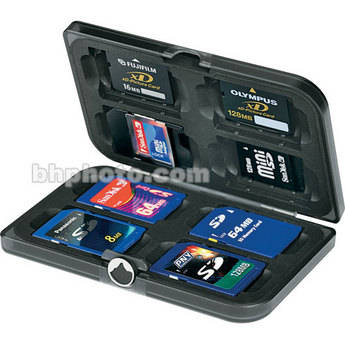
...My guess is that if the card is going to go corrupt, it's less likely to happen after it comes out of the camera. I use a Pelican SDHC card case to store cards as soon as the video is shot.

Pelican SDHC Card Case
http://www.pelican.com/cases_detail.php?Case=0910

True, but if it's an event or something that can't be repeated wouldn't it be a good idea to back up the file just in case? I mean, what if you lost the SDHC cards? What if something happened to them on ingest? I saw another post here recently where someone had a USB card reader corrupt his files so he lost everything. Wouldn't the $300 for a netbook be worth the peace of mind?

I think maybe it would.
 
What if something happened to them on ingest?

...Forget about ingest, the cards could just as easily corrupt when you are doing your back-up, especially if you are rushing under the pressure of shooting a live event.

Yes a back-up copy would be nice to have, but why not do this at the end of the day when the chaos of the shoot is done, and you can carefully and methodically copy the files from your cards.
 
Okay.... I'm still stumped. You have two or more cards... You are shooting. You swap cards. While idle, you open your netbook and copy the contents of a card to the HDD... No rush.

You know right then if everything is good.

OR.. You just store the card and hope that everything is fine when you get back to the studio?

I'll dump to netbook. You can wait if you like.
=)
 
I use this one - small and stylish: http://www.bhphotovideo.com/c/produ...4775_FEF_PixelPak_V1_Memory_Card.html#reviews

424469.jpg
 
Hey All,

Any thoughts on this. I have been searching around but have not found quite what I am looking for. we do weddings and I would love to back up as I go.

Digital Foci has a product called "Picture Porter" which should backup SDHC cards. I've not tried it with HMC-150 specifically..., but definitely is good for the still camera backing up CF cards while continuing to shoot the wedding...

http://www.digitalfoci.com/picture_porter.html

While the device can display various still and a couple of 'movie' formats, I believe it will 'backup' the entire contents of the flash device.
 
...Forget about ingest, the cards could just as easily corrupt when you are doing your back-up, especially if you are rushing under the pressure of shooting a live event.

Yes a back-up copy would be nice to have, but why not do this at the end of the day when the chaos of the shoot is done, and you can carefully and methodically copy the files from your cards.

I am going to have to agree with this. I put the cards in a case and they are not touched till download later on.. We tried backuping and only had enough time to get 1 in the computer...
 
I am going to have to agree with this. I put the cards in a case and they are not touched till download later on.. We tried backuping and only had enough time to get 1 in the computer...

Were you transcoding or something? I can copy a 16gb SDHC in about 15-20 min.. It's not like I wanted to erase the original. I wasn't waiting to re-use the card.
 
I feel so blessed and liberated in not having to back-up in the field like I used to have too with the P2. I have 8 SD cards and the exact same case that's listed at the top. It can pretty much get me through most projects without having to offload and or back-up, and if it's a really important job then I'll buy more cards to keep shooting and won't offload that card till I'm done.
 
I feel so blessed and liberated in not having to back-up in the field like I used to have too with the P2. I have 8 SD cards and the exact same case that's listed at the top. It can pretty much get me through most projects without having to offload and or back-up, and if it's a really important job then I'll buy more cards to keep shooting and won't offload that card till I'm done.

Once we found the 'right number' of cards to cover a wedding, our backing up in the field was for redundancy, as well as verification, than reuse.

While in the case of the reception shots, unless it was an 'event', losing a card was not an absolute show stopper... but losing the Wedding Party Formals... lawyer action... The only time we came close to that was when we still did film, and the Hasselblad back was not properly seated on the camera, and there were light leaks on some of the formals... required a large amount of free images to assauge...
 
dude, gotta agree with ATL,

Netbook is the way to go. You can use the REAL panasonic copy software, they're small, you can verify the data is there. Also if you're shooting a real ton of footage, bring an external HD. Or bring an external HD anyway for redundancy. They're cheap, and you can use it for a lot more stuff too. Good ones have 8+ hour battery life.

The last thing, is (and many may disagree with me, but I swear by it), you CAN preview your footage on them despite the slow procs. Use VLC, or the viewer, and it'll run like 1 fps, but at least you can get a picture. It's no substitute for a calibrated field monitor, but it's better than the onboard LCD. 10" netbook's resolution is 1280 x 600, so you can almost get to 720p for a clearer idea.

And in the field, there are a million things you could use a nice small comp for, even just notes alone are worth it.
 
dude, gotta agree with ATL,

Netbook is the way to go. You can use the REAL panasonic copy software, they're small, you can verify the data is there. Also if you're shooting a real ton of footage, bring an external HD. Or bring an external HD anyway for redundancy. They're cheap, and you can use it for a lot more stuff too. Good ones have 8+ hour battery life.

We tried the 'laptop' backup early on. The netbook, does make the unit 'small', but it still has to be situated in the 'open' position. When we did use a laptop, it was sort of like a beacon for people to get interested in our stuff. We had a set of cameras ripped off at a wedding, so our 'rules of engagement' required that everything of ours be in a box, and except in use, locked up... the laptop sitting on top of the box... well, we thought of as a sign that says 'steal this stuff'... even if we sat next to the equipment, nefarious evil doers could take advantage of our being away to steal... paranoid... you bet...

Anyway, so devices that could be in the box, backing up, were seen by us as a solution to the problem and did not give any more notice of our equipment than necessary.

(Actually at one wedding, when I was called a way for an 'unexpected' event, when I returned, some of the kids of the wedding guests where playing with my laptop...)
 
After the ceremony I usually copy the cards up to that moment for safekeeping/backup and if something was to happen i would at least be able to provide some of the footage!... i also get a an hour or two of downtime, so i use this time to edit some of the morning preparations or in the case of a SDE (same day edit) i get things done.
Now about backing things up at the reception, well that really depends on case by case basis (depends on the venue and time).

a netbook sounds good, but i use a 17" Mac Book Pro for more editing space... i might consider one of the Lenovo 10.1" netbooks just because you can install Mac OS X, also the Dell minis work good for what i read (google hackintosh)
 
Back
Top