
BrownCowVideo
Active member
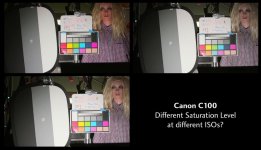
Has anyone experienced different saturation levels in the C100 at different ISOs? I was running my various lights through some test charts, and finally deduced why my results were so skewed anytime a different light necessitated that I change the ISO... my camera seriously boosts saturation at low ISOs, especially at 320. See the image below. I did an ABB at both 320 and 850.
Has anyone else experienced this? I don't believe that any other camera I've owned has displayed this behavior. I will next try it with the custom profile turned OFF and see what happens. My profile is below the photo.
Color Profile is:
[ CUSTOM PICTURE FILE ]
MODEL : "Canon EOS C100"
Rename : "Flo "
Protect : Unprotect
Gamma : Wide DR
Black - Master Pedestal : -1
Black - Master Black - Red : +0
Black - Master Black - Green : +0
Black - Master Black - Blue : +0
Black Gamma - Level : +0
Black Gamma - Range : +0
Black Gamma - Point : +0
Low Key Satur. - Enable : Off
Low Key Satur. - Level : +0
Knee - Enable : On
Knee - Slope : -15
Knee - Point : 109
Knee - Saturation : +0
Sharpness - Level : +0
Sharpness - H Detail Freq. : +0
Sharpness - Coring - Level : +0
Sharpness - Coring - D-Ofst : 0
Sharpness - Coring - D-Curve : 0
Sharpness - Coring - D-Depth : +0
Sharpness - HV Detail Bal. : +0
Sharpness - Limit : +0
Sharpness - Select : 0
Sharpness - Knee Aperture - Gain : 0
Sharpness - Knee Aperture - Slope : 1
Sharpness - Level Depend - Level : 0
Sharpness - Level Depend - Slope : 0
Sharpness - Level Depend - Offset : 0
Noise Reduction : Off
Skin Detail - Effect Level : Off
Skin Detail - Hue : 0
Skin Detail - Chroma : 16
Skin Detail - Area : 16
Skin Detail - Y Level : 16
Selective NR - Effect Level : Off
Selective NR - Hue : 0
Selective NR - Chroma : 16
Selective NR - Area : 16
Selective NR - Y Level : 16
Color Matrix - Select : Normal 1
Color Matrix - Gain : +30
Color Matrix - Phase : +10
Color Matrix - R-G : +0
Color Matrix - R-B : +0
Color Matrix - G-R : +0
Color Matrix - G-B : +0
Color Matrix - B-R : +0
Color Matrix - B-G : +0
White Balance - R Gain : +0
White Balance - B Gain : +0
Color Correction - Select Area : Off
Color Correction - Area A Setting - Phase : 0
Color Correction - Area A Setting - Chroma : 16
Color Correction - Area A Setting - Area : 16
Color Correction - Area A Setting - Y Level : 16
Color Correction - Area A Revision - Level : +0
Color Correction - Area A Revision - Phase : +0
Color Correction - Area B Setting - Phase : 0
Color Correction - Area B Setting - Chroma : 16
Color Correction - Area B Setting - Area : 16
Color Correction - Area B Setting - Y Level : 16
Color Correction - Area B Revision - Level : +0
Color Correction - Area B Revision - Phase : +0
Other Functions - Setup Level - Level : +0
Other Functions - Setup Level - Press : Off
Other Functions - Clip At 100% : Off
Has anyone else experienced this? I don't believe that any other camera I've owned has displayed this behavior. I will next try it with the custom profile turned OFF and see what happens. My profile is below the photo.
Color Profile is:
[ CUSTOM PICTURE FILE ]
MODEL : "Canon EOS C100"
Rename : "Flo "
Protect : Unprotect
Gamma : Wide DR
Black - Master Pedestal : -1
Black - Master Black - Red : +0
Black - Master Black - Green : +0
Black - Master Black - Blue : +0
Black Gamma - Level : +0
Black Gamma - Range : +0
Black Gamma - Point : +0
Low Key Satur. - Enable : Off
Low Key Satur. - Level : +0
Knee - Enable : On
Knee - Slope : -15
Knee - Point : 109
Knee - Saturation : +0
Sharpness - Level : +0
Sharpness - H Detail Freq. : +0
Sharpness - Coring - Level : +0
Sharpness - Coring - D-Ofst : 0
Sharpness - Coring - D-Curve : 0
Sharpness - Coring - D-Depth : +0
Sharpness - HV Detail Bal. : +0
Sharpness - Limit : +0
Sharpness - Select : 0
Sharpness - Knee Aperture - Gain : 0
Sharpness - Knee Aperture - Slope : 1
Sharpness - Level Depend - Level : 0
Sharpness - Level Depend - Slope : 0
Sharpness - Level Depend - Offset : 0
Noise Reduction : Off
Skin Detail - Effect Level : Off
Skin Detail - Hue : 0
Skin Detail - Chroma : 16
Skin Detail - Area : 16
Skin Detail - Y Level : 16
Selective NR - Effect Level : Off
Selective NR - Hue : 0
Selective NR - Chroma : 16
Selective NR - Area : 16
Selective NR - Y Level : 16
Color Matrix - Select : Normal 1
Color Matrix - Gain : +30
Color Matrix - Phase : +10
Color Matrix - R-G : +0
Color Matrix - R-B : +0
Color Matrix - G-R : +0
Color Matrix - G-B : +0
Color Matrix - B-R : +0
Color Matrix - B-G : +0
White Balance - R Gain : +0
White Balance - B Gain : +0
Color Correction - Select Area : Off
Color Correction - Area A Setting - Phase : 0
Color Correction - Area A Setting - Chroma : 16
Color Correction - Area A Setting - Area : 16
Color Correction - Area A Setting - Y Level : 16
Color Correction - Area A Revision - Level : +0
Color Correction - Area A Revision - Phase : +0
Color Correction - Area B Setting - Phase : 0
Color Correction - Area B Setting - Chroma : 16
Color Correction - Area B Setting - Area : 16
Color Correction - Area B Setting - Y Level : 16
Color Correction - Area B Revision - Level : +0
Color Correction - Area B Revision - Phase : +0
Other Functions - Setup Level - Level : +0
Other Functions - Setup Level - Press : Off
Other Functions - Clip At 100% : Off