HPX-3000 / P2 Workflow

SUPPATIME

Active member
Hey all; Drew here. If any of you recall from about a year ago, I was the cinematographer on a few short films using the HVX200 with the P+S Technik mini35 and Panavision Super Speeds. Last December, I fell in love with the Panasonic cameras and the P2 system.

Here I am working for a company in Los Angeles on a spec shoot for a reality series, and yesterday, we used two HPX-3000s and 10 32GB P2 cards in 1080i/24P in DVCPRO HD. Due to our post workflow and concerns with support with the AVC-Intra codec, we opted for the former.

Our downtime with the P2 cards was a fault multi-faceted; our external 1TB hard drive didn't arrive until after lunch, there was no Firewire800 cable included as per my request (we went USB 2) and rather than getting the Panasonic 5 card reader, we used the adapter cable to go from P2 to the Express PCMCIA on a MacBook Pro.

I'm doing my damndest to convince this company that the HPX-3000 / P2 combination is the way to go for the production, but I need some serious help speeding up the card capturing process.

I can only assume my wishlist would help this process:

17" MacBook Pro 2.6GHz / 4GB RAM / 250GB
G-RAID G-Safe Mirrored HD @ 1TB (swappable) with Firewire800
Panasonic AJ-PCD20 5 card reader with Firewire800
Panasonic 32GB P2 Cards (16 total)

Again, to convince the powers-that-be that Panasonic is the way to go, I need to speed up the downtime between transfers so I can get the P2 cards back out into the field faster. Anything else that you can think of that I'd need?

Also, a major concern is archiving footage. I had made the suggestion that, after delivering the 1TB HD to the editor that transfers be made to DigiBeta for archiving. Again, anything that would be faster (DVD, BluRay?) can help with my arguement.

The one mistake I am entirely responsible for is that I transferrer the footage to the Mac through Final Cut HD... which took a lot of time converting the files to Quicktime. Again, any advice on how to speed up workflow and archiving is much appreciated.

- Drew
 
For Final Cut Pro you should be using 1080i/24pA, unless there's something different about AVC-Intra that I've yet to hear about.

As far as archiving goes, I'd suggest BluRay or more hard-drives in Redundancy.

How's the 3000 working out? I wanted to rent one for a job coming up but also wanted a relay, that won't happen because of the lightloss with the only available relay systems currently.
 
Ditch the mac, get a modern Windows laptop with the PCMCIA slot and expresscard slot, and go directly to an eSATA or FW800 hard disk for the cheapest, fastest transfer system. Put the P2 card in the PCMCIA slot, and an eSATA (or FW800) adapter in the ExpressCard slot.

Your Mac/PCD20 system would probably work fine as well, it'll just cost way more and be a whole lot slower. You don't want to run the cards on FW800 and the drive on FW800 -- unless you have two separate FW800 busses, and you won't on an MBP.
 
For Final Cut Pro you should be using 1080i/24pA, unless there's something different about AVC-Intra that I've yet to hear about.

I was the resident "P2 Guru" on set, not the DP or Editor, so I don't know what their issues were with AVC-Intra. From what I've been told, as it's Quicktime compatable, it's actually the superior codec that Panasonic uses. I don't know their issues with 24PA, but something from the studio end has them sticking with the regular 24P. I assume it's not a Final Cut issue, but more an end-user concern.

As far as archiving goes, I'd suggest BluRay or more hard-drives in Redundancy.

Cost is their biggest concern, as this will be a television series. I know they don't want to shelf out thousands of dollars on HDs that'll never see the light of day again. BluRay sounds like the way to go, but again, is there a fast system to allow for burning? Price isn't entirely an issue, as said, this is a pro production, but everything comes down to speed.

How's the 3000 working out? I wanted to rent one for a job coming up but also wanted a relay, that won't happen because of the lightloss with the only available relay systems currently.

I've never been more impressed with a camera than I was the 3000. I've come from using a lot of F900s, and the subtle differences in menus was cause for momentary confusion at times, but Panasonic has their imaging down with that camera. Noise was nominal at 0dB and the list of options in that camera blows my mind. Coming from the HVX-200 with adapters on various other shoots, I look forward to the day when I can tell them to do a test with the HPX-3000, pro35 and some PRIMO glass. Drool.

Ditch the mac, get a modern Windows laptop with the PCMCIA slot and expresscard slot, and go directly to an eSATA or FW800 hard disk for the cheapest, fastest transfer system. Put the P2 card in the PCMCIA slot, and an eSATA (or FW800) adapter in the ExpressCard slot.

Your Mac/PCD20 system would probably work fine as well, it'll just cost way more and be a whole lot slower. You don't want to run the cards on FW800 and the drive on FW800 -- unless you have two separate FW800 busses, and you won't on an MBP.

That might be a very good option. I'm a die-hard Mac guy, so I'll end up shooting myself in the face trying to figure out Windows again, but if it'll speed up the transfer times (which it sounds like it will), I can see if they'll hire a D.I.T. or qualified AC to take over that task.

I think, Barry, there was some confusion as to the set-up we used yesterday: the P2 cards were fed into the PCMCIA slot through an adapter, and the footage ran out to the external HD via USB 2. I assume most of the slowing down went through the transfer to that hard drive, but also because Final Cut converted the files to Quicktime before doing so.

Is there any software that can be used in conjunction with the AJ-PCD20 5-slot P2 device so the files can be quickly and efficiently dropped to the external HD without having to run through Final Cut? I know there's a variety of software for Mac and PC to transfer one card quickly and then reformat... I'm hoping there's one that's compatible for the 5-card reader so I can capture the data faster (and hopefully to separate bins for each card) and format them so they can go back out to work.
 
Honestly, the producers might be better off with something like a Sony XDCAM F355. That camera seems to dominate HD reality television--ie, used on Survivor's next season, COPS, Mythbusters, AxMen, Ice Road Truckers, Extreme Makeover, etc. etc.

The F355 doesn't cause the media management headaches you're struggling with; it records a little less than two hours of HQ video to a disk, and you just keep popping in new disks ($70 each). And you can reuse them after editing. Plus, the XDCAM uses 1/2" chip, which means it's a little easier to keep things in focus for run-and-gun reality work.

I'm a Panasonic fan, but I think it's hard to argue that P2 is the best format for reality TV right now, especially combined with the roughly 1GB a minute demands of the HPX3000 (assuming you use 100mbps data rate).

Really, the HPX3000 seems like overkill for a reality series to me. It's heavier than cameras like the Sony, the power-draw is greater, and shooting in DVCPRO HD cancels out some of the benefits of a 2.2MP imager, since the format itself doesn't match the 3000's full-raster resolution.

Just my two-cents...
 
Is there any software that can be used in conjunction with the AJ-PCD20 5-slot P2 device so the files can be quickly and efficiently dropped to the external HD without having to run through Final Cut?
You don't have to go through FCP at all. You can use P2 Log Pro to convert files to Quicktimes (if that's what you need) or you can just use P2CMS to copy the cards over.

It's really rather risky to use FCP to convert the files from the cards over to the external hard disk anyway. You want to copy the entire MXF file structure from the cards, and preserve that. Get Raylight to do away with the whole FCP import step.

I'm hoping there's one that's compatible for the 5-card reader so I can capture the data faster (and hopefully to separate bins for each card) and format them so they can go back out to work.
With the five-slot reader, you can drag and drop all five cards at once, which will get you the full 800mbps transfer rate.

Ditch FCP out of the middle of your workflow, that's not doing you any favors. If you want to use a portable Mac, your problem is going to be in getting fast throughput to your external drives (unless the MBP has some connection I'm not thinking of). On a Windows system you could do as I said before, use PCMCIA for the card and FW800 or, preferably, eSATA for the drive. Or both. Or four cards at once even. I mean, if you want to speed up your transfers, consider this option:

Use a Windows laptop like my Lenovo R61, which has USB, a firewire 400 port, an ExpressCard slot and a PCMCIA slot. Get the five-slot reader hooked in through an FW800 connection (using a PCMCIA->FW800 board on the Windows system). Get an ExpressCard->eSATA adapter and plug in one drive via eSATA. Plug in another drive via FW400 to the laptop's built-in FW400 port. Plug in another drive via USB. Then you can drag and drop four cards all simultaneously (one to the eSATA drive, one to the USB drive, one to the FW400 drive, and one to the laptop's internal hard disk, preferably a SATA 5400 or 7200RPM drive). With a configuration like that you should be able to offload four 16GB cards in about 20 minutes total (wild guess, I haven't pushed it that hard before). And, if you're going with a Lenovo, you could actually install a second hard disk inside the laptop and copy all five cards simultaneously. With both internal drives being SATA, I bet you wouldn't even slow down when doing that.
 
Honestly, the producers might be better off with something like a Sony XDCAM F355.

The F355 doesn't cause the media management headaches you're struggling with; it records a little less than two hours of HQ video to a disk, and you just keep popping in new disks ($70 each). And you can reuse them after editing. Plus, the XDCAM uses 1/2" chip, which means it's a little easier to keep things in focus for run-and-gun reality work.

The production is looking into the XDCAM. Again, for ease of use, I firmly agree that it would be a better choice as far as data, discs and archiving go. I'll be sure to look into that more deeply.

Really, the HPX3000 seems like overkill for a reality series to me.

You don't know what I'm working on... :happy:


With the five-slot reader, you can drag and drop all five cards at once, which will get you the full 800mbps transfer rate.


Use a Windows laptop like my Lenovo R61, which has USB, a firewire 400 port, an ExpressCard slot and a PCMCIA slot. Get the five-slot reader hooked in through an FW800 connection (using a PCMCIA->FW800 board on the Windows system). Get an ExpressCard->eSATA adapter and plug in one drive via eSATA. Plug in another drive via FW400 to the laptop's built-in FW400 port. Plug in another drive via USB. Then you can drag and drop four cards all simultaneously (one to the eSATA drive, one to the USB drive, one to the FW400 drive, and one to the laptop's internal hard disk, preferably a SATA 5400 or 7200RPM drive). With a configuration like that you should be able to offload four 16GB cards in about 20 minutes total (wild guess, I haven't pushed it that hard before). And, if you're going with a Lenovo, you could actually install a second hard disk inside the laptop and copy all five cards simultaneously. With both internal drives being SATA, I bet you wouldn't even slow down when doing that.

Thanks again for your wisdom, Barry.
 
Barry (or whomever can respond),

What say you to this potential setup? Again, sticking with the Mac option for the time being:

Apple MacBook Pro
Dual-Port Firewire 800 Express PCMCIA Adapter (see here)
G-RAID G-Safe Mirrored HD
Panasonic AJ-PCD20 5 P2 Card reader

The thought is, the Dual-Port Firewire 800 card goes into the PCMCIA slot, thereby allowing both the AJ-PCD20 to be connected to the computer, and the computer to the 1TB hard drive for (hypothetically) 800Mbps transfer rates, given I use third-party P2 software. I'm unsure the card works with Mac OS, but I'd be willing to give it a try.
 
Last edited:
Could work, as that gives you two separate FW800 busses.

But dude, trim that banner down... we've got a 569x70 max size! :)
 
Ditch the mac, get a modern Windows laptop with the PCMCIA slot and expresscard slot, and go directly to an eSATA or FW800 hard disk for the cheapest, fastest transfer system. Put the P2 card in the PCMCIA slot, and an eSATA (or FW800) adapter in the ExpressCard slot.
.

i use this exact meathod it HOWLS through cards, but my raid is a 0
 
Just a thought here. I just did a shoot with the HPX-3000 in 1080 24p. If you shoot with 5 16gb cards you should have a bunch of recording time for one camera. In addition, you can have a few empty cards available to replace the ones you are offloading. By the time you are done offloading you should be able to switch out cards.

In other words, offloading may not be too much of a factor in terms of time because you will be able to hot swap your cards as you shoot.
 
Sorry if I'm not following this correctly but why would you need a dual port Firewire 800 reader? Doesn't your macbook pro have a Firewire 800 port? So then wouldn't you be able to hook up your harddrive to the built in FW800 and then connect the card reader via a fw800 adapter in the expansion slot?

davide
 
Just a thought here. I just did a shoot with the HPX-3000 in 1080 24p. If you shoot with 5 16gb cards you should have a bunch of recording time for one camera. In addition, you can have a few empty cards available to replace the ones you are offloading. By the time you are done offloading you should be able to switch out cards.

In other words, offloading may not be too much of a factor in terms of time because you will be able to hot swap your cards as you shoot.

I completely agree; the production staff aims at keeping the pace of the production up, so they've opted for the 32GB cards. A lot of the banter on this show is between three guys cracking jokes and commenting on issues at hand. Their theory is the bigger cards you have, the longer these guys can go and get into their routine.

I've worked with 4, 8 and 16GB cards since using P2 nearly a year and a half ago, and honestly, the 32 and new 64 cards scare the hell out of me. The speed to transfer the data just isn't there yet (in my opinion), and the concept of potentially losing data is terrifying.


Sorry if I'm not following this correctly but why would you need a dual port Firewire 800 reader? Doesn't your macbook pro have a Firewire 800 port? So then wouldn't you be able to hook up your harddrive to the built in FW800 and then connect the card reader via a fw800 adapter in the expansion slot?

davide


The dual port is to use the 5 card reader and the Firewire800 hard drive at the same time; without it, the hard drive would need to be powered off of the MacBook's USB 2.0 port, which isn't really fast enough for what I'm going to need it to do.


I'm in the works with a new setup (including some off the wall variables) which I'll be sure to keep you guys posted about in the near future. If all goes well, Panasonic will have a showcase system to be proud of on network television.

And Barry, sorry about the image below... seems I made the cut a long time ago when you didn't have so many restrictions on file size. :cheesy:

I'll scale it back or get rid of it when I'm not at the office.

Cheers!
 
I've worked with 4, 8 and 16GB cards since using P2 nearly a year and a half ago, and honestly, the 32 and new 64 cards scare the hell out of me. The speed to transfer the data just isn't there yet (in my opinion), and the concept of potentially losing data is terrifying.

Ha, that's funny, I'm just the opposite. I'm pretty confident about the integrity of the P2 cards themselves (ie, I don't think they're going to lose data), and I'm only feeling good about P2 cards now that they're reaching 64GB sizes. With 5 of those in a 3000, you could shoot in 24p for more than 6 hours! So for most productions, you don't have to worry about recycling the cards during the day. When the day is over, just pop all 5 cards into that 5-slot reader, and go to dinner (or to bed) while the computer copies everything over from the cards to your hard drive. Pretty straight forward, at least for how I work...
 
The dual port is to use the 5 card reader and the Firewire800 hard drive at the same time; without it, the hard drive would need to be powered off of the MacBook's USB 2.0 port, which isn't really fast enough for what I'm going to need it to do.


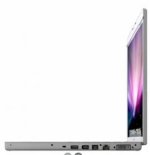
Gotcha, but instead of plugging the hd into the usb2.0 port why not just use the built-in firewire 800 port on the side of the machine? Here's a picture of what I mean. It's the third port from the left. Then you could just get a single port fw800 card for the expansion slot to plug in the 5 card reader. I'm guessing the cost difference is probably going to be negligible anyway, so it probably doesn't matter that much. Good luck!
 

Attachments

  • Picture 1.jpg
    Picture 1.jpg
    5.1 KB · Views: 0
Ha, that's funny, I'm just the opposite. I'm pretty confident about the integrity of the P2 cards themselves (ie, I don't think they're going to lose data), and I'm only feeling good about P2 cards now that they're reaching 64GB sizes. With 5 of those in a 3000, you could shoot in 24p for more than 6 hours! So for most productions, you don't have to worry about recycling the cards during the day. When the day is over, just pop all 5 cards into that 5-slot reader, and go to dinner (or to bed) while the computer copies everything over from the cards to your hard drive. Pretty straight forward, at least for how I work...

I totally agree with you, but we're running multi-camera all day. Unless I had a few computers / HDs to do this with, I'd spend nearly all of the next day transferring the data. 5 64GB P2s versus 15 64GB P2s makes all the difference in the world.


Gotcha, but instead of plugging the hd into the usb2.0 port why not just use the built-in firewire 800 port on the side of the machine? Here's a picture of what I mean. It's the third port from the left. Then you could just get a single port fw800 card for the expansion slot to plug in the 5 card reader. I'm guessing the cost difference is probably going to be negligible anyway, so it probably doesn't matter that much. Good luck!

Very true. I found the dual 800 and figured it'd be nice to max out the PCMCIA slot while leaving the original Firewire 800 open for other things. Probably not necessary, but it might come in handy.

Currently, the production is back to a tape-based system (yuck, Sony), but they're talking about the segments of the show. I might be able to convince them for the more epic looking portions of the show, they need one of the HPX cameras.
 
Here's what I've been using shooting a doc -- generating a lot of footage every day:

17" MBPro
HPX500 with 4 32GB P2 cards, and 2 8GB P2 cards, more than enough to get me through the day at 720p 24n
5-slot P2 card reader. This is essential. I agree with Barry that the PCMCIA slot is fastest, but it's only one card at a time. The P2 reader is awesome.
For drives, I would recommend the CalDigit. These are better than G-Tech, slightly cheaper, and you can switch RAID Mode: O, 1, or JBOD.
For archiving, I think your best solution is LTO-3. For a high-end production, this is the only serious archiving solution. BluRay discs will eventually "rot." You can get 400GB on a single $40 tape that has a 30--year shelf-life. The Quantum 600a is expensive (about $6500) but connects via ethernet. I run this straight off my MBPro.

Sometimes with this setup, right now as a matter of fact, I'm doing all of the following at the same time, though I wouldn't recommend it:

1. Copying dailies from cards via P2 card reader to CalDigit HDPro (connected as esata via Expresscard
2. Importing yesterday's footage into FCP.
3. Archiving day before footage to LTO tape.
4. Posting to DVXuser.

All at the same time. Gotta love the stability of OSX.

Peter
 
Thanks for starting this thread, as we are considering going the dual FW800 adapter route as well.

I have a PCD20, a Dell Precision laptop, and I think adding the dual FW800 adapter and a raid zero with removable drives would be a fast and safe option.
 
Hi Peter,

What lens are you using?
I'm getting ready to shoot a verite style doc in 3 different countries (US, Brazil and Indonesia) my workflow will be very similar but I'm looking for low cost wide angle lens solutions.
Both Canon and Fujinon have announced low cost HD wide angles at NAB but I haven't seen any available yet for sale.
 
Back
Top