hi - not sure if this is the right forum or right place within the forum. I want to learn how to grade (not use LUT, i'd rather create a LUT) to bring dvx200 vlog-l footage to "simple" rec709. nothing creative, no cinematic looks, just ... good rec709. I have adobe CC and am learning how to use, but not sure if I would do this in speedgrade, or just using premiere? for now, i've been looking at the scopes and bringing (in premiere) using master curves to bring levels up from 60-80ire up to 80-100ire and blacks down to 0 ire .... then putting in a slight s-curve (not sure what this does, or if im doing it right, or ... where to learn how to do it right?!?!). not sure about how to add saturation or contrast or sharpness ... in short I have no idea what I'm doing but i would really like to learn and not sure where to look. any advice is greatly appreciated!

Navigation
Install the app
How to install the app on iOS
Follow along with the video below to see how to install our site as a web app on your home screen.
Note: This feature may not be available in some browsers.
More options
You are using an out of date browser. It may not display this or other websites correctly.
You should upgrade or use an alternative browser.
You should upgrade or use an alternative browser.
how to grade vlog-l to rec709?
- Thread starter camnoob
- Start date

Jason R. Johnston
Well-known member
Start with Panasonic's Varicam 35 V-log to rec.709 LUT available at the Varicam 35 website.

Cary Knoop
Veteran
That will work but even better will be to use DaVinci Resolve RCM and use the proper input transformation.Start with Panasonic's Varicam 35 V-log to rec.709 LUT available at the Varicam 35 website.

TDCat
Member
Hi,
I prefer to do it manually too (I use the DVX200) as any LUTs I have used do not come close to the look I'm after (though I guess they may technically be Rec.709 spec).
Premiere Pro - Premiere Pro DVX200 Log Grading Video
Davinci Resolve - Davinci Resolve DVX200 Log Grading Video
Don't take my methods as gospel by any means but it works for me!
Regards,
Torsten.
I prefer to do it manually too (I use the DVX200) as any LUTs I have used do not come close to the look I'm after (though I guess they may technically be Rec.709 spec).
Premiere Pro - Premiere Pro DVX200 Log Grading Video
Davinci Resolve - Davinci Resolve DVX200 Log Grading Video
Don't take my methods as gospel by any means but it works for me!
Regards,
Torsten.
I've seen your vid Torsten, good stuff. I'm quite sure I adapted a bit of what I'm currently doing from your vid. I'm wondering where I can learn more. For example, after adjusting pedestal and whites, how does one know WHERE to grab to make the s-curve? it seems very random and arbitrary how I am doing it at this point, i guess I am just grabbing it about 1/2 way between the pedestal and the "middle" for the bottom of the s-curve and same for the top. I wish there were an in depth "learn how to use all these tools" but the training i've found seems to be more of an introduction. how saturated should it be in rec709 for example ... i realize for creative looks, everything is subjective but since I just want to bring vlog-l to "proper rec709" it seems like there would be some less subjective ... rules ... for lack of a better word. Thanks for your Vid, and your reply.
Thanks for your reply JRJ. I've tried Pany's LUT, I just don't find it to be very good. I still have to tweak a lot even with the LUT, so to me might as well just not use it at all. I want to create my own vlog-l to rec709 lut. How does one create a LUT? I'm guessing learn how to grade and then there is some kind of "export as .cube"
Jason R. Johnston
Well-known member
The Varicam 35 V-Log to Rec.709 LUT is a good starting point. You need to understand that a LUT has the ability to complete change the color matrix of an image...it's not just adjusting the blacks, mids, and highlights to look like cheap video. The sRGB color space is limiting, too...so what you see on your computer monitor isn't going to work on a modern 709 or 2020 television. That's why there's a LUT for that. And since you're just starting off, you might want to start with the basics first.
Cary Knoop
Veteran
While Rec2020 is very different Rec709 and sRGB are virtually identical.The sRGB color space is limiting, too...so what you see on your computer monitor isn't going to work on a modern 709 or 2020 television.
TDCat
Member
it's not just adjusting the blacks, mids, and highlights to look like cheap video
It's all about creating a look that works. I wouldn't assume the output of a basic log to linear grade is cheap. It's a good starting point.
Jason R. Johnston
Well-known member
It is a good starting point...I said that.  And, yes, both Rec.709 and sRGB are virtually identical except for gamma curve, but grading on a computer screen for television without being able to monitor a proper Rec.709 output is going to be problematic. He'll be wondering why the blacks are suddenly crushed. lol But, seriously: what I'm saying is that you can't just go start making your own LUTs not knowing a thing about color grading (I guess you could...it's one way to learn). I can't really help the OP with specifics of Premiere since I use FCPX and/or Resolve. That Premiere tutorial TDCat linked to is super helpful to that point. If the OP can get his hands on Resolve someday? Fantastic. Once he learns to confidently grade, he won't really need to use someone else's LUTs anymore. Regardless of the OP's expertise level, at the end of the day, it is most certainly all about creating a look that works; emotionally and technically.
And, yes, both Rec.709 and sRGB are virtually identical except for gamma curve, but grading on a computer screen for television without being able to monitor a proper Rec.709 output is going to be problematic. He'll be wondering why the blacks are suddenly crushed. lol But, seriously: what I'm saying is that you can't just go start making your own LUTs not knowing a thing about color grading (I guess you could...it's one way to learn). I can't really help the OP with specifics of Premiere since I use FCPX and/or Resolve. That Premiere tutorial TDCat linked to is super helpful to that point. If the OP can get his hands on Resolve someday? Fantastic. Once he learns to confidently grade, he won't really need to use someone else's LUTs anymore. Regardless of the OP's expertise level, at the end of the day, it is most certainly all about creating a look that works; emotionally and technically.
Cary Knoop
Veteran
Not if you setup your system correctly.It is a good starting point...I said that.
Sure it is always best to use a dedicated video card and a high end calibrated monitor to color correct your footage but that does not mean it is impossible to color correct a video without getting your levels wrong if you use a computer monitor connected to a GPU. Thousands of people do that.
Last edited:
The Varicam 35 V-Log to Rec.709 LUT is a good starting point. You need to understand that a LUT has the ability to complete change the color matrix of an image...it's not just adjusting the blacks, mids, and highlights to look like cheap video. The sRGB color space is limiting, too...so what you see on your computer monitor isn't going to work on a modern 709 or 2020 television. That's why there's a LUT for that. And since you're just starting off, you might want to start with the basics first.
that's interesting ... see i'm glad i posted here
 ... where can i learn about "ok i've filmed correctly in LOG following guidelines, i've applied the Pany LUT, now where do I go from here" to finalize the grade, again not trying to be creative/cinematic with the grade, just trying to get it "correct". Sounds like for one, that I need to possibly put a 709 flatscreen on the wall next to me and check the footage there ... I'm grateful for the replies.
pa-recordz
Member
The Varicam 35 V-Log to Rec.709 LUT is a good starting point. You need to understand that a LUT has the ability to complete change the color matrix of an image...it's not just adjusting the blacks, mids, and highlights to look like cheap video. The sRGB color space is limiting, too...so what you see on your computer monitor isn't going to work on a modern 709 or 2020 television. That's why there's a LUT for that. And since you're just starting off, you might want to start with the basics first.
Hello Forum
If i start with the "Varicam 35 V-Log to Rec.709 LUT" the color of my image is looking wrong.
I made a clip with the scenefile1 which is looking "natural" for me. Then I was shooting the same clip in the v-log mode (internal recording to SD-card).
When i compare the both clips, some color on the vectorscope is turning. For Example: Blue is turning to Cyan. Yellow and green looks very muddy.
But if I turn on the Log View Assist in the V-Log Mode, blue looks like blue like with the scenefile1. So is that an LUT Problem?
Simple "Grading" by Hand (Set Exposure, Shadow, Highlights, etc.) brings the same result.
Panasonic Support says that is an Scenefile Problem and i have to make adjustments in the Scenefile Menue. But any adjustments in the Scenefile-Menue are ignored if i turn on the V-Log Mode.
All the other V-Log Footage on YouTube or Vimeo look correct (Color) with the V-Log->LUT.
Can Someone help? Am I doing something wrong?
Here you can see the "Wrong Color"
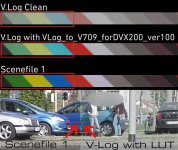
Last edited:
Cary Knoop
Veteran
Your "V.Log Clean" whitest region is already at around 176, that should after transformation to Rec709 get close to 100 IRE however your converted bar shows an almost identical value as the log value.Hello Forum
If i start with the "Varicam 35 V-Log to Rec.709 LUT" the color of my image is looking wrong.
I made a clip with the scenefile1 which is looking "natural" for me. Then I was shooting the same clip in the v-log mode (internal recording to SD-card).
When i compare the both clips, some color on the vectorscope is turning. For Example: Blue is turning to Cyan. Yellow and green looks very muddy.
But if I turn on the Log View Assist in the V-Log Mode, blue looks like blue like with the scenefile1. So is that an LUT Problem?
Simple "Grading" by Hand (Set Exposure, Shadow, Highlights, etc.) brings the same result.
Panasonic Support says that is an Scenefile Problem and i have to make adjustments in the Scenefile Menue. But any adjustments in the Scenefile-Menue are ignored if i turn on the V-Log Mode.
All the other V-Log Footage on YouTube or Vimeo look correct (Color) with the V-Log->LUT.
Can Someone help? Am I doing something wrong?
Here you can see the "Wrong Color"
View attachment 123475
What editor do you use and how do you apply the LUT?
Could you share the out of camera files so we can take a look in order to find out what is going on?
pa-recordz
Member
Here you can Download the Files:
V-Log:
https://www.dropbox.com/s/h9ne08vpb7qnau2/V-Log.MP4?dl=1
Factory Scenefile 1 (No V-Log)
https://www.dropbox.com/s/zi9gcwdq7xymo0b/Scenefile 1 no V-Log.MP4?dl=1
Greetings
Pascal
Edit:
I was using Premiere Pro CC 2017 and Davinci Resolve.
The LUT was applied in the Lumetrie-Section of Premiere Pro and as Node in Davinci Resolve
Blue is turning of the axis...
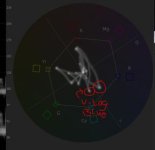
V-Log:
https://www.dropbox.com/s/h9ne08vpb7qnau2/V-Log.MP4?dl=1
Factory Scenefile 1 (No V-Log)
https://www.dropbox.com/s/zi9gcwdq7xymo0b/Scenefile 1 no V-Log.MP4?dl=1
Greetings
Pascal
Edit:
I was using Premiere Pro CC 2017 and Davinci Resolve.
The LUT was applied in the Lumetrie-Section of Premiere Pro and as Node in Davinci Resolve
Blue is turning of the axis...
Last edited:
Cary Knoop
Veteran
This is what I get when I use input transforms in ACES in DaVinci (14 beta II) - Looks like there is some color space transform issue:

This is what I get in Premiere applying the LUT:

The white balance of Scenefile 1 seems off.
This is what I get in Premiere applying the LUT:
The white balance of Scenefile 1 seems off.
Last edited:
pa-recordz
Member
This is what I get when I use input transforms in ACES in DaVinci (14 beta II) - Looks like there is some color space transform issue:
View attachment 123484
This is what I get in Premiere applying the LUT:
View attachment 123486
The white balance of Scenefile 1 seems off.
:shocked:
which LUT did you use???
Cary Knoop
Veteran
The standard VLOG LUT.:shocked:
which LUT did you use???
http://pro-av.panasonic.net/en/varicam/35/dl.html
pa-recordz
Member
ok...my color is still wrong.
This is what i have done (step by step)
- importing the clip into PR
- Drag and drop to the "new" button for a new Sequence
- at the lumetri Color section (at the simple correction) apllied the LUT.
Do i have to make any adjustments with the color space? :crybaby:
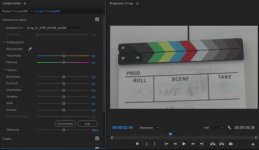
Is there a problem because of the internal 8-Bit recording?
ok...sorry...stupid question if the clip is working for you
This is what i have done (step by step)
- importing the clip into PR
- Drag and drop to the "new" button for a new Sequence
- at the lumetri Color section (at the simple correction) apllied the LUT.
Do i have to make any adjustments with the color space? :crybaby:
Is there a problem because of the internal 8-Bit recording?
ok...sorry...stupid question if the clip is working for you
Last edited:
Cary Knoop
Veteran
Could you make a PNG export of the frame and use dropbox?