C100: How Not To Accidentally Erase A Card

nedcam

Well-known member
This is in response to Clint's recent posting of his unfortunate disaster of reformatting the wrong card. I feel your pain. Although I have never done that I have come very close when tired, confused in a dark environment or when there's several cards in the same area waiting to be downloaded. In my P2 card days a crew member I had trusted erased the wrong card which had several scenes on it. The police never found his body...

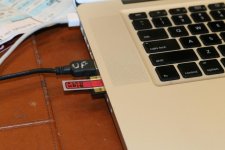
When I migrated to these damn small SD cards from P2 I knew I needed an ADD proof system and I'd like to share it with Clint and my peeps: Flags, from the office supply store. These are the same stickies that your lawyer and accountant use to point you to where you're supposed to sign a document:

http://www.staples.com/Post-it-1-2-inch-Flags-with-Pop-Up-Dispenser/product_SS975428
View attachment 85947

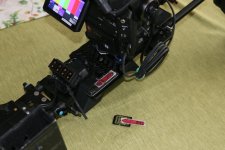
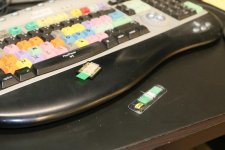
• RED means STOP! do not erase yet, needs downloading.
• GREEN means OK- Good To Go, OK to reformat.

The great thing about these flags is that they are so thin they stay on even when slid into the laptop. The red flag does not come off until AFTER the download is completed and a quick Tech Check is done, under penalty of death. They have an adhesive bottom so I have the all important red ones on my rig itself. It's important to immediately throw away all used flags so they don't cause confusion. I hope this cheap trick helps.
 

Attachments
  • GREEN FLAG.jpg
    GREEN FLAG.jpg
    63.6 KB · Views: 0
  • RED FLAG 2.jpg
    RED FLAG 2.jpg
    61.5 KB · Views: 0
  • RED FLAG 1.jpg
    RED FLAG 1.jpg
    86.1 KB · Views: 0
Last edited:
Smart! I've been using tape or dry erase markers, but haven't been happy with the solution. I'm curious if this will work with my XQD reader too.
 
I've been using the card wallet method with white side of label out when there's data on it, and branded side out when it's ready to use or format. Not foolproof, but I've found a lot of people to also be using this method so you're more likely to have crew already familiar with it.
 
You could just flip the little switch on the side of the SD card when removed which makes it read only.

john.
 
Steelej,

Putting the lock on does not let you know, let's say a hour later, whether you transferred the footage or not. It's easy to lose track as to which cards were downloaded. So it would be possible to reformat a card and never having downloaded. The ultimate disaster.

I would assume anyone who reads dvxuser has the experience to always put the lock on as soon as the card is removed from the camera.
 
Steelej,

Putting the lock on does not let you know, let's say a hour later, whether you transferred the footage or not. It's easy to lose track as to which cards were downloaded. So it would be possible to reformat a card and never having downloaded. The ultimate disaster.

I would assume anyone who reads dvxuser has the experience to always put the lock on as soon as the card is removed from the camera.

When you download files then turn lock off. It is the same flag as another else, it works only if you are careful.
 
With SD cards, I just don't format until the end of the day, then confirm the card count with the DIT the next morning. Some projects I'll actually keep on cards for six months or more. Even shooting ProRes with the BMPCC, it's only a few hundred bucks to keep a day's worth of data.
 
When you download files then turn lock off. It is the same flag as another else, it works only if you are careful.

Another vote for this method here. Why use a sticky tab when the built in switch does the same.

write protected means used and not downloaded (your red tab)
not protected means it's green tab and ready for wiping and use.

Now, let's talk about microsd cards and the fact they are so small they seem to simply vanish.
 
Some people prefer stickers, the others like lock or a different place for clean cards, numbers and script or don't erase any card during a day, etc. The main thing is the result.
 
The thread isn't about a C300 though, prefix is C100 :)

John.

True, and yes I do have reading comprehension skills ; ) , but using the 'sticky flags' method is a much better visual method(you can tell at a glance from a distance) and transcends specific card and camera types which makes it much more useful and almost universally applicable. Do we really need a specific way to not accidentally erase a card shot on a C100 or would you rather have an idea/good practices that would apply to ANY card type or camera that you shot on?

And hell, the C100/C300/C500 are in the same family… Shouldn't you be able to share your sticky flags among family, anyway? :laugh:
 
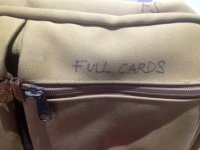
That is a great idea to have a separate bag for Full cards. My problem is that the clients want to avoid overtime so we usually will do one download at lunch, even in a restaurant, and the last one when we start the Abby Singer Shot. Also, unlike many of you all, I shoot for out of towners, such as today, and they have a plane to catch so the downloading must be completed right after the Martini Shot. So collecting all the Full cards in a bag is not a good protocol for me unless I am working on my own projects.

As to the idea of using the Lock or Label Up to signify what needs downloading and what's completed, that would be a recipe for disaster in my world. Often I must pass the card, in a dark studio, van, etc. to an Intelligent PA, a Grip with a GED, a Trained Monkey or God forbid: The Client (and often the client's nephews or nieces). So the Flags are a simple low tech, visually simple way of avoiding disaster.

But, to each their own!
 
With SD cards, I just don't format until the end of the day, then confirm the card count with the DIT the next morning. Some projects I'll actually keep on cards for six months or more. Even shooting ProRes with the BMPCC, it's only a few hundred bucks to keep a day's worth of data.


I went to a "NEVER REFORMAT A CARD DURING A SHOOT" rule too, around 2006. Even while working in a studio with an assistant, a card got reformatted and those pics were lost. We went through 9 cards total that day (CF I think.) I asked the person at the laptop if a card had been downloaded, they said "yes." I think that was card #6 ...

Never again! Storage is cheap in comparison .... Arg.... especially for SD cards.


FWIW, B&H has the Lexar 600x SD cards on sale right now. $100 for 2x 64GB, $50 for 2x 32GB. These test as fast as the Sandisk 80 MS/s cards, just a little short of the Sandisk 95 MB/s.

The PNY Elite 90 MB/s also test just a little slower than the 600x Lexar & 80 MB/s Sandisk. I have never tried them, but the 32 GB were on sale at Amazon for 2 x 32 GB for $30, 2x 64 GB for $60. Now the 32 GB are up to $18. and the 64 GB are 37. Although I have only ever used Sandisk SD cards.

Cheers!
 
I have two pelican sd card holders. One is labeled: "Exposed", the other is "Unexposed".

Has worked for me for a long time.
 
Back
Top