GH2 How is the HDMI out on the GH2?

Hutchman

Active member
Hey guys,

I own a gh13 and am looking to upgrade to the GH2, primarily for increased ISO and HDMI out.

But what is the quality of the HDMI out? Is it 1080P? 1080i? Does the hack effect it?

I've heard the HDMI out is pretty lousy on preview, but gets better when you record, but it's still only 1080i not 1080p, is that correct?

I shoot drama, so I guess I could just record the rehearsals and then just delete them is that what people do?

In short, is the HDMI out, along with the increased ISO, worth me upgrading from the gh13?

THANKS
 
They are the only two reasons to upgrade in my opinion, but they are significant. External monitor & ISO improvement.

I just made the leap myself, and am about to order a monitor. The monitor issue is clear, because it just isn't possible with the GH1, and for serious work, it is absolutely mandatory for critical focus and exposure. You wouldn't record serious audio without headphones, would you? A monitor is the visual equivalent of headphones.

The ISO improvement is substantial, but be warned not to allow complacency in - a cleaner high ISO is good, of course, but is still no match for the quality of low ISO on the GH1, and lighting for low ISO will give better results, no matter what. In daylight, there is no substantial difference between the GH1 an GH2, with good bitrate, in my experience. Indoors, I still try to keep ISO below 1600, but 1600 is useable on the GH2, where I never felt it was really acceptable on the GH1 for anything you want to impress with.

All in all, for me, it was a worthwhile upgrade, mainly for the monitor, but also to get rid of some of that coloured snow at ISO 800 and 1600. If you're not planning on getting a good monitor, I doubt it's worth it though. (note that I haven't received, or even ordered my monitor yet as I'm waiting on a paycheck.)
 
I never used the GH1 but I just got my hands on a DP6 monitor and it is day and night compared to with out a monitor.
You will have a hard time recording the HDMI output ( http://www.dvxuser.com/V6/showthread.php?237584-HDMI-Capture-Problem-SOLVED-AviSynth-RULES! ) but you will get a much more critical focus. No more I hope it's sharp, now you know immediately!
Just for this, GH2 is a big advantage.

Now it all depends on what your use is. For leisure you can still rock it with the good ol version 1. otherwise you may consider the switch (or wait for the GH3, when it comes out, don't know when tho)
 
Thanks, Phenixone, is it 1080i or 1080p would you say? Does is change when you press record? And does the hack effect it?
Thanks!
 
HDMI is 720p or 1080i. The format dies not changes when recording like on the canons And the image uses all the pixels (no black bars)- great for focusing. Also the images lightness changes slightly when recording but that's it. NothIng major.
 
Last edited:
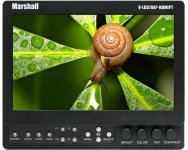
I have found myself a perfect condition, used Marshall 7" HDMI monitor (The V-LCD70XP-HDMI) for £300!!!! Now that's a bargain. Panasonic battery mount to boot!

Monitorisation, here I come......yippee!

Marshall+V-LCD70XP.jpg
 
From another thread on this forum they stated that video is recorded at 23.97p embedded in a 59.94i stream by adding 3:2 pulldown, then when it goes to output to hdmi, it adds extra fields to get to 60i. So it is in fact still a 24p signal, it is just packaged away.

Here is the thread, and how to fix it, if you want to record from the HDMI out > http://www.dvxuser.com/V6/showthread.php?237584-HDMI-Capture-Problem-SOLVED-AviSynth-RULES!

I am not sure if the output is 4:2:2 or 4:2:0, but the thread goes on to say you need to record 4:2:2 in order for their fix to work. I also remember reading somewhere that the output is 8bit in a 10bit wrapper.

Here is an updated version of the avisynth script > http://marvelsfilm.wordpress.com/2011/04/27/gh2-hdmi-recording-avisynth-script-update/

and here is another article on the subject, inwhich they say it actually is 4:2:2 output. > http://marvelsfilm.wordpress.com/2011/04/19/panny-gh2-hdmi-recorder-bingo/
 
Last edited:

My GH2 screen is black when I am in playback and hooked up to an HDTV via hdmi....anyone else have this problem? Has anyone come up with some sort of work around for the focus assist disabling once you connect the hdmi? That drives me crazy!
 
My GH2 screen is black when I am in playback and hooked up to an HDTV via hdmi....anyone else have this problem? Has anyone come up with some sort of work around for the focus assist disabling once you connect the hdmi? That drives me crazy!

Me too. Saving for a smallHD monitor which allows zooming in..
 
To clarify: Nobody knows what the color space is of the GH2's HDMI output, because the chroma is so mangled up. The only thing we can say with certainty is that after applying the chroma fix with Avisynth, we have a clean, uncompressed 4.2.0 picture. For technical reasons, the codec you capture to should be 4.2.2, but that's not saying or implying that the signal coming out of the camera is 4.2.2. It's more like 4.xzxcjty!
 
Back
Top