C300: how do I know I'm properly exposed when shooting in C-log

I'm about to shoot my first interview with the Canon C300 and I would like to shoot in C-log, but I'm concerned about exposing my subject properly.

If you shoot in C-log your waveform displays the light on a much lower % level than when you're shooting in standard C300 mode. So on what % level should the light be falling in your waveform monitor when you're shooting in C-log?

The reason I ask is because if the light on my interviewee is around 70-80% on the waveform monitor in normal mode, if I switch to c-log, exposure on the waveform drops to 40%. That's a big drop.

My instinctive reaction would then be to increase the light, but wouldn't I then be in danger of over-exposing?

What is the recommended lighting workflow when shooting in c-log?
 
I don't really agree, View Assist applies a canon lut that is pretty contrasty. Not the best reference. I would say it all depends where you intend to put middle grey. Canon log places middle grey at 32% IRE at the same exposure as 50% IRE on other gammas. So its designed for a gamma adjustment in post. For the most part if you shoot canon log and the footage doesn't look some what underexposed then something is wrong. For outside I leave middle grey around 40% as long as my highlights are not in danger, if so I put it at 32%. For interiors I place it a 40% if theres a lot of light, and 50% if there isn't.
 
I'm sympathetic towards Jem and Canon's effort to put up a training series online. That's good.

Unfortunately the videos don't add much information. There is quite a bit of "what", but very little "why".

Canon Log reserves a whole lot of 8 bit real estate for highlight rolloff. It might be a very good choice for outdoor shooting or maybe interior environments where you have large windows in the scene that you want to protect, but that are otherwise well lit.

Choosing Log when there isn't a lot of light and you expose 'correctly', you WILL need to lift gamma in post. That footage WILL get noise as a result. You might get great results straight out of the camera with Wide DR in this scenario.

Canon pushes Canon Log quite a bit. It says that "Canon Log was designed to get the most out of the sensor" and similar things. This is on the Canon Digital Learning center and in their (C300) material. But remember, at the time when most of this material was written, the Wide DR profile didn't exist. That profile ALSO reaches the same dynamic range, but is more biased towards the region up to 98% reflectance. It still has pretty decent rolloff.

Wide DR at its default gets a little too black in the bottom for me and it has got some sharpening. On the flip side, I like the color matrix better than Log. It might be time very well spent to create a custom profile based on Wide DR that suits your normal needs.
 
I don't really agree, View Assist applies a canon lut that is pretty contrasty. Not the best reference. I would say it all depends where you intend to put middle grey. Canon log places middle grey at 32% IRE at the same exposure as 50% IRE on other gammas. So its designed for a gamma adjustment in post. For the most part if you shoot canon log and the footage doesn't look some what underexposed then something is wrong. For outside I leave middle grey around 40% as long as my highlights are not in danger, if so I put it at 32%. For interiors I place it a 40% if theres a lot of light, and 50% if there isn't.
That's exactly what I do.

Choosing Log when there isn't a lot of light and you expose 'correctly', you WILL need to lift gamma in post. That footage WILL get noise as a result. You might get great results straight out of the camera with Wide DR in this scenario.
Wide DR is a C100 only gamma setting, no?
 
Thanks everybody. Wow, I did not realize any of this. It sounds like choosing one of the baked looks (standard or WDR) would be a safer bet for an indoor interview, or am I mistaken?
 
What about using a 50% (or is it called "18%"?) grey card for proper exposure?

I know that it's common with DSLR shooters. But do any of you use it with the C300?
 
Thanks everybody. Wow, I did not realize any of this. It sounds like choosing one of the baked looks (standard or WDR) would be a safer bet for an indoor interview, or am I mistaken?

Sorry about the mix-up. I missed that you're on C300 and that camera doesn't have Wide DR yet. Maybe it will come in time.

The beauty of Wide DR is that is reaches the same DR as Canon Log, but with a different curve. If Wide DR wasn't available I'd probably shoot Log instead, but be mindful of exposure. Like others have mentioned, I too feel it's better to not use view assist.

The tips about IRE40-50 for indoor shoots are spot on.
 
What about using a 50% (or is it called "18%"?) grey card for proper exposure?

18% comes from '18% reflectance' and is the nuance of gray used to calibrate for exposure.

The mentions above for 32% or 40 and 50% refer to the point of the WFM where you would calibrate the 18% reflectance card to.
 
I'm about to shoot my first interview with the Canon C300 and I would like to shoot in C-log, but I'm concerned about exposing my subject properly.

If you shoot in C-log your waveform displays the light on a much lower % level than when you're shooting in standard C300 mode. So on what % level should the light be falling in your waveform monitor when you're shooting in C-log?

The reason I ask is because if the light on my interviewee is around 70-80% on the waveform monitor in normal mode, if I switch to c-log, exposure on the waveform drops to 40%. That's a big drop.

My instinctive reaction would then be to increase the light, but wouldn't I then be in danger of over-exposing?

What is the recommended lighting workflow when shooting in c-log?

I learned the hard way when I started shooting S-LOG on the Sony F3 and most of the time over-exposed all my shots. Lucky for me the material I shot did not have a lot of contrast so I didn't kill or clip any whites too badly. After my "experiments" live in the field :lipsrseal I decided it was time to read the Sony white paper on S-LOG and figure out proper exposure values.

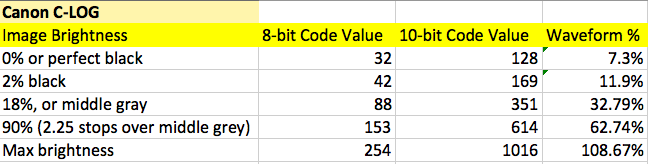
I strongly suggest doing the same with C-LOG and reading the Canon white paper. I know it can be hard to understand or interpret this document without being a rocket scientist or mathematician so I'll save you the trouble and give you the skinny. From the Canon C-LOG white paper it indicates that on the C300 in 8-bit C-LOG mode or on the C500 in 10-bit C-LOG mode middle grey should be at 32.79% on your waveform monitor and 90% white should be at 62.74% on your waveform monitor.

Canon C-LOG
18% Middle grey = 32.79% IRE
90% White = 62.74% IRE


You can use a grey card and the built-in spot meter on your Canon to adjust your exposure until you read 32.79%. Also then check your whites as with anything higher than 62.74% you are at risk of clipping so you need to really watch that. The Canon C-LOG values are a little lower than that on the F3 (38% for middle grey and 68% for 90% white) but if you follow these Canon IRE values as your guide and ignore what you see on your VF you will be pleasantly surprised once you de-LOG your footage and start to grade it.

For de-logging I recommend LUT buddy, or stacking two filters in post - one for de-logging and the other one for your actual CC and grading. Somewhere in these forums I wrote on how to delog using standard tools in AE and FCP.

Anyway go out and try it and post some results here so we can see.
 
What about using a 50% (or is it called "18%"?) grey card for proper exposure?

I know that it's common with DSLR shooters. But do any of you use it with the C300?

I know it's a bit uncommon and takes a few seconds longer but that's exactly what I do with my F3 in SLog mode.
I take a reflected reading with the camera's meter, and adjust lights to my desired f stop.
 
I have a gray card now and plan to start using it for both this and to help match shots with multiple cameras and between camera moves when single-camera shooting.
 
Yes using the cameras spot meter is the best way to go. It's far less subject to interpretation than say for example using custom zebra strips to indicate your IRE. Don't do that, just use your spot meter or waveform monitor on external LCD if you have one.

Also be sure to check your whites, as anything over 63% IRE on your Canon's spot meter is at risk at clipping and immense loss of detail. Some suggest using a white piece of paper or foam board but these can sometimes increase reflectivity so its better to use something white that is more matte in appearance.

I know it sounds absurd to think whites can not exceed 63% but this is where the beauty of the image from LOG comes from, go higher than that and you'll just end up with hard whites which highly resemble cheap video. LOG has to be exposed perfectly to work.
 
Anyway go out and try it and post some results here so we can see.

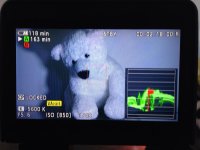
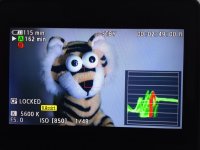
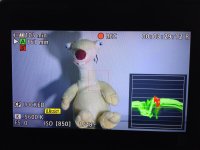
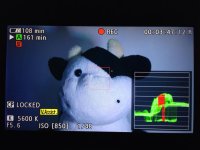
Thanks everyone. OK I just did. Please see my C-log footage before and after color correction here:

https://vimeo.com/57956530

Please tell me if my exposure was off. I tried to be as precise as possible dialing whites to slightly over 60% and greys to slightly over 30%. It would be nice if the C300 actually displayed that % reading for the red rectangle spot meter in it's waveform monitor.

IMG_0001.jpgIMG_0002.jpgIMG_0003.jpgIMG_0004.jpg
 
Last edited:
Sorry to have misinformed you. I thought the C100 had a spotmeter whereby the box actually gave you a IRE % readout.

As for "good" exposure values when shooting C-LOG according to Canon's white paper, here is a handy quick reference chart I put together, it is same for C100, C300,

canon_c-log.png
 
One of the things that attracted me to the C300 was a comment by Richard Crudo, who shot Max is Back for the C300 launch. He said he put the camera in C-log lock mode and exposed like it was film. That's pretty basic: set an incident light meter at the chosen camera ISO, take readings and shoot. I've tested using this approach, and an incident reading will put middle gray around 30-35% on the waveform. Similar to what's been discussed in earlier posts.

When in comes to highlights, however, using a Minolta spotmeter, I found I could retain detail, texture in fabric, at 4.5 - 5 stops above middle gray - around 90% on the waveform. So, if the incident reading is f2.8, a spot reading on a brightly lit curtain could be f11.5 - 16 before blowing out. I think that restricting highlights to 62.74% on the waveform might be unnecessary.

On another forum, James Longley, who has been using C-log for his Afghanistan documentary, posted this:

"One thing about exposure: Don't overexpose the C300. Just set the zebras at 90% (+/-5) and don't let anything go over unless absolutely necessary. You may think that the shadows are gone, but they're not. The camera is very forgiving – you get so much more than what you can see of the darks on the LCD screen in daylight. You have to just have faith that the shadow detail will be there when you bring the material home."

It is always important to test, but I think you can expose highlights in C-log up to 90% on a waveform.
 
Back
Top