How do highlights compare to the FS-100? Debating upgrading

Sam,

Very nice skin tone there although if you're referring to the image i posted, there's little comparison. My one was very low light, in the background with a very blue side light. I presume that yours is daylight and exposed nicely and that by far and away is the nicest type of light on skin with these cameras.

There's no denying the 100 can produce lovely images. I think the key to the OP is that IMHO the 700 works better out of the box in a wide variety of situations without having to head into 'profileland'.

Although would love to know more about that latest profile :)

cheers
paul
 
Actually that still is a tungsten source, in the vid we see
-ext no nd
-tung int,
-tung/gel (int to-ext)
and finally ext with VND.
The profile is http://www.sammorganmoore.com/backlot/fs100-ferrari-profile

Yep - Im aware that you image was a far more challenging setup

My profile is just miles from most of the faux log stuff, which I think could introduce the weirds

Just trying to milk some more miles from my FS100, £0 and feel with that image I am now where I should have been 14months ago..

S
 
Last edited:
Paul,

Are you able to repeat that high saturation light test? If you can try changing the slope setting and go more positive.

I have a theory that the slope angle is too low which causes a brightness level to be aliased. It's only a guess.

Incidentally I saw a similar effect briefly on SPOTY last night.
 
I also agree the FS-100 is capable of good images... but the way it handles highlights and it's 8 bit color space are what I'm finding very limiting

check out http://www.youtube.com/watch?v=z5J7mpFUXHw&hd=1

I was in the forest, no budget, so no lighting, no grip gear, etc. The highlight rendition was TERRIBLE. Especially the grass, went a pukey plastic hasbro/lego green. The only way to make it semi appealing was to blur the **** out of it when I went through and color graded it.

Even DSLRs handle the highlight roll off way better. They have a bit of a bloom and a nice smooth transition. With 99% of the profiles on the FS-100 the second you go past 100/109 IRE you end up with something unusable.
 
Paul;
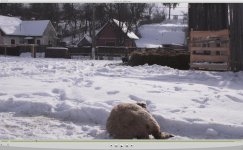
here's a screen grab from what i shot yesterday... notes;
- ungraded straight out of the BMD recorder's DNx screen cap
- it's a feature going out to 2:35 and we had just slated so the camera was not in final frame, but in this grab you can see the roof of the cottage blown out ( it's out of 2:35 in the final frame so i didn't care),
- highlight snow and deep shadows are both maintained, the roof clips gracefully, on my spot meter i read 11.5 stops from the snow to the shadows on the haybales...
- old skool ND9 in the MB, so there's some IR polution, Angenieux 28-70 @ t22
- like Nirv and Morgan, i do not use fauxlog
- skintone look awesome, but actor's agrements do not allow me to post anything with them in it

snow.jpg
 
What profile?

I'm not on my color correct monitor at the moment, but at least on this laptop, I definitely wouldn't classify the rendition of those highlights as visually appealing =/
 
Is there any chance you are looking at it on a screen that clips highlights? that would kak it significantly... looks like i expect it to on my 2010 MBP, tons of detail in both the highlights and the shadows

It's not been graded.. i had to dig around to find something that was blown out in frame... all the information is there from the deep shadow to the grains of snow.. i shoot to give options in the grade, high light roll off decisions happen there

I use 709 based profiles; overcast day - bright day - day int - Floro's - night ext - tungesten int, this was my "bright day", i rate the camera at 400ISO when using that one
 
Last edited:
Even DSLRs handle the highlight roll off way better.

Indeed, I think thats one reason DSLRs were such a hit even though on paper their video specs are terrible.

It took DSLRs 5 gens to get the highlights right (in stills)

With 99% of the profiles on the FS-100 the second you go past 100/109 IRE you end up with something unusable.

Yep 99%, investigate the 1%

i think the 99% are created using everyone copying everyone else starting from abels profiles which done in a studio on B+W test material pay no heed to highlight roll off.

S
 
Dermot,

I just re-read I wrote and I definitely could have worded it better. That was not a dig towards you or your work! Thank you for your contribution to the thread and taking the time to post a still! I love this community because there's always such great advice and dialogue here.

Still would love to know your specific profile so I can go do a test of my own.
 
my camera's are in cases now, in transit until tomorrow evening (Bucharest -Paris - NYC- Vancouver)

If i can i'll dig out my profiles from my lappie, but need to double check as i wrote them down nearly a year ago, and i know some have changed over time and tests

Will mention that i expose with a lightmeter and pretty much ignore the histogram and monitors, find the correct exposure to be critical, not much wiggle room.. more like shooting reversal than neg back in 16mm days
 
Dermot - do you care to share?

Seems like you are getting more DR than me

S

Sam you are losing top end with your knee so high and so flat. You could afford to come down a little but go steeper

I get much better roll off with a much lower knee but a much steeper slope.

I prefer the Standard Gamma curve pegged at -15 with a low knee of 75-80 but a slope of 4 or 3. I use a similar slope settings for CT curves. This will give a more DSLR look that people say the FS100 is incapable of. A more video look is achieved with a higher knee which may be desirable.

But, you have to look at the histo for correct setting per scene. The real problems I see are low almost flat slopes that just posterise the highlights but destroy the number of white graduations.

Most of "those" Presets have suboptimal knee/slope settings that clip way lower than 109 which just produce ugly highlights that FS100 has become infamous for. My result look like Dermot's for the record. I am happy with the roll off and how they clip.

Im pretty sure DSLR shooters expose via auto exposure most of the time preventing a lot of clipping but also there's auto knee settings going on behind the scenes that flatters the camera/shooter.
 
All,

I'm not in a position at the moment to duplicate that test sadly but what you say does make sense. However the 100 and the 700 to a lesser degree suffers from some artefacting in scenes with extreme contrast on hard edges. i.e. heavily back lit onto a dark surface will show sparkles of colour. This is well documented on here and elsewhere. I suspect that it's something similar but only happening with 1 channel because of the light. The C300 seems to suffer from this too (but i guess it might be different in that case).

One of the issues with the PP handling is that the knee is a straight line, why oh why isn't is a curve... There's a definite bump in the PP when the knee kicks in, one of the reasons that i've tended to keep the knee quite high. Used the normal 709 gamma curve until you hit super-brights then try to rein those in a bit.

Dermot, great capture there and you have managed to reverse engineer the handling of the 100 in great detail. However daylight handling has always been good for me, i find it's in the tungsten area that the highlights suffer more. Also in your DNxHD files are they being stored in video data levels, i.e. not 0..1024 but 64...940 (or whatever the limits are)? The reason i ask is that the jpg you've posted is not from 0 to 255...

The 700 suffers from a band of noise, sometimes i look at footage and think how wonderfully smooth and detailed then at other times why is there noise there.

I'm going to be profiling the cameras soon, because i'm going to create a reverse LUT to get the profiles i used into linear space. When i do that i'll have a bit more time to quantify the curves and noise of both of them.

cheers
paul
 
Last edited:
Dermot, great capture there and you have managed to reverse engineer the handling of the 100 in great detail. However daylight handling has always been good for me, i find it's in the tungsten area that the highlights suffer more. Also in your DNxHD files are they being stored in video data levels, i.e. not 0..1024 but 64...940 (or whatever the limits are)? The reason i ask is that the jpg you've posted is not from 0 to 255...

depends upon the decoder used, for that screen cap i used the desktop decoder, and it does scale to 64-940 + is limited to 8bit, alot of software uses the standard decoder, PP for one, MC when in AMA, almost anything that runs Qt in the timeline directly... but if you capture into MC it uses Avid's DNx decoder and it is 10bit/full range, but not realtime until captured

I used "grab" from my desktop OSX decoder's version of DNx, the editsuite uses captured Qt's tho
 
depends upon the decoder used, for that screen cap i used the desktop decoder, and it does scale to 64-940 + is limited to 8bit, alot of software uses the standard decoder, PP for one, MC when in AMA, almost anything that runs Qt in the timeline directly... but if you capture into MC it uses Avid's DNx decoder and it is 10bit/full range, but not realtime until captured

I used "grab" from my desktop OSX decoder's version of DNx, the editsuite uses captured Qt's tho

I struggled getting an answer direct from BMD about what the shuttles were recording. I understood that they placed the 8 bit source between 64-940 which begged questions about how did the 256 values scale between those limits, with 0 to 64 and 256 to 940. They swore blind that it didn't truncate the source, in other words me fear was they take only 16-235 and map that to 64-940.

I'm still not entirely convinced though and it is difficult to find solid information on the mapping going on. I was looking for a workflow that would let me get at the raw values in the files themselves to see. I assume that it would be data and 0 to 1023. But some tests indicated something else amiss (unless the tests were invalid. It seems that i was getting video levels from DNxHD and the shuttle). I recorded to .mov, perhaps that was my mistake - did you use the mxf wrapper on the shuttles?

cheers
paul
 
still in transit...
We used the Qt on the show we just wrapped and are editing in MC's, then finishing/gradeing in Avid|DS by re-linking to the camera orignals,

in both MC & DS when using Avid's de-coder they are full range, in MC with AMA it's a trainwreck of clipped -or- scaled levels, DS does not ever use the desktop decoders so my shots are always is what they should be.. 8Bit/full range inside a 10bit/full range wrapper

I suspect my footage would be a similar trainwreck in PP or any other sofware that uses the desktop decoder as it's engine

One reason i've not shared my profiles is because they are specfic to my post back end, and not everyone has access to the toolset that i can play with
 
It's also worth noting that the forum software also recompresses posted images and does a horrible job and removes the fidelity of the highlights. An image of skin tones I was quite pleased with looked really quite ordinary when posted here.

There's a health warning if anyone downloads an image to interrogate it further.
 
Back
Top