C100: How can I tell the 60i clips from the 30p?

drummondb

Well-known member
Well, shoot. I like to vary my frame-rates during weddings. On my master 24p timeline, I use 24p for shots where sound sync is necessary, 30p for the ever-so-slight slow-mo dream-like look, and 60p for more pronounced slow motion. When I shoot with DSLR's, it's very easy to see which is which. Premiere Pro shows me if the clips are 23.976, 29.976, or 59.976.

But I used C100's on my last project, and now Premiere is showing both 30p and 60i clips as 29.976i UFF. I understand that the 30p is embedded in the 60i stream, but does anyone have any tips for figuring out which clip was filmed interlaced and which weren't?
 
Last edited:
Yeah, the problem is BOTH are actually 60i, as 30p is embedded in a 60i stream. The only thing I can figure is do your best to see which clips have less motion blur? If you filmed at 60i and had a 180 degree shutter, then the shutter would be 1/120 rather than 1/60. The other option is to load each 29.976i clip into a player like VLC where you can disable de-interlacing. If you see interlacing artifacts, it's an actual 60i clip.

Any other ideas?
 
no that confuses me as well. when I drag it to premiere it only says 29.97
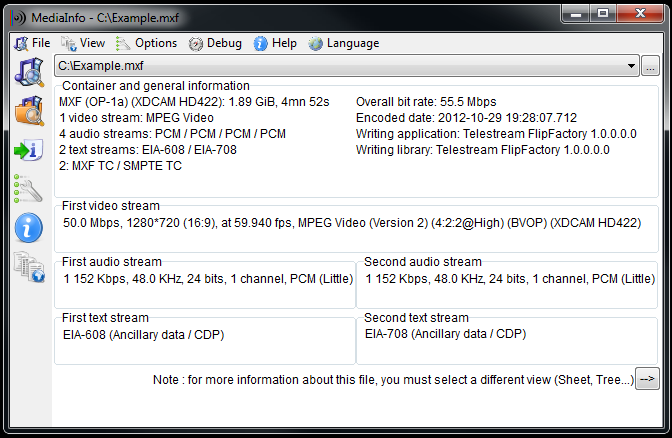
Sorry, I didn't mean clip info in Premiere. I meant the free app Media Info. Windows and Mac:
http://mediaarea.net/en/MediaInfo

The MediaInfo data display includes:


  • Container: format, profile, commercial name of the format, duration, overall bit rate, writing application and library, title, author, director, album, track number, date, duration...
  • Video: format, codec id, aspect, frame rate, bit rate, color space, chroma subsampling, bit depth, scan type, scan order...
  • Audio: format, codec id, sample rate, channels, bit depth, language, bit rate...
  • Text: format, codec id, language of subtitle...
  • Chapters: count of chapters, list of chapters...
MediaInfo analyticals include:


  • Container: MPEG-4, QuickTime, Matroska, AVI, MPEG-PS (including unprotected DVD), MPEG-TS (including unprotected Blu-ray), MXF, GXF, LXF, WMV, FLV, Real...
  • Tags: Id3v1, Id3v2, Vorbis comments, APE tags...
  • Video: MPEG-1/2 Video, H.263, MPEG-4 Visual (including DivX, XviD), H.264/AVC, Dirac...
  • Audio: MPEG Audio (including MP3), AC3, DTS, AAC, Dolby E, AES3, FLAC...
  • Subtitles: CEA-608, CEA-708, DTVCC, SCTE-20, SCTE-128, ATSC/53, CDP, DVB Subtitle, Teletext, SRT, SSA, ASS, SAMI...


[TD="class: Banner_Top_Background"][/TD]

[TD="colspan: 2"] [/TD]

[TD="class: centered"][/TD]
MediaInfo_Easy.png
 
Back
Top