HMC40 and external recorders

Wesley Byram

Well-known member
I'm considering the purchase of an external HDMI recorder (probably a Ninja 2 but other recorders are not ruled out) for my HMC40 to squeeze a bit more life out of the camera. Mainly, I'm looking for more flexibility in post with grading, and 4:2:2 chroma for the occasional green screen shot. So, has anyone tried pairing the HMC40 with a Ninja, Nanoflash, Hyperdeck Shuttle, or other?

Some specific questions:

Does the HMC40 do anything funky with the HDMI output, like clipping the values outside of the studio-swing range of 16-235?

Can recorders with 3:2 pulldown removal deal with the HMC40's cadence?

I would especially like a bit more detail in the darker areas of the image that may be getting smudged by the internal codec. Is there much of a gain with an external recorder there?

Any "gotcha"s or other relevant details that I haven't even thought of?

Thanks.
 
I never tried it, but I'm sure that it would work fine. The HMC40 is from Panasonic's broadcast lineup, so you would be on solid ground in assuming that the HDMI output is fully standardized, etc.

The NanoFlash can remove 2:3 pulldown from a 60i HDMI output, I presume the other recorders can too.
 
I never tried it, but I'm sure that it would work fine. The HMC40 is from Panasonic's broadcast lineup, so you would be on solid ground in assuming that the HDMI output is fully standardized, etc.

The NanoFlash can remove 2:3 pulldown from a 60i HDMI output, I presume the other recorders can too.

Thanks. I had assumed that there would be no issues with an external recorder on this cam, but it never hurts to double check.

One other, perhaps a bit O.C.D, question. How robust, physically, is the HMC40's HDMI conector? I ask, because my day job is PC repair, and it's common practice for laptop manufacturers to do unkind things like soldier usb ports and power jacks (especially power jacks) directly to the mainboard instead of connecting them via a short internal cable. This has the effect of stressing both the jacks and the mainboard whenever the user does something as basic as using the AC adapter. I've read somewhere (can't remember where, sorry) that the VG20's HDMI port is soldered right into the system board, making the port prone to breakage.

If recording from the HDMI port on the HMC40, I'd like to know that it's going to be reliable and unlikely to damage the camera after a while. Given that I haven't heard much about damaged HDMI ports in general, and given that Panny gave the HMC40 a 3-year warranty (one of the reasons I bought it, in fact), I would guess that it's built pretty well on the inside. Granted, it would be nice if the '40 had an HD-SDI connector, but one can't have everything.
 
Well, for anyone that might be curious, I decided to pick up a Hyperdeck Shuttle 2 and play around with it. Indeed, it works fine with the HMC40. The Shuttle doesn't do pulldown removal internally. It must be done in post, and it's here that I ran into some difficulty.

Unlike anyone sane, I run Linux exclusively on my editing station. Creating a Mac (HFS+) formatted filesystem on the SSD is a piece of cake, and VLC can view the uncompressed files to verify that the recorder is working. However, I quickly found out that pulldown removal using ffmpeg and yuvkineco produced footage that was WORSE than the camera's on board AVCHD. I almost returned the Shuttle, but decided to work on the problem instead. It looks like the uncompressed footage was getting converted to interlaced 4:2:0 at some point in the chain, in addition to a general loss of tonality (very spiky histogram.) After a bit of web searching and man page reading, I wrote a crude shell script using mencoder that batch processes uncompressed .mov's in the current directory and converts them to lossless huffyuv .avi files:

for mediafile in *
do
mkdir 24pfiles
mencoder -fps 30000/1001 -field-dominance 0 $mediafile -nosound -o 24pfiles/$mediafile.avi -ovc lavc -lavcopts vcodec=huffyuv:format=422p -vf filmdint=fast=0/io=30:24/dint_thres=256,softskip,harddup -ofps 24000/1001
done


The resulting .avi's are less than half the size of the uncompressed .mov's while maintaining exactly the same quality (assuming that the recordings come from an 8-bit camera, such as the HMC40). With that done, the huge uncompressed files can be discarded (edit: well, except that the above script produces .avi's without any audio, but that can be corrected.)

After getting this workflow established, the first thing that I noticed is that the HMC40's AVCHD implementation is very very good. So far, there's actually very little visible difference between the AVCHD files and uncompressed. Splitting the chroma channels from the luma and zooming it, you can clearly see more chroma resolution (4:2:2 vs 4:2:0), but viewing at 1:1 the distinction is all but invisible. It does seem like I can push the Shuttle footage harder in the grade, though.

I shot some footage for an upcoming project of tree tops against a clear blue sky. The shot calls for keying out the sky and replacing it with a CG effect. I recorded both from the Hyperdeck and to the SD card in camera and compared the two. Surprisingly, for this particular shot, the matte pulled from each was virtually identical. However, I suspect that this is because so much of the frame was simple blue sky, that the AVCHD codec was just not being stressed enough to break down.

So, is it worth upgrading the HMC40 with an external recorder? I'm not sure yet. At first glance, it doesn't appear to be. The difference between 4:2:2 and 4:2:0 is tiny (*Progressive* 4:2:0, I should note. Interlaced is another story.) On the other hand, there is no macroblocking on the uncompressed footage, and that becomes apparent with heavy grading. There is still noise though, and grading is still limited by the 8-bit values of the HMC. If someone requests, I can shoot some comparisons and post the results here.

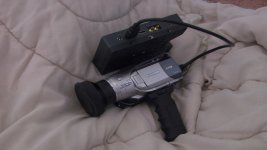
In the meantime, I may see if I can use the Hyperdeck to resurrect another old friend:
 

Attachments

  • Hodrodded HV20.jpg
    Hodrodded HV20.jpg
    301 KB · Views: 0
Last edited:
Back
Top