

iggy097
Well-known member
Maybe this has been covered before but, at a shoot in our studio last night, we had 6 different scripts. Anyhow I shot half in Wide Dr, and half in Cinema. I have more experience with the wide DR, but I wanted to see how the Cinema held up.
When shooting in Cinema, it seems as though the exposure meter is way off.
If I use waveform monitor, I was exposing by keeping skin tones somewhat in the center of the meter, and this has produced a nice image with applying some curves in post.
Now, the exposure meter reads waaaay overexposed with those waveform readings.
If I had exposed using the meter and not the waveform, it would have been massively underexposed, the waveform reading was around 20 or so ( I think that's how It reads, still new to all of this coming from the HMC40 ).
Coming from a HMC40 and 550D, it seems like the exposure meter on the 550d was almost always spot on. Why is the C100 so different? The studio has white walls, not sure if that makes a difference.
I'll attach some samples for reference. I wish I had someone that had a C100 around me that knew what they were doing, as I am all self taught, and have no formal training whatsoever.
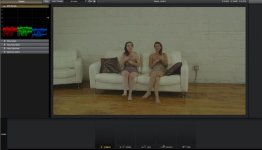
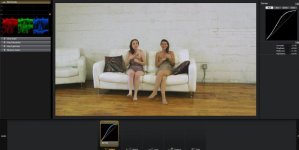
Above is one example. The upper image is with the exposure meter reading dead in the center. Shot on the right is how I would like it to be exposed for the scenes, after applying curves in post. Is this how the RGB parade is supposed to look when using Cinema? Or am I doing something wrong? In this shot there are two lights, one on either side of the actresses.
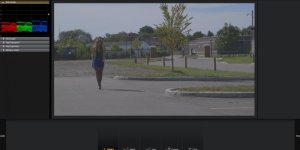
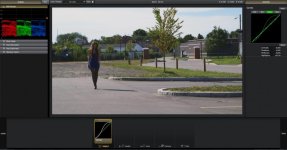
Now, on these two images, the upper image, Cinema again, the exposure meter reads in the center, and the RGB parade is more of where I would have set it if using waveform to expose and not the exposure meter. Shot on the right is corrected with curves.
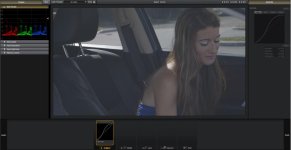
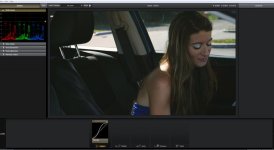
Same thing on this shot. Exposed using the exposure meter, which read in the center.
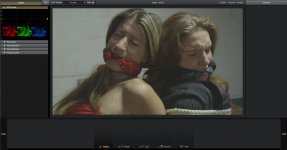
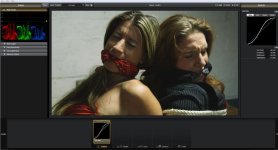
Now, the final shots, were exposed using the waveform monitor. I try to keep the levels between .2 and .8 ( sorry if this is incorrect terminology, I'm learning on the fly ). I think this produces the look that I am going for, and the scene was lit was an overhanging light, and a slight fill on the side.
Now, am I reading exposure incorrectly when using the Cinema profile? Should I not be exposing using the meter? Or is the meter correct, and the RGB parade is supposed to be all crushed way down like that when not color corrected? I'm a bit confused on how the whole thing works, and help of any sorts is GREATLY appreciated.
FYI - the first shots are being used for a special FX script, second set of shots is a kidnapping scene, last shot was a Dick Tracy'ish script with the talent trying to escape a ticking time bomb.
Here is a link to the last 3 sets in a quick 10-15 render of each if you care to see the final ( with just the curves in the picture applied ) - not to say that it's the final, but for testing purposes - https://www.dropbox.com/sh/rnkqp9crt7jokoo/B5l1DyW_YK
When shooting in Cinema, it seems as though the exposure meter is way off.
If I use waveform monitor, I was exposing by keeping skin tones somewhat in the center of the meter, and this has produced a nice image with applying some curves in post.
Now, the exposure meter reads waaaay overexposed with those waveform readings.
If I had exposed using the meter and not the waveform, it would have been massively underexposed, the waveform reading was around 20 or so ( I think that's how It reads, still new to all of this coming from the HMC40 ).
Coming from a HMC40 and 550D, it seems like the exposure meter on the 550d was almost always spot on. Why is the C100 so different? The studio has white walls, not sure if that makes a difference.
I'll attach some samples for reference. I wish I had someone that had a C100 around me that knew what they were doing, as I am all self taught, and have no formal training whatsoever.
Above is one example. The upper image is with the exposure meter reading dead in the center. Shot on the right is how I would like it to be exposed for the scenes, after applying curves in post. Is this how the RGB parade is supposed to look when using Cinema? Or am I doing something wrong? In this shot there are two lights, one on either side of the actresses.
Now, on these two images, the upper image, Cinema again, the exposure meter reads in the center, and the RGB parade is more of where I would have set it if using waveform to expose and not the exposure meter. Shot on the right is corrected with curves.
Same thing on this shot. Exposed using the exposure meter, which read in the center.
Now, the final shots, were exposed using the waveform monitor. I try to keep the levels between .2 and .8 ( sorry if this is incorrect terminology, I'm learning on the fly ). I think this produces the look that I am going for, and the scene was lit was an overhanging light, and a slight fill on the side.
Now, am I reading exposure incorrectly when using the Cinema profile? Should I not be exposing using the meter? Or is the meter correct, and the RGB parade is supposed to be all crushed way down like that when not color corrected? I'm a bit confused on how the whole thing works, and help of any sorts is GREATLY appreciated.
FYI - the first shots are being used for a special FX script, second set of shots is a kidnapping scene, last shot was a Dick Tracy'ish script with the talent trying to escape a ticking time bomb.
Here is a link to the last 3 sets in a quick 10-15 render of each if you care to see the final ( with just the curves in the picture applied ) - not to say that it's the final, but for testing purposes - https://www.dropbox.com/sh/rnkqp9crt7jokoo/B5l1DyW_YK
