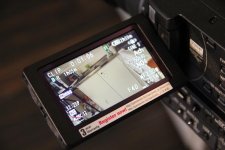
Help! Wierd flickering lines in LCD!

Bante

Active member
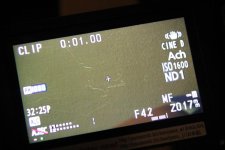
Has anyone of you ever got wierd flickering lines in the cameras lcd?

It has now happened to my camera twice and worst part is that they seem to disappear after a while. The second time it happened the lcd was pretty much unusable. They are flickering when I move the camera around and the recorded footage is clean, so it's not the sensor. Do my camera need service?

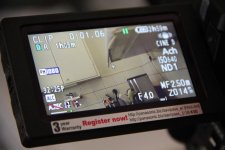
It was hard to photograph, but I attached two pictures and if you zoom in you can barely see the lines, they are however much more visible IRL.

I realize the attachments get compressed, so here's a link to highres picture:

http://btbmedia.se/photo
 

Attachments
  • IMG_0914.jpg
    IMG_0914.jpg
    59.9 KB · Views: 0
  • IMG_0913.jpg
    IMG_0913.jpg
    64.4 KB · Views: 0
Last edited:
Sounds like a loose cable inside or something. There certainly shouldn't be any flickering lines going on that make your LCD unusable to use...
 
Yea, I was afraid of that ..

However, this issue has become much more interesting! The lines are actually a ghost image burnt into the display.

If I setup my camera on a tripod, with the lcd display on, towards a well-lit location for about 10 minutes, it will produce highlighted lines. If someone could confirm or deny this, it sure would be helpful.

I'm in contact with my retailer now and they will talk to Panasonic tomorrow.
 
Just found this in the manual:

"Screen burn-in may occur in the LCD monitor. However this is not a defect."
 
I had another bug the other day. My WFM rolled horizontally just like when loosing sync but instead of vertical it was a horizontal roll. I had to turn of the camera and on again to make it go away...
 
Yea, that is exactly what I am experiencing. So I am guessing this is normal behaviour then? Or is it just a few selected cameras that show this symptoms?

Cant see what youre talking about exactly from those stills, but Im guessing your shooting under lights that are out of sync with your shutter and its causing a band.
 
Cant see what youre talking about exactly from those stills, but Im guessing your shooting under lights that are out of sync with your shutter and its causing a band.


No, it's not a shutter issue. Have a look at my new attached photo, they are much more visible now.
 

Attachments

  • IMG_0918 Denna syns tydligast.jpg
    IMG_0918 Denna syns tydligast.jpg
    61 KB · Views: 0
Are you talking about the fine hair likes lines that look like scratches?

Yes, exactly. They are not scratches though, they are some kind of burnt-in ghost lines in the monitor. They actually flicker alittle when I wave the camera around. They disappear after a while but they come back in different patterns everytime I set the camera on tripod for like 10 minutes towards a static scene. I'm basicly burning in another set of lines.

Since the manual mentioning this not being a defect, I'm still wondering if this is harmful for the LCD. I usually have the monitor on while rigging and prepping a scene. I'm also curious if all or only a few af100 suffers from this issue.
 
If its those scratchy lines, its very odd and isnt burn in. You need Panasonic to take a look at it.
 
I had another bug the other day. My WFM rolled horizontally just like when loosing sync but instead of vertical it was a horizontal roll. I had to turn of the camera and on again to make it go away...

I had this one too.
 
If anyone with an AF100 could make this little test:

1. Setup your camera on tripod towards a static scene.
2. Turn on your camera and lcd for about ten minutes.
3. Reframe your shot. Do you see any lingering ghost lines from the prevoius frame?

I really appreciat it if you could perform this little test and post your results here!
 
If anyone with an AF100 could make this little test:

1. Setup your camera on tripod towards a static scene.
2. Turn on your camera and lcd for about ten minutes.
3. Reframe your shot. Do you see any lingering ghost lines from the prevoius frame?

I really appreciat it if you could perform this little test and post your results here!

Bante Ive already done it. Nothing. Your particular camera has an issue.
 
I have two af-100's. I used both the other day to shoot a timelapse scene from different angles for the same amount of time (about an hour). One af-100 had the weird lines for like 20 minutes while the other had no issue whatsoever. Now I can't seem to recreate it in my office. I'm shooting again today with both cameras. If it happens again to the one and not the other, I'll be sending it in.
 
Looks like Panasonic Service Center in UK found something wrong with my cam, since I have a "Spare backorder" status on my repair. Most likely a new LCD monitor.

Just thought I let you guys know.
 
I have two af-100's. I used both the other day to shoot a timelapse scene from different angles for the same amount of time (about an hour). One af-100 had the weird lines for like 20 minutes while the other had no issue whatsoever. Now I can't seem to recreate it in my office. I'm shooting again today with both cameras. If it happens again to the one and not the other, I'll be sending it in.

Had it happen to my unit as well. The lines develop along the edges of very high contrast material that's displayed on the LCD for extended periods of time. I was shooting a piano (black) and the highlights of the lights off the glossy finish caused lines on the screen that took half an hour to fade away. But they did fade away.
 
Back
Top