Help-Baseball-sized Quick Reference Card- What You Need To Know about recording Audio

mrmccormack

Active member
Hey...

I want to produce a Quick Reference Card for the most basic
things about recording audio - and need some help from the pros here on dvxuser forum.

The baseball-sized card will be printed on both sides,
it will be released under Creative Commons License so anyone could print it.

WHY?
It so easy for people not to know the basics, with so much emphasis on high end equipment
and software. This card will hopefully reinforce the most basic things, and can fit in camera bag.

I read this somewhere, a while back.
"I'd rather have a sound pro with 20 years experience and a $20 microphone
than an amateur with no experience, who looks like a pro, with a $2,000 microphone"

I've been learning audio for a couple years, in my spare time, I'm a novice,
it's really hard to get good audio.

Here are some of my points so far, but would appreciate input.

Audio Recording- TIPS you got to know:

  • Get the mic as close as you can
  • The built in mics on cameras are lousy- for decoration only :) - but handy to sync externally recorded audio
  • Mounting and external mic/recorder on the camera is the worst and last place to consider
  • Consider audio levels on portable recorders (like Zoom H1, H2, H4n) to peak about -10dB
  • For film/video record .wav format at 48kHz
  • Turn OFF or remove anything you can, clocks, fridges, open windows etc.
  • Never say these words "Don't worry, I'll fix that in post"- don't fool yourself and think it is less work in post, to fix things
  • Allow 5 seconds before record audio, and 5 seconds after
  • Record a minute of ambient sound or room-tone, you may need that to fill in gaps in post
  • Record dialog in MONO, stereo can only lead to problems
  • Use a pop filter whenever you can
  • use foam on mic, or a dead cat if windy
  • spend a very long time learning how to "listen"
  • Take a few takes, even if the first one sounded great, try recording at different levels
  • Don't by an expensive mic, until you master a cheap one
  • Buy some moving blankets ($20/each) to deaden the area you are recording,try them on the floor to muffle footsteps, hand them somewhere in room, the difference is noticeable
  • Buy a good set of headphone, these a widely used by pros $84. http://www.bhphotovideo.com/c/product/49510-REG/Sony_MDR_7506_MDR_7506_Headphone.html
  • Take your time, do not rush
  • Have the manual for your recording device in the case, there's always a lot to learn from it
  • After recording, listen to audio on "monitor speakers"
  • If you are recording an interview, provide cue cards written on foam board for your talent, non-pros will mess up even a few lines
  • When recording device is on table, like on a small tripod, but foam bad under it (it will pick up noise from desk if you don't)
  • Portable recorders all suffer from handling noise. buy one of these, or make a DIY version http://www.bhphotovideo.com/c/product/823279-REG/BARSKA_AF10926_ACCU_Grip_Camera_Pistol_Grip.html
  • Use a lavalier when practical, and learn how to hide it under clothing, or as part of the set
  • the day before you shoot/record - go and do a bunch of sample recording on the location
  • Know that it is a very noisy world, as you learn to listen you will discover your brain has been filtering out all these unwanted noises your whole life, but a recording device has no such capability
  • transfer your recording from the SD card to a computer as soon as you can, them make another back up to Dropbox (any cloud solution)
  • Don't blow in the mics, snap your fingers
  • Learn how to wind up a cord- why did this pro, working at the highest level in audio, say
    "Easily the most important thing I have ever put on the internet. Seriously."
    http://randycoppinger.com/2011/09/28/how-to-properly-roll-cable/
  • If your recording clips, do something about it, turn down gain, or move mic further away, or tell talent/actor to not speak so loudly
  • Recording far too loud, is worse than far too soft (not sure about this one guys, they are both bad)
  • Use a boom pole, even a DIY one, your recorder can be mounted at the end of boom pole. Rest the boom pole on the top of your shoe between takes, not on the ground
  • at the end of the recording session, after everyone leaves, take a moment to record, at close range, any sound effects you may want to use, like door's closing, anything that might be useable in post. You will likely use sound FX, but might end up using some of these.
  • know what signal-to-noise ratio is
  • keep your crew quiet, no keys jingling, clothes shuffling, they really have to concentrate on being still and quiet- you sometimes don't realize how noisy the crew was until you are editing, then it is too late.
  • Always have fresh batteries, and place a rubber band around any new batteries to tell them apart from ones that may not be fully charged
  • know what the "proximity effect" is http://www.youtube.com/watch?v=hphcWMzah58
  • more...
--
Thanks, any suggestion/corrections/additions would be greatly appreciated.

~Rob

A got a few tips from:
Thanks Alex H.
http://www.dvxuser.com/V6/showthrea...as-main-audio-for-550d&highlight=audio+basics

and thanks to
Scott Koue for his help too.
 
I have read that this is generally accepted, I forgot to add:

Use a shotgun mic for exterior shots only, use a boom pole with another mic for indoors (too much echo with shotgun mic when inside)
and
spend 1 hour per week on audio section of dvxuser forum.

Maybe I'll need 2 quick ref cards :)
Rob
 
Last edited:
I have read that this is generally accepted, I forgot to add:

Use a shotgun mic for exterior shots only, use a boom pole with another mic for indoors (too much echo with shotgun mic when inside)

More accurately, it's generally repeated. For beginners/amateurs, yes, it's an okay rule of thumb simply because the hypercardioid is more forgiving in reflective interiors. Once you get to know the shotgun mic, how it responds, and how to utilize its rejections properties, there are plenty of interiors where a shotgun will behave just fine and may even be the better choice. The better rule would be: switch to a hypercardioid or cardioid in highly-reflective interiors where the shotgun just can't function.
 
For film/video record .wav format at 48kHz

While this is true in most cases, I've seen some productions come in as 48.048kF mode, and I think that is ultimately determined by the rest of crew like the post supervisor, etc.

I think it is also important that you make a point about metadata in BWAV files as that is key to a successful post production sound workflow, if and only if, the metadata is correct from the start, and preserved properly throughout picture editorial and sound editorial.

.. and if I had a choice, I would choose to record split mono instead of poly-wav (yes I know organization is better with poly/interleaved wav files) but recording as split mono gives easier access to retrieving only one channel in post.
 
This sounds great. I just learned how to wrap my cables better! If anyone was thinking of monetizing this idea and would want a graphic designer to design the card to be as clear and simple as possible but appealing enough that someone would want to buy some that were nicely printed, I could do that for you. My site: http://www.mhoyledesign.com

Thanks for the tips! I know I would want to buy a pack of these and give them to friends if they were pretty. :)
 
... I've seen some productions come in as 48.048kF mode, and I think that is ultimately determined by the rest of crew like the post supervisor, etc.

That's more an artifact of non-sync sound, is it not? Different crystals in different devices tend to clock, well... differently. Without a master clock (i.e. without external sync), the smaple rate can vary a smidge +/- 48k. This is also what causes drift, especially between consumer/prosumer cameras and low-cost recorders: the camera clocks just above 48k and the recorder just below, or vice versa. The device's settings may say "48kHz," but the actual rate may be off. Put them together in an NLE and they'll lose sync over longer takes.
 
That's more an artifact of non-sync sound, is it not? Different crystals in different devices tend to clock, well... differently. Without a master clock (i.e. without external sync), the smaple rate can vary a smidge +/- 48k. This is also what causes drift, especially between consumer/prosumer cameras and low-cost recorders: the camera clocks just above 48k and the recorder just below, or vice versa. The device's settings may say "48kHz," but the actual rate may be off. Put them together in an NLE and they'll lose sync over longer takes.

It's more of the BWAV header, not an "artifact" if I'm understanding you correctly.

I am referring to this workflow http://www.trewaudio.com/audioflow/48048-khz/
 
It's more of the BWAV header, not an "artifact" if I'm understanding you correctly.

I am referring to this workflow http://www.trewaudio.com/audioflow/48048-khz/

Right-o. That's not an option with most of the sound recorders that make the pages here. What I was referring to comes from lower-cost recorders, and I have had many files over the years recorded at "48k" that, upon examining the actual sample rate in the metadata, were just above or below. Perhaps "result" would be a better word: the result of two cheap devices running without a master clock.
 
That's more an artifact of non-sync sound, is it not? Different crystals in different devices tend to clock, well... differently. Without a master clock (i.e. without external sync), the smaple rate can vary a smidge +/- 48k. This is also what causes drift, especially between consumer/prosumer cameras and low-cost recorders: the camera clocks just above 48k and the recorder just below, or vice versa. The device's settings may say "48kHz," but the actual rate may be off. Put them together in an NLE and they'll lose sync over longer takes.

It's a rate used when you are shooting film but posting in video in the US. It compensates for the speed drop when you do a 3:2 pull down. If you don't do this you have to run the DAW in pulldown mode and that can cause problems with sounds coming from other places like music.

The production recordist over cranks slightly so that when it's played in post at 48 it will be in sync with the pulled down telecined footage.

I wouldn't stick it on a cheat sheet since nobody should be using that rate if they need a cheat sheet.

Though it would be a funny sight. Your set up with the 35mm cameras and your $1,200 a day sound guy is looking up what frame rate to use on a baseball card ;~)

Hey that's what the iPhone version is for! You can pretend your putting the phone in airplane mode while you look up some CYA bit of info.
 
Thanks everyone, for input .

This cheat-sheet is meant for beginners, just starting out, to try to help them get good audio on a very tight budget.
As I mentioned "Quick Reference Card for the most basic
things about recording audio
"

I think a very common reason for bad audio, is they forget or never learned the most basic things.

No pro would print one, or want one,
and their knowledge wouldn't fit on a card anyways :)

---
Over last few years, I have found a few good resources, and the Quick Reference sheet
might refer to them.


For example, the PDF link
Home Recording and Postcasts
The purpose of this guide is to help you, the home recordist or podcaster, capture better sound for your recording projects, whether they are:
• Monologues
• Round table discussions
• Interviews
• Music performances, or
• Creating audio tracks for videos
http://labooth.jimdo.com/app/downlo...cs_home_recording_podcasting.pdf?t=1349630136


image.jpg

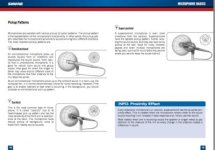
I like the drawings, and the concise explanation of "proximity effect".

Thanks, I'll keep working on the tips.

Rob
 
Thanks blickblocks :
Thanks for feedback...

>I just learned how to wrap my cables better!
. Right on... this type of thing is hard to teach students, as they often don't see that it is important.
(I don't teach audio, I teach programming, but it seems in all fields, sometime the "basics" just aren't too exciting and not treated as a "foundational" skill,
which, of course, they are.

. I enjoyed your work on your website, very nice.

. Will be in touch, the design of the card - or maybe a little book, would be very important, I agree.

. It will be under Creative Commons License, if I ever finish it :)
and maybe a free model will work.
I learned a lot from Chris Anderson's book on free, and have had some good luck with writing free software
mp3 and zip here.
http://www.wired.com/print/techbiz/it/magazine/17-07/mf_freer
It's an excellent read - and Free.

Cheers,
Rob


Note: I'm on the beta test list for
http://www.microlancer.com/
might be worth a look if you are interested.
 
No pro would print one, or want one,
and their knowledge wouldn't fit on a card anyways :)

I know I was kidding, though most pros do have some cheat sheet someplace...

We had a whole binder full of the stuff we would always forget and then spend time looking up. One day we said we should keep this stuff handy and stop wasting time.

This was post so things like how to stripe DA-88 for PAL. Or how to get a good footstep on grass sound.
 
Thanks Scott:

".. and if I had a choice, I would choose to record split mono instead of poly-wav
"

Q:
Are you talking about recording on high end recorders $$ ?

Can low end recorders (Zoom H1, H4n) record split mono -- is that just stereo 2 channel,?

In FCP X, I can easy split tracks etc.

I'm selling all my zoom H1, H4, Roland R05, recorders,
I got http://www.bhphotovideo.com/indepth/audio/hands-reviews/hands-review-tascam-dr-60d
which so far does everything I need and pre-amps seem quiet.

I had to look up poly-wav... but I knew what Nagras is...
REF:
Also known as “Poly WAV,” Poly.Wav,” “.WAV Poly,” and other names. A file format often used in location recording and post-production work. Poly WAV files are multi-channel BWF files that contain extra metadata identifying the channels, etc. Many multi-channel portable recorders, such as Nagras and others, generate poly WAV files.


Rob
 
Hi Rob,

I just read the DR 60d manual and it doesn't look like it can record split mono or "different files for each channel."

In the end it is not a big deal - it is pretty much for convenience and other post sound things that might make life easier for us folks.

At least on the Mac operating system, you cannot simply listen to one channel out of a polywav file without having to download Wave Agent, opening PT, etc. If you use the operating system to playback (hitting Spacebar) a polywav file, you will hear the sum of all the channels in the polywav. That polywav might consist of: the mix track, lav1, lav2, lav3, lav4, boom1, boom2.. When you're trying to quickly evaluate one channel out of all those channels in this situation when someone is breathing down your back, things can be difficult. Again, no big deal at all... Only convenience.

If production files do not come in as split mono, we can surely split them up, but when you're dealing with a terabyte or so of production recorder files, splitting them can take extra time.

On a different note, I have my own cheat sheet, well, it's a binder full of useful articles, formulas, mixing ideas, etc. that I printed out over the years. I occasionally read that every now and then.
 
RJF:

. Thanks for responding, good one...

At least on the Mac operating system, you cannot simply listen to one channel out of a polywav file..
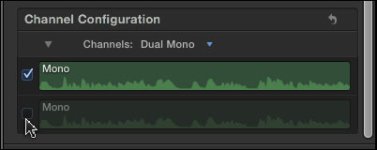
If polywave can mean a stereo wave, here is what I do frequently (and conveniently) in FCP X.
http://www.larryjordan.biz/dual-channel-mono-audio-in-fcp-x/
"If you only want to hear one channel – just the guest, for example, and not the interviewer – uncheck the channel you don’t want to hear. "


I just read the DR 60d manual and it doesn't look like it can record split mono or "different files for each channel."
I think that is correct too... I do like this feature, but it is the same channel, at different levels...
Dual recording allows two files to be recorded simultaneously.

However,
this isn't still isn't ""different files for each channel."

I'm sure happy with DR60, but it is probably more gear ($$$) than I need right now, I'm still learning how to listen :)
"

Also, note DR60's feature: Recording 4 channels

You can connect external mics or other equipment to record four

independent channels as two stereo recording files


~Rob

Ref FCP X
audio-04.jpg
 
Back
Top