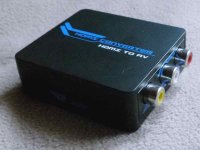
I tried this tiny HDMI to AV converter and can not get it to work!
http://www.youtube.com/watch?v=ogd4y9TFaGQ
I think I've tried everything and it does not work... Same video plays OK when I feed it from video streamer (WDTV Live) via HDMI out, but when I try to play it from GH2 via HDMI out - converter does not see the video signal. Same streamer and cable and TV works fine, as expected, with the converter, but not with GH2, so the problem has to be in GH2 HDMI out signal. I tried to power the hdmi2av converter via USB, or HDMI, or USB + HDMI and no matter what I do - it does not see the video signal! And strange thing is that when GH2 is connected to TV via HDMI, you can not choose any recording mode other than 1080i and I knew it (has been mentioned several times on the net). But when I connect GH2 to hdmi2av converter - I can still choose any other mode from GH2 menu - so it seems GH2 does not recognize it has been connected via HDMI, when using converter.
Any advice please..?
http://www.youtube.com/watch?v=ogd4y9TFaGQ
I think I've tried everything and it does not work... Same video plays OK when I feed it from video streamer (WDTV Live) via HDMI out, but when I try to play it from GH2 via HDMI out - converter does not see the video signal. Same streamer and cable and TV works fine, as expected, with the converter, but not with GH2, so the problem has to be in GH2 HDMI out signal. I tried to power the hdmi2av converter via USB, or HDMI, or USB + HDMI and no matter what I do - it does not see the video signal! And strange thing is that when GH2 is connected to TV via HDMI, you can not choose any recording mode other than 1080i and I knew it (has been mentioned several times on the net). But when I connect GH2 to hdmi2av converter - I can still choose any other mode from GH2 menu - so it seems GH2 does not recognize it has been connected via HDMI, when using converter.
Any advice please..?