HDMI Out, 4:2:2 etc,.

Just a little update - the Ninja arrived and I did a quick and dirty test.
From what I can see in the moment, there is a bigger difference between the AVCHD and the Ninja, than between the AVCHD and the uncompressed Shuttle.

I have no idea what´s going on here. If I transcode the uncompressed Shuttle material to Cineform, the HDLink says "upresing to 4:2:2" - WTF?
Maybe the shuttle records in 4:2:0 - who knows?

Can someone here please confirm that, just as a sanity check?
Frank
 
Frank, it should be fairly easy to tell 4:2:2 from 4:2:0 - pick a solid and intensive color (like a red flower) and look at its edges (best if against some other primary color background, like Green). If the edge is jagged both horizontally and vertically, it's 4:2:0; the 4:2:2 picture doesn't have horizontal jaggies on vertical edges!
 
Right Piotr, I look at it later - I have an edit to get done instead of playing with my new toys - Grrrrr!

But from a first glance, yeah it looks much more like the pics on that Prepost site.
Which is a good thing, cause it means I can squeeze out more quality with the Samurai, and a bad thing, cause my confidence in BM is sinking.

Frank
 
Frank,

This is very interesting with the Ninja vs Shuttle. Some kind of demonstration would be super useful here!

When I set the output for the FS100 it seems the shuttle doesn't like 1080p, it has to be set to 1080i/720p but then it's supposed to negotiate the highest connection. I do wonder whether this is happening, there's a chance that perhaps the shuttle is negotiating the wrong connection. What's your FS100 set to on the HDMI output and what frame rate are you recording?

You should ask David about the cineform message - under what circumstances would it say that on import, perhaps it's a dumb assumption or perhaps they can tell that it's not real 4:2:2

You can see that the shuttle footage does have a different noise pattern, although Dustin mentions the iframe MPEG compression affecting it but with the shuttle it's fully uncompressed. You can also see the AVC fixing some things too, some edges look different for example. I do wonder whether this implementation of AVC is so well tied to the sensor characteristics that it is also cleaning the image as it goes through...

I really look forward to some sample frames, can you record on both? the Shuttle has HDMI out as well (although if it's negotiating incorrectly i would rather have the Ninja first in the pipeline)

thanks
Paul
 
Right Piotr, I look at it later - I have an edit to get done instead of playing with my new toys - Grrrrr!

But from a first glance, yeah it looks much more like the pics on that Prepost site.
Which is a good thing, cause it means I can squeeze out more quality with the Samurai, and a bad thing, cause my confidence in BM is sinking.

Frank

Quick finish the real work and get back to playing (i assume you're prepping for your feature?) :)

I would love to see some examples here, i was talking to someone at BM support the other day. I would like to point them to this thread once we've got something tangible.

cheers
Paul
 
And once again they have done the dreaded interlace mistake. Their software has deinterlaced the AVCHD material causing jaggies. Just click those files and interprete them to progressive (Premiere) or click their interlace flags to none (final cut) to get rid of them. This is because AVCHD files are actually flagged as interlaced eventhough they are progressive. When you create prores files they are automatically flagged as progressive.

This comparison is thus moot. Postmasters comparison looks more correct.

Funny how something so simple will cause three pages of debate. Nothing to do with compression.
 
Last edited:
And once again they have done the dreaded interlace mistake. Their software has deinterlaced the AVCHD material causing jaggies. Just click those files and interprete them to progressive (Premiere) or click their interlace flags to none (final cut) to get rid of them. This is because AVCHD files are actually flagged as interlaced eventhough they are progressive. When you create prores files they are automatically flagged as progressive.

This comparison is thus moot. Postmasters comparison looks more correct.

Funny how something so simple will cause three pages of debate. Nothing to do with compression.

hahahahaha...
you can fool some of the people some of the time....LOL..and some people get fooled soooo easily
 
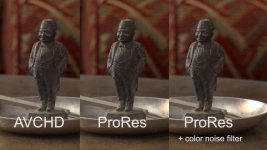
Okay, here is a little update.

AVCHD vs. Ninja

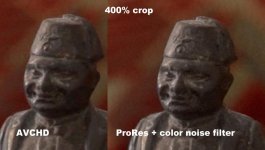
I found out, that the FS100 seems to apply a color noise filter, before writing to the card, the HDMI signal is unfiltered.
So I darkened the room a bit (shutters) to provoke noise and recorded at 18/9 and 0 db gain.
In the right picture I added a color noise filter.

This is the 18db sample:

18db.jpg


Tiff download for all 3 gain settings here: http://www.file-upload.net/download-4098021/Desktop.rar.html
 
And once again they have done the dreaded interlace mistake. Their software has deinterlaced the AVCHD material causing jaggies. Just click those files and interprete them to progressive (Premiere) or click their interlace flags to none (final cut) to get rid of them. This is because AVCHD files are actually flagged as interlaced eventhough they are progressive. When you create prores files they are automatically flagged as progressive.

This comparison is thus moot. Postmasters comparison looks more correct.

Funny how something so simple will cause three pages of debate. Nothing to do with compression.

I did mention several times i think they'd done something with the AVCHD, i never knew it was flagged as being interlaced at source, i thought AVCHD had moved on from that and supported progressive properly (the older AVC didn't). Certainly FCPX flags them as progressive...

Regardless of that, the thread has had it's effect and we've been looking at the real world differences between AVCHD and other captures, which can make a sizeable difference to post workflow and also in quality too. There's no debate here, just an attempt at finding answers

cheers
Paul
 
Last edited:
Okay, here is a little update.
I found out, that the FS100 seems to apply a color noise filter, before writing to the card, the HDMI signal is unfiltered.
So I darkened the room a bit (shutters) to provoke noise and recorded at 18/9 and 0 db gain.
In the right picture I added a color noise filter.

Great work, there's quite a difference there now. You just had to look at the red channel to see more better definition and tone and it's very visible in the frame grabs.

Any chance of a comparison with the BM Shuttle and Ninja? I can't duplicate that shot and in my cursory comparisons i don't believe i'm seeing this level of difference

Which noise filter are you using? There's a nice FCPX plug in called tonalizerVFX which, amongst other things, de-noises and also can help highlight handling (I believe it can reconstruct detail from un clipped channels)

cheers
Paul
 
Last edited:
I do a BM shuttle comparison for my blog soon.

I use the color noise plugin that comes with Cineform.

Frank
 
I did mention several times i think they'd done something with the AVCHD, i never knew it was flagged as being interlaced at source, i thought AVCHD had moved on from that and supported progressive properly (the older AVC didn't). Certainly FCPX flags them as progressive...

AVCHD unfortunately still flags them as interlaced. 60p material is correctly flagged as progressive though. Some programs are starting to notice this and they are developing workarounds. Latest Premiere should be able to spot progressive AVCHD on ingest, but it doesn't hurt to check. Telltale signs of deinterlacing are the jaggies. Philip Bloom actually fell for this too as he accidentally deinterlaced the Sony NEX-5n material on his latest cameratest, though he did fix it later on.

This was easy to spot in the SD-era as when you did a deinterlace the effect was very noticeable. Now with HD and enhanced deinterlacers, it can happen very subtly.
 
I grabbed a little bit of time to look at this in more depth. I'm nowhere near done yet but thought i'd post a couple of findings.

I am still very dubious about the original blog post i linked to. I simply don't see the same detail loss in the original AVCHD. However i do obviously realise that AVC will react with different scenes and in the blog post it is a very detailed city scape and so perhaps the compression ran out of capacity.

To illustrate this, the images below show the same scene from the AVCHD and uncompressed 4:2:2, however this frame section is taken from a pan so AVC cannot take as much advantage of similarities between the previous and next frames as it would like too (despite the fact that it's mostly sky too). This shows very clearly the problems with intra frame codecs.

You can argue that when panning people won't see detail so much which is true. However if you're grading and adding secondaries then the compressed version is a keying nightmare. AVC does add in compression noise around the edges too.

Frank - you had the ninja yet? Any findings?

cheers
Paul


View attachment 47582View attachment 47583

Man, it took me freakin' forever to find a post like this. One simple, illustrative post to say whether or not it's worth using an external recorder with this.

Thank you...
 
Back
Top