HDMI Out, 4:2:2 etc,.

paulcurtis

Veteran
Hi,

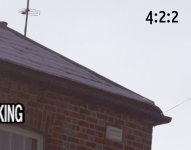
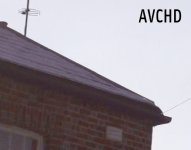
I was looking at a blog post here: http://prepostconsulting.com/en/english-atomos-ninja-sony-fs100-codec-comparison-test/

It's showing the FS against a Ninja and the quality difference is really quite apparent, especially in terms of resolution and fine detail.

I'd tested my FS against my blackmagic shuttle before seeing that post and didn't see quite this level of difference, in fact nowhere near. I'm sort of trying to do a sanity check here and i will do some more testing as soon as I can.

I do wonder whether the blogs AVC files are correct, they look more aliased then they should. Or whether i've got the BM running correctly. I'm using 1080p25 and the only way to get video out of the FS is to switch to 1080i but apparently the recorder is supposed to auto sense and switch accordingly. I get one single mov file out of it which looks like a progressive file. I do no other work on it save to bring it into FCPX and overlay onto the AVC file and switch between them. I see some small differences, more apparent in the channels but not the kind of resolution difference this blog is showing.

Is anyone here running a BM with an FS100 at 25fps, what kind of work flow are they using and what kind of results?

When i can, i will try some more specific tests now i know what i'm looking for

Also there were initial reports that the HDMI out was 4:4:4 at 8bit but i've never seen a confirmation of this...?

cheers
Paul
 
I´m exactly in the same boat.

The Ninja should arrive today, so I can compare it to the BM Shuttle and the internal codec.
The only difference I ever saw between AVCHD and BM is at a greenscreen, but even there it´s really marginal.
At higher ISO, AVCHD was even cleaner, cause it senses the Gain you use and adjusts accordingly. That is not true for the HDMI output.


Actually that site you linked, was the reason why I ordered an Ninja.

In the moment, it looks like Sony´s implementation of AVCHD is running in circles around all theory.

Frank
 
I´m exactly in the same boat.

The Ninja should arrive today, so I can compare it to the BM Shuttle and the internal codec.
The only difference I ever saw between AVCHD and BM is at a greenscreen, but even there it´s really marginal.
At higher ISO, AVCHD was even cleaner, cause it senses the Gain you use and adjusts accordingly. That is not true for the HDMI output.


Actually that site you linked, was the reason why I ordered an Ninja.

In the moment, it looks like Sony´s implementation of AVCHD is running in circles around all theory.

Frank

Frank, excellent news - i very much look forward to hearing about your tests.

That blog post showed some very real differences. I'm hoping i've got something wrong with the way i'm using the BM. The only places i see differences are really in the smoothness of the out of focus areas because these can get blocky with AVCHD as they're so subtle. I can see slightly better definition in the colour channels but not to the degree of that blog post.

I wanted to do some more testing at higher ISO rates. I've a dark sofa which has some very subtle texture on it and the camera was really not coping well with it, i want to try the same again with the BM because the results i'm seeing might just have too much detail for the AVCHD compression.

I was also really testing against uncompressed to see if the magenta/green overexposed highlight artefacts were compression based. Sadly not though...

cheers
Paul
 
Image quality between the two is almost indistinguishable in 95% of situations. But try comparing the editing workflow off the Camera directly, versus ProRes into the Ninja - you'll 'get it'.

As soon as I saw it, a big ****-eating grin broke out on my face.

Drag and drop editing, no transcoding, no rendering after making simple cuts. Shooting to ProRes (and editing in FCP) is a editing dream - it pretty much cancels out everything I ever hated about editing (mainly all the waiting you have to do).
 
BM (sort of) announced that they are close to implement an "much asked for, popular codec" into the Shuttle.

Hi guys,

Thanks very much for your feedback.

We're currently working on implementing a very popular compression format that everyone has been requesting and that's very close to being done. We should be able to support TC as well and I'll have the guys look into this as a priority.

regards

Kristian Lam
Blackmagic Design

http://forums.creativecow.net/readpost/124/879258

My hopes are high that they speak of Cineform (wishful thinking here of course) . that would be a major game changer for me.
I hope they did not mean ProRes - on the other hand, that would be still better than the awkward version of DNXHD that they have now in the shuttle 2.
 
Stupid question, if you're sending an HDMI signal to the ninja, is their an HDMI or SDI out that you can send to a monitor?
 
I agree with Greg, the AVCHD looks incredibly good. The Prores is very slightly better but if you
aren't in FCP and your exposures are already looking good without a lot of grading there's
no shame in using the AVCHD.

One would want to make sure their lenses and technique were in top form before getting
bothered about using an external recorder.
 
Dustin - If you look at the linked blog at the beginning you'll see quite clearly that there is a big difference in detail compared to the AVCHD. Either that bloggers testing messed up something or there really is quite a bit more detail available.

The AVCHD *is* very very good, but it's not a miracle worker in all scenes.

The shuttle i have is V1 and so it will only do uncompressed, i'd have to buy another one to get anything else. Of course pulling out the SSD, popping in another one whilst the first is plugged into a thunderbolt/sata adapter and the uncompressed movie is transcoded to ProRes is still quite nippy.

DNxHD is a very weird codec, i tried using it way back as a cross platform master but the implementation is so dodgy and even the UI elements in the codec settings still aren't fixed, that i had to abandon it. I did use cineform for years but every now and again it would break as updates were sent out. They're not always entirely backward compatible. Perhaps a lot better now.

I believe there's now an open source Prores on windows too, worth looking at perhaps.

The reason for the thread is to sanity check that bloggers findings and Frank is in an excellent position to do so as he has both a BM and hopefully a Ninja soon.

cheers
Paul
 
I grabbed a little bit of time to look at this in more depth. I'm nowhere near done yet but thought i'd post a couple of findings.

I am still very dubious about the original blog post i linked to. I simply don't see the same detail loss in the original AVCHD. However i do obviously realise that AVC will react with different scenes and in the blog post it is a very detailed city scape and so perhaps the compression ran out of capacity.

To illustrate this, the images below show the same scene from the AVCHD and uncompressed 4:2:2, however this frame section is taken from a pan so AVC cannot take as much advantage of similarities between the previous and next frames as it would like too (despite the fact that it's mostly sky too). This shows very clearly the problems with intra frame codecs.

You can argue that when panning people won't see detail so much which is true. However if you're grading and adding secondaries then the compressed version is a keying nightmare. AVC does add in compression noise around the edges too.

Frank - you had the ninja yet? Any findings?

cheers
Paul


422-motion.jpgAVCHD-motion.jpg
 
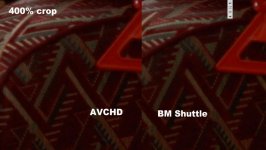
This drives me nuts - I can´t see anything close to what you see on that Prepostconsulting website.

Crop.jpgShuttle1.jpgAVC.jpg
 
Min was also panning, but rather slow, as I would do in a real world situation (7 seconds rule).

Frank
 
I can confirm that the FS100 AVCHD codec being very clean, my nanoFlash 220 Mbps 422 I-frame recording are even cleaner in terms of compression artifacts - even with stationary shots (like for instance contrasty heads of nails in wood).
 
When I look at the prepostconsulting site what stands out to me in the AVCHD is that there
is some sort of extra blur in the luminance channel that looks like it is at least two pixels high.
This is visible in the close up of the building in the windows.

The 4:2:0 versus 4:2:2 should _not_ have an effect that causes a vertical blur of two pixels. You might
say well that's just the AVCHD codec blurring the Y channel. I don't believe this because I don't see any
deblocking or Gibbs ringing or any other hint that serious compression is happening in the area.

Also, if you look at the handrail shot it's clear that there is some kind of bi-linear interpolation
going on. See how the handrail goes from one row of pixels to another. I would expect it to be
more "antialiased" than that.

The main difference between the AVCHD and the 4:2:0 high rate should be compression
artifacts and chroma sampling. What I see is not just compression artifacts
or chroma sampling because the luminance is poorly resampled. It looks like bilinear
to me because there is no ringing that you would expect in bicubic or one of the
fatter resampling kernels.

The video editing program is zooming in 400% and who knows what kind of resampling
the program is doing to blow up the picture. It might be nearest neighbor (correct
for pixel peeping) or something nastier depending on whether the input is 4:2:2 or
4:2:0.

At any rate, Postmaster's stills look correct to me. What I see is the tinniest difference
in chroma sampling and the BM looks very slightly better.
 
Funnily enough in Franks samples there seem to be some very fine horizontal lines, single pixel in the material texture. If these are 400% crops then it looks like the web compression is affecting the results too. I assume they're not in the original? I would say in your side by side sample they're the wrong way round. There's more compression noise in the BM Shuttle version. In fact if you open in photoshop and peek the red channel you can see. As i mentioned, perhaps the JPG compression for the forum?

I wonder whether uncompressed is better in low light/high noise? Next on my list.

I really think there's something wrong with the AVCHD samples in that blog post. I simply don't see enough of a resolution difference between the two.

Is the HDMI out 4:4:4 8bit though, there was a quote a while back stating that the HDMI out would negotiate the highest quality with the recorder. Does anyone have anything capturing 4:4:4?

For me, the reason is low light/high noise. I'm keen to squeeze the maximum out of the sensor.

cheers
Paul
 
I had the same result as you did, Frank. The AVCHD files looked CONSIDERABLY cleaner than the MPEG2 files I captured on a nanoflash running 220mbps, I-frame. While I did not pan the shot, I had a lot of fine detail in motion throughout the frame.
 
The tiffs look about right. The AVCHD is 4:2:0 but it isn't objectionable. Both are
quite clean.

The two tiff files are not from the same frame though. I don't know if they were intended to be
from the same frame but if anyone wants to pixel peep them by blinking back and forth,
they can not lined up precisely because were taken at different times.

One should expect the AVCHD file to have less noise because the compression+deblocking
algorithm are basically a very sophisticated temporal noise filter. The I-frame only nanoflash
has no such temporal denoising properties since it is intraframe only. The noise
that is in there gets blurred a bit by the DCT+quantization compression step and gets
a bit blobbier. Hard to explain but try making some random noise and compressing
it to I-frame only MPEG2 and compare the result to your original noise and you should
get a feeling for the blobbiness I talk about.

Basically you have a choice with a noisy sensor and the setup we
are discussing. You can have slightly denoised 4:2:0 with difficult editing performance or
you can have a some slight chunkiness in the noise and 4:2:2 color sampling plus easy editing.

If you don't like the 220mbit I-frame, try the 180mbit long-gop and see if there is any
noise reduction from the interframe compression.
 
Or you can transcode to Cineform while dumping from the card (takes about the same time as just dumping the AVCHD) and have an easy editable codec with temporal denoised material.
That doesnt give you real 4:2:2 though - but for me, that´s the way in the moment.
I hope the Atomos finally arrives today, so I can give it a test ride.

And yeah, not exactly the same frame, the shuttle takes a little bit longer to react to the record button as the camera.
I had the clips in different timelines - one in a BM timeline and one in a AVCHD timeline and just grabbed the frame by timecode.

Frank
 
Back
Top