CAMCORDERS: HC-X2 - Weird blue reflection on skin from stage lights

EdRicker

Active member
Hi all,
I've had the Panasonic HC-X2 camcorder since the summer and have shot various concerts, presentations, weddings, etc. I shoot an annual Christmas show and whipped out the HC-X2 for my close angle.
Editing now, I got some crazy skin reflections from one of their stage lights. Didn't happen on every song, but it pretty much ruined some of the closeups.
See screenshots. Closer framing is the HC-X2, and the wide shot is my Panasonic GH6. Same white balance on both cameras, identical settings in every way. 30fps 10bit 422 MOV, normal ISO and F1 normal color profile. The blue skin reflection only showed up in the HC-X2.
I've shot this show for the past 8 years using my AG-DVX200 as a closeup and never had this use. This is rooough.

Any ideas what could have caused it? Any settings I can poke around with on the HC-X2?

 

Attachments

  • Show 2 Edited.00_25_22_21.Still004.jpg
    Show 2 Edited.00_25_22_21.Still004.jpg
    139.5 KB · Views: 17
  • Show 2 Edited.00_25_22_21.Still005.jpg
    Show 2 Edited.00_25_22_21.Still005.jpg
    154.3 KB · Views: 18
This isn't a solution but just sharing that blue clipping has always been notoriously difficult for camera sensors to handle and this evens hows up in Hollywood movies under some lighting at times.
 
This is the new reality of LED stage lights where you need to reduce your expectations.

The blue tint is more prominent in X2 but I see it in both cameras. Sometimes in post I reduce the saturation of the offending color.
 
I don't think anyone can explain why the X2 is looking so much worse than the GH6. They are both single sensor cameras. The only explanation is that the X2 has a poor imaging sensor and you need to massage the menu settings to pull the best out of the camera. Luckily Panasonic gives us a lot of menu controls for color. If you know anybody who can get you in the theater off hours or in for a different show, try to set up the camera and a monitor and tweak it out. That is the only way to solve the problem. Recreate the scene and alter the camera to perform better.
 
I always smile at this. My JVC ⅓" cameras can render LED lighting really well. My stills cameras that very occasionally do video are so different. My Pentax cameras are pretty good, but the Canons, much less so. The Eos 7 mkII doesn't like blue much, and while the two pentax DSLRs do blue, one of them does pinks and magentas very poorly. The graduation from pink to magenta and further as the blue channel in the lights increases is sort of ignored. Pink, magenta and mauve colours all look pink.

This sadly is very common now - the sensors just add their own version of truth.
 
I've read various science explanations but they can only explain why not provide a fix.

The LED light provides a very narrow and intense wave length of one color that easily causes a channel to clip before the overall image is over exposed then the camera software has to figure out what to do with it. In the samples provided the GH6 looks like it converts the clipped blue on the forehead to white while the X2 retains the blue. In these situations it better under expose but even that doesn't fix it.

If you have an LED light you could play around with different setting but like I said this is a common issue which like Paul said effects each camera different. This is another reason to film with the same camera for multi camera shoots, makes matching easier.
 
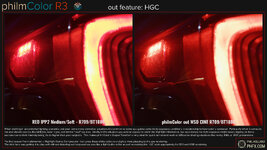
I use Phil Holland's Philmcolor occasionally in post production and he has an interesting note regarding out of gamut colors like what you're describing. Essentially it sounds like you need a measure of Highlight Gamut Compression, or the ability to control what that color does at it approaches clipping, but that may be easier said then done, depending on the capture formats available to you and what you can do in post.

Including a quick screenshot of his commentary on that here:

philmColorR3_feature_out_HGC.jpg
 
Agree with Tom as I shoot Vlog on both my GH6 and GH5S use highlight metering mode too. This approach very often results in a slightly lower level but much easier to increase in post than manage clipping. In the theatre now I set WB at 3700 as I find this is a good compromise for the mixed lights.
 
Hi all,
I've had the Panasonic HC-X2 camcorder since the summer and have shot various concerts, presentations, weddings, etc. I shoot an annual Christmas show and whipped out the HC-X2 for my close angle.
Editing now, I got some crazy skin reflections from one of their stage lights. Didn't happen on every song, but it pretty much ruined some of the closeups.
See screenshots. Closer framing is the HC-X2, and the wide shot is my Panasonic GH6. Same white balance on both cameras, identical settings in every way. 30fps 10bit 422 MOV, normal ISO and F1 normal color profile. The blue skin reflection only showed up in the HC-X2.
I've shot this show for the past 8 years using my AG-DVX200 as a closeup and never had this use. This is rooough.

Any ideas what could have caused it? Any settings I can poke around with on the HC-X2?

Have a look at the videos below. They will give you an idea of what is going on and more importantly how to fix it. The first video gives you an idea of how to avoid the situation prior to shoot, and the second video gives you answers of how to minimise the problem in post if using Resolve, although most NLEs have similar tools to achieve similar results. Much harder of course trying to fix it in post.

Finally, a couple of stills off one job I had to try and fix. The worst I've ever had to fix. I wasn't happy with the result, but the client went away happy, so the day was solved. The "fix" that was applied used the techniques of rebuilding channels as shown in the Resolve training video. But in this case, feeding luminance from the blue channel to virtually non-existent levels in the red and green channels by using parallel nodes.

Chris Young


Attachments

  • LED Sort of Fixed comp.jpg
    LED Sort of Fixed comp.jpg
    94.1 KB · Views: 4
Back
Top