I am quite sure Nlog is just a noPP profile with contrast and saturation dialled all the way down (and maybe a gamma curve on top). In fact he gives instructions to dial them down in his app manually (-3 contrast and -4 saturation in the app). If those are not dialled down (as default), it just look like another noPP profile. I also get similar result if I use the built in neutral profile and -3 contrast and -3 saturation.

Navigation
Install the app
How to install the app on iOS
Follow along with the video below to see how to install our site as a web app on your home screen.
Note: This feature may not be available in some browsers.
More options
You are using an out of date browser. It may not display this or other websites correctly.
You should upgrade or use an alternative browser.
You should upgrade or use an alternative browser.
Hacked Sony A7S?!
- Thread starter arturochu
- Start date
paulcurtis
Veteran
Testing in Vegas, gaps appear in both Slog2 and Nlog for me but not Cine4, I'm wondering if it's because I'm previewing on the same monitor as I'm viewing the Waveform and can't preview it fullscreen.
There are numerous places where the image can be altered. A lot of imports into editors dither the image (add subtle noise), resolve does this all the time and it means that the waveforms aren't accurate. You really need to be able to expand those vertically. What you are looking for is an equal distance between lines, showing the values are not quantised.
What you may be seeing there is the scaling of the signal down to that vertical height, so a kind of aliasing effect. Can you zoom into part of the waveform? So there's no aliasing of the display going on?
cheers
Paul
paulcurtis
Veteran
I am quite sure Nlog is just a noPP profile with contrast and saturation dialled all the way down (and maybe a gamma curve on top). In fact he gives instructions to dial them down in his app manually (-3 contrast and -4 saturation in the app). If those are not dialled down (as default), it just look like another noPP profile. I also get similar result if I use the built in neutral profile and -3 contrast and -3 saturation.
Can't say i've played with that but i would say that the distribution of the values looks more like a expanded Slog2 than cine4 for example.
He's pretty convinced there's a LUT in there and i've posted the graph from that data and that by itself is not enough to create this image that's being shown. If that lut is being applied to linear data then it would not work. So it's either on top of a gamma or log.
cheers
Paul

Well, here is the test, N-Log vs PP off (neutral).Same ISO (800) and same white balance. I can't tell the difference. There you go. QED 
It is an A7sii that I am testing on btw. And no, N-Log doesn't even do 4K or IBIS. All he is doing (so far) is make an app with menus and stuffs and use the neutral profile and call it N-Log. If you believe N-log is some kind of magic curve, well, the magic is with us all the time already.
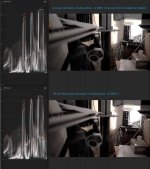
It is an A7sii that I am testing on btw. And no, N-Log doesn't even do 4K or IBIS. All he is doing (so far) is make an app with menus and stuffs and use the neutral profile and call it N-Log. If you believe N-log is some kind of magic curve, well, the magic is with us all the time already.
Last edited:
All was shot with same aperture (13), WB 5500, Lens FE 28-70 in AF with no ND Filter, maybe sharpening is dialed down in Slog and Cine4 more, but in Nlog was also -7.
Here are some comparisons.
It's important to remember there's no magic here folks, the camera will output it's range into a variety of profile curves. Each curve has it's use.
Remember that a log curve is a way to record scene linear light in a standard way that in vfx/post we can turn that back into real world light levels for comping/vfx work. There's a real reason for it. Whereas when recording on camera we're really trying to make the best of a bad container.
When comparing i've been careful to not introduce other gamma shifts and to look at the data in the images. Just importing to PPro will add an sRGB gamma to the images so it's not useful for comparing.
I wonder if auto white balance was used in these samples too? Cine4 appears quite off and that affects things too
View attachment 106876View attachment 106877View attachment 106878View attachment 106879
Here's the analysis.
Slog could have been exposed up higher, it had a bit more range before it clipped, 10% or so.
Nlog is using more of the container which is a really good sign. Is it a log curve? It's similar, it has crushed blacks and i'm not sure what's happening with the colour temperature in the highlights. What i do like is the fact that the blacks are lowered making much better use of the container.
This image appears quite a bit sharper too, and also doesn't show colour moire that the slog and cine versions have. I find that a bit odd though. So i would like to check how these were shot. The data rates are the same in the files. And the gamma curve being used shouldn't affect these aspects. So i'm assuming there were differences in aperture/lens/settings. The Nlog image looks considerably better because of this.
I think on reflection that CSV data is being applied to an Slog based source image, this CSV is crushing and rolling off and scaling the image to fit the container better which is what i'm seeing here. Although the ISO is too low for that, so could be wrong here.
But here's the caveat - is the source data that is being manipulated 8 bit or 10 bit? If it's 8 bit then you're not gaining anything (and in fact could be loosing) if it's 10 bit then that is a great achievement from Nabil. The LUT being used is 10 bit but that means nothing, it depends on the input data.
How can we tell? Either we need to test very carefully with grads and look for banding. But on my waveform i get to see the actual values being shown, although they are RGB values not YUV (I can't get XAVC yuv values). What i did was to take the slog2 and scale it to match the nlog. Then compare waveforms.
(download the image to see clearly https://www.dropbox.com/s/dvc95xtxx2mwmjw/waveform.jpg?dl=0 )
View attachment 106880
I have to say it looks like the Nlog has gaps in the waveform compared to Slog. The Nlog image has not been manipulated, there should be no gaps, each horizontal line should be equally spaced. To my mind i think this may indicate that the LUT being applied is being applied to 8 bit data. The Nlog is on the left, untouched, the Slog2 on the right and scaled and offset to match the Nlog. See how there are black bands missing in Nlog? This concerns me, the Slog2 by comparison is even. I believe this indicates that the Nlog LUT has been applied to 8 bit Slog2 data in camera. I really hope this isn't the case, but Sony have always maintained that the hardware is 8bit. I so want to believe we can get a better image out but...
We need to investigate further, as Samuel suggests, if we can shoot smooth grads like for like. and compare those perhaps we'll see more clearly.
It's possible that the LUT being used is wrong too, maybe the gaps are being generated by that.
In fact if i have time i will see whether i can take that CSV file and turn it into a LUT and apply that to Slog2 footage - i suspect it may turn out looking how the Nlog looks, with the same gaps.
Perhaps someone else can try the same steps to double check?
cheers
Paul
paulcurtis
Veteran
Yeah zooming way in, the waveform is quite regular for Nab log, (and everything else for that matter).
That signal seems dithered. Are you able to look at a single channel? It might be clearer?
If decoding happens through QT for example then depending on what pixel format you ask for QT will quite often dither the result. It's madness once you start digging through. Generally for looking at an image it's a good thing but not if you're trying to quantify it
So try a single channel and i'll have another look
One app that doesn't lie is SpeedGrade, so if you have the adobe stuff that's worth a try. Nuke X is probably a bit more expensive to have laying around unless you use it all the time.
cheers
Paul
paulcurtis
Veteran
Well, here is the test, N-Log vs PP off (neutral).Same ISO (800) and same white balance. I can't tell the difference. There you go. QED
It is an A7sii that I am testing on btw. And no, N-Log doesn't even do 4K or IBIS. All he is doing (so far) is make an app with menus and stuffs and use the neutral profile and call it N-Log. If you believe N-log is some kind of magic curve, well, the magic is with us all the time already.
I never even thought to look at that. Well that's pretty telling.
That LUT posted might be making a small difference, so you could be right that the LUT is on top of no profile (well normal gamma actually)
Although you're using this on an A7sII (you're brave for loading that), i wonder if the A7sII will produce different results in this case?
cheers
Paul
paulcurtis
Veteran
All was shot with same aperture (13), WB 5500, Lens FE 28-70 in AF with no ND Filter, maybe sharpening is dialed down in Slog and Cine4 more, but in Nlog was also -7.
Well if you look at the roof tiles of NLog vs the others there is a HUGE difference in clarity. I can't believe it's Nlog though, so i think something was different for that version. It's worth looking at that regardless.
cheers
Paul
I was curious and decomplied his app to look at his source code. I can't say I understand 100% all the code, but well I can't even find the nab.csv file that he claimed to be using. (Or maybe I mislooked which is entirely possible) But the point is the csv file he provided is so linear that I simply don't think it can make any differences in gaining any DR.
You are right that the result might be different as I am using an A7sii. Too bad I sold my A7s already. Maybe someone else with an A7s can do a test comparing NLog and Neutural?
You are right that the result might be different as I am using an A7sii. Too bad I sold my A7s already. Maybe someone else with an A7s can do a test comparing NLog and Neutural?
paulcurtis
Veteran
I was curious and decomplied his app to look at his source code. I can't say I understand 100% all the code, but well I can't even find the nab.csv file that he claimed to be using. (Or maybe I mislooked which is entirely possible) But the point is the csv file he provided is so linear that I simply don't think it can make any differences in gaining any DR.
You are right that the result might be different as I am using an A7sii. Too bad I sold my A7s already. Maybe someone else with an A7s can do a test comparing NLog and Neutural?
there was a tumblr blog where he posted the CSV file. I didn't think the source to the application was available? He released some SDK files previously but not all of them so i've not really given it any serious looks.
Actually it sounds like you've decompiled the app right? Would be curious to see that actually.
cheers
Paul
I hear you! I did exactly the same and all that was not making any sense for me. I was searching whole app by singular number and still couldn't find anything. This is very suspicious for me...I was curious and decomplied his app to look at his source code. I can't say I understand 100% all the code, but well I can't even find the nab.csv file that he claimed to be using. (Or maybe I mislooked which is entirely possible) But the point is the csv file he provided is so linear that I simply don't think it can make any differences in gaining any DR.
You are right that the result might be different as I am using an A7sii. Too bad I sold my A7s already. Maybe someone else with an A7s can do a test comparing NLog and Neutural?

paulcurtis
Veteran
Paul, yes I decomplied it. There are numerous tools available to do that.
Anyway I think we can forget it. Guess he read this thread. He deleted his Twitter and tumblr already. Very fishy.
It was always fishy but then he did succeed in creating a menu and he did also decompile some SDK files.
What i would be interested to see in the source code was whether that LUT is actually applied anywhere or whether his app simply presses the standard picture profile settings. Because the essence of what he was attempting was sound. I have grave doubts that the LUT was being used because to my mind the android side of things runs in a very slow sandbox, there's no way it would be fast enough to process a LUT in real time. So it largely depends whether there is a SDK feature to apply a given LUT to the camera image.
Can anyone send me the app or code?
If there is such a thing then that *would* be super useful.
The rest of the claims i really don't think have any foundation - 4K, 10 bit etc,.
cheers
Paul
Paul, you can download the app from here: http://we.tl/M0DUTm2hsy
paulcurtis
Veteran
Well i had a look at that android package.
When you decompile it also decompiles the sony libraries, so there's a huge amount of boiler plate work and it's tough to sort out what is custom from that. I suspect looking through the resources that this started life as one of the existing play mobile apps - Live View Grading one for example. The code is there to switch between different look modes. I can also find icons and graphics from what looks like the live view grading in the resources folder.
Hasten to add i don't do android dev work, so i'm not expert. Mostly iOS/C# but not java.
There is some custom looking code in the BaseApp class, this creates an array which is basically a linear array - it has the looks of a look up, and is part of a call back. However due to the way the array is created it won't affect an image. I can not find that CSV file that was posted to tumblr anywhere, hard coded or in the resources (but i could have missed it somewhere)
But that callback itself is interesting, with the implication being that data can be passed back and forth. Indeed some of the play mobile applications look interesting but then do any of them work on movies and not stills?
The live view grading is an interesting app, i've never tried it but it does work on movies. Whether it is working on 8 bit movies or a higher bit depth is the key. I suspect it's all 8 bit but i don't know.
It's a shame Nabil has gone dark, afterall he has managed to upload an app to the camera and create a menu system, that is a fantastic start. I wish he was a bit more forthcoming in broadening the community - less hyperbole and more about the work he's actually achieved.
cheers
Paul
When you decompile it also decompiles the sony libraries, so there's a huge amount of boiler plate work and it's tough to sort out what is custom from that. I suspect looking through the resources that this started life as one of the existing play mobile apps - Live View Grading one for example. The code is there to switch between different look modes. I can also find icons and graphics from what looks like the live view grading in the resources folder.
Hasten to add i don't do android dev work, so i'm not expert. Mostly iOS/C# but not java.
There is some custom looking code in the BaseApp class, this creates an array which is basically a linear array - it has the looks of a look up, and is part of a call back. However due to the way the array is created it won't affect an image. I can not find that CSV file that was posted to tumblr anywhere, hard coded or in the resources (but i could have missed it somewhere)
But that callback itself is interesting, with the implication being that data can be passed back and forth. Indeed some of the play mobile applications look interesting but then do any of them work on movies and not stills?
The live view grading is an interesting app, i've never tried it but it does work on movies. Whether it is working on 8 bit movies or a higher bit depth is the key. I suspect it's all 8 bit but i don't know.
It's a shame Nabil has gone dark, afterall he has managed to upload an app to the camera and create a menu system, that is a fantastic start. I wish he was a bit more forthcoming in broadening the community - less hyperbole and more about the work he's actually achieved.
cheers
Paul
First of all sorry for my bad english, I hope you can understand it.
I'm owning a Sony A7s and had a look at this. From what i've seen Nabil didn't do much (except for claiming this).
What he did is download the live view grading app. To modify an app is not that difficult.
You can simple download the app as apk (with; https://sony-pmca.appspot.com) to your desktop.
Next you can extract the apk, you get a few files and one of them is classes.dex. I used bytecode viewer on Windows
but I'm sure there are many other ways. Here you can edit codes and text string.
Besides that he changed a few images. You can do this by going to the apk, in the 'res' folder you can find another folder
called 'drawable-long-nodpi'. In this folder are the images used for the ui.
In the folder 'assets' is a file called 'MenuData.xml'. Here you can change the menu that opens when you press the menu
button when the app is running. He tried to add the 4k options here, but it doesn't display when running the app.
I looked into it and it could be because the classes.dex doesn't support xavc s 4k (yet).
I want to try and continue this project. What I would need to get further is someone with a 4K-capable camera (a7s m2, etc.etc.)
to download the live view grading app and post his apk here. (easily done with https://sony-pmca.appspot.com)
The difference is that their apk should contain xavc s 4k support in there classes.dex and would make it more easy to
port 4k support to our a7s cameras.
Just using their apk won't work as there is a API check in the code. This could be erased (in the classes.dex)
and I think it should work after that. After that is done we could try to make some modifications to make it stable.
I hope someone here is able to help me.
(I don't want to make any claims, like someone previously did, I just like to TRY and maybe succeed in making this mod.)
Thanks for reading.
// Also if anyone wants to share the apk of other apps (for a7s or any other device) it would be appreciated.
I'm owning a Sony A7s and had a look at this. From what i've seen Nabil didn't do much (except for claiming this).
What he did is download the live view grading app. To modify an app is not that difficult.
You can simple download the app as apk (with; https://sony-pmca.appspot.com) to your desktop.
Next you can extract the apk, you get a few files and one of them is classes.dex. I used bytecode viewer on Windows
but I'm sure there are many other ways. Here you can edit codes and text string.
Besides that he changed a few images. You can do this by going to the apk, in the 'res' folder you can find another folder
called 'drawable-long-nodpi'. In this folder are the images used for the ui.
In the folder 'assets' is a file called 'MenuData.xml'. Here you can change the menu that opens when you press the menu
button when the app is running. He tried to add the 4k options here, but it doesn't display when running the app.
I looked into it and it could be because the classes.dex doesn't support xavc s 4k (yet).
I want to try and continue this project. What I would need to get further is someone with a 4K-capable camera (a7s m2, etc.etc.)
to download the live view grading app and post his apk here. (easily done with https://sony-pmca.appspot.com)
The difference is that their apk should contain xavc s 4k support in there classes.dex and would make it more easy to
port 4k support to our a7s cameras.
Just using their apk won't work as there is a API check in the code. This could be erased (in the classes.dex)
and I think it should work after that. After that is done we could try to make some modifications to make it stable.
I hope someone here is able to help me.
(I don't want to make any claims, like someone previously did, I just like to TRY and maybe succeed in making this mod.)
Thanks for reading.
// Also if anyone wants to share the apk of other apps (for a7s or any other device) it would be appreciated.
Last edited: