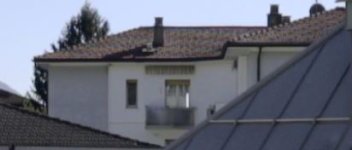
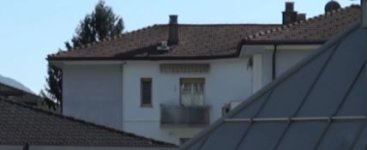
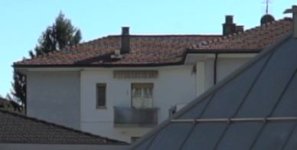
Hacked Sony A7S?!

for me Nlog has a good DR and is very simple to grade like a Raw image.

greatz
Christian

Hi Christian,

In that case you're not really comparing, the Slog has half the exposure of Nlog and so in order to equalise the image you have to gain up the shadows and therefore noise at 3200ISO.

As was mentioned perhaps an easy way of comparing is to expose to the right, so that in both cases you clip the highlights and pull back a bit. That way both exposures would have the same starting position and we can look at the noise. Ideally that Slog2 should have some kind of Slog2 input LUT added before grading too. To grade from a flat log image can be quite a challenge.

However no matter how you look at it Slog2 will be noisier, it's ISO3200 vs ISO100. Slog2 is really a container designed to eek out as much dynamic range as possible and in the flattest way. Whereas this profile and the other cine profiles roll off the highlights very quickly. There's an article on my blog below that breaks down the curves and shows how the values are distributed.

The question with NLog is that can it hold the same range as Slog2 with the same kind of tonality as a log curve but at ISO100? That would be a major achievement.

But from the way the image looks NLog seems a much better comparison to one of the cine curves and so if you shoot like for like there then you'll start with a similar position.

As i've mentioned, based on the CSV data that Nabil put on that tumblr blog i suspect that Nlog is taking a cine curve and modifying it slightly, raising the blacks and rolling off the highlights, but this is the same as black gamma and knee.

I hope i'm wrong, because to be able to create a custom LUT to shape the camera data is an incredibly useful function but we have to be applying the LUT to the source data before it gets decimated for compression. If we were applying the supplied CSV based LUT to source data then the shape would look quite different as the source is going to be linear.

If Nabil has found a way to apply a custom 10 bit LUT to 10+ bit source data (even if it's after a profile curve) then that by itself is a great achievement but i think this NLog curve is the wrong thing to do in that case. You would want to be modifying the Slog2 data and shaping that. So the output is still 10 bit but you get to shape the curve the way you want. We could crush the shadows and add a small highlight roll off that suits this camera better. If we create the LUT then we can also reverse it in post and that is very important too.

If you speak to him then perhaps you could ask these questions? If i can understand where in the chain this is happening then we can suggest ways in which it would make a difference.

cheers
Paul
 
^ That's why I always shoot a ramp. It's easy then to look in Premiere and find two screenshots where the clipping point is the same in both setups, and another two where the shadows go similarly useless in both setups. Just take note of what shutter speed each of those four samples comes from, and those numbers will give you your DR comparison.
 
i think the DR between Cine 4 and Nlog are the same (when i find time tomorrow i repeat the shot with Iso200 for Nlog).
i like the colors and the possibility to use Iso100 on Nlog, on Slog i dislike the magenta tone(and the Iso limitation).
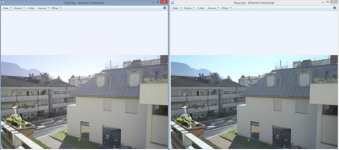
 
i think the DR between Cine 4 and Nlog are the same (when i find time tomorrow i repeat the shot with Iso200 for Nlog).
i like the colors and the possibility to use Iso100 on Nlog, on Slog i dislike the magenta tone(and the Iso limitation).

I've not had a chance to have a real look, maybe over the weekend but i suspect that Cine4 and Nlog are pretty close and you could get anything Nlog does with cine4.

Again with the slog2 shot you never clipped the slog2 version, there still seems to be latitude in the highlights. But there's enough ramping that perhaps there's an exposure match between one of the Slog2 and the nlogs.

Thanks for doing this

cheers
Paul
 
Seems like it has an edge over cine4, but s-log2 still seems the way to go in daylight. At night I consider cine4/n-log.
 
easiest way to compare the DR is to shoot at iso 3200 and expose slog2 perfectly (+2 before hightlights clip) and then record and use the same settings on nlog and then compare. Everything I have seen so far seems that slog2 still packs 1-2 stops more then N-log. Unless you can pull back more in post then slog2 like RAW, but I dont think that is the case here.

It is cool none the less. Timelapse apps could be created similar this way. and hopefully some day 4K 10bit.
 
Last edited:
slog2 would have almost no banding :) currently thats one of the thing i most hate when using slog, the other one is noise.

imagine they could hack slog2 to be usable from iso 100. more DR and less noise. :)

just get neat video. noise-be-gone!
 
yeah however denoising a giant project crashes my NLE. So I have to denoise everyclip before I throw them in the edit, and that is quite time consuming.
 
Yes, that's where you apply it. But I only apply it when everything else is done, just before hitting render. I think that's what jurny was suggesting.
 
I was about to post some comparisons but i noticed something else.

The Nlog version is considerably sharper than the other versions. Can you confirm the workflow for them all? And the recording settings? Was the same lens used? They do look quite different...

thanks
Paul
 
Last edited:
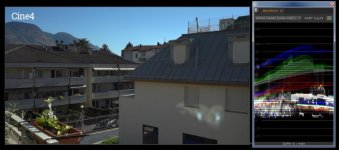
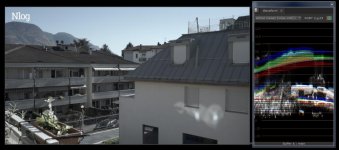
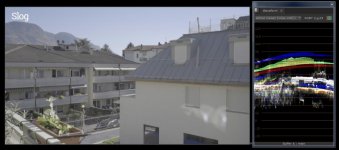
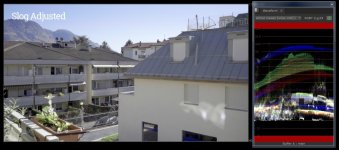
Here are some comparisons.

It's important to remember there's no magic here folks, the camera will output it's range into a variety of profile curves. Each curve has it's use.

Remember that a log curve is a way to record scene linear light in a standard way that in vfx/post we can turn that back into real world light levels for comping/vfx work. There's a real reason for it. Whereas when recording on camera we're really trying to make the best of a bad container.

When comparing i've been careful to not introduce other gamma shifts and to look at the data in the images. Just importing to PPro will add an sRGB gamma to the images so it's not useful for comparing.

I wonder if auto white balance was used in these samples too? Cine4 appears quite off and that affects things too

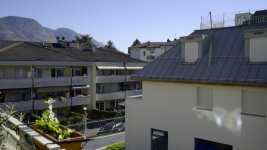
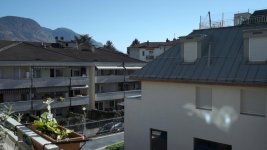
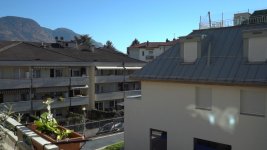
cine4.jpgnlog.jpgslog.jpgslogadjust.jpg

Here's the analysis.

Slog could have been exposed up higher, it had a bit more range before it clipped, 10% or so.

Nlog is using more of the container which is a really good sign. Is it a log curve? It's similar, it has crushed blacks and i'm not sure what's happening with the colour temperature in the highlights. What i do like is the fact that the blacks are lowered making much better use of the container.

This image appears quite a bit sharper too, and also doesn't show colour moire that the slog and cine versions have. I find that a bit odd though. So i would like to check how these were shot. The data rates are the same in the files. And the gamma curve being used shouldn't affect these aspects. So i'm assuming there were differences in aperture/lens/settings. The Nlog image looks considerably better because of this.

I think on reflection that CSV data is being applied to an Slog based source image, this CSV is crushing and rolling off and scaling the image to fit the container better which is what i'm seeing here. Although the ISO is too low for that, so could be wrong here.

But here's the caveat - is the source data that is being manipulated 8 bit or 10 bit? If it's 8 bit then you're not gaining anything (and in fact could be loosing) if it's 10 bit then that is a great achievement from Nabil. The LUT being used is 10 bit but that means nothing, it depends on the input data.

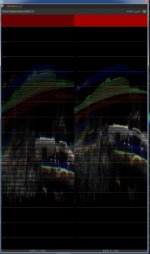
How can we tell? Either we need to test very carefully with grads and look for banding. But on my waveform i get to see the actual values being shown, although they are RGB values not YUV (I can't get XAVC yuv values). What i did was to take the slog2 and scale it to match the nlog. Then compare waveforms.

(download the image to see clearly https://www.dropbox.com/s/dvc95xtxx2mwmjw/waveform.jpg?dl=0 )

wave.jpg

I have to say it looks like the Nlog has gaps in the waveform compared to Slog. The Nlog image has not been manipulated, there should be no gaps, each horizontal line should be equally spaced. To my mind i think this may indicate that the LUT being applied is being applied to 8 bit data. The Nlog is on the left, untouched, the Slog2 on the right and scaled and offset to match the Nlog. See how there are black bands missing in Nlog? This concerns me, the Slog2 by comparison is even. I believe this indicates that the Nlog LUT has been applied to 8 bit Slog2 data in camera. I really hope this isn't the case, but Sony have always maintained that the hardware is 8bit. I so want to believe we can get a better image out but...

We need to investigate further, as Samuel suggests, if we can shoot smooth grads like for like. and compare those perhaps we'll see more clearly.

It's possible that the LUT being used is wrong too, maybe the gaps are being generated by that.

In fact if i have time i will see whether i can take that CSV file and turn it into a LUT and apply that to Slog2 footage - i suspect it may turn out looking how the Nlog looks, with the same gaps.

Perhaps someone else can try the same steps to double check?

cheers
Paul
 
Last edited:
Testing in Vegas, gaps appear in both Slog2 and Nlog for me but not Cine4, I'm wondering if it's because I'm previewing on the same monitor as I'm viewing the Waveform and can't preview it fullscreen.
eLOIQcj.png
 
Back
Top