Greenscreening

Elmer_Lang

Well-known member
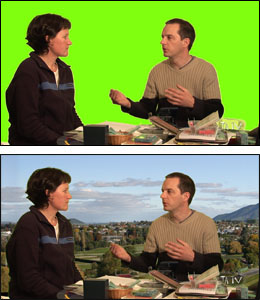
Ok, there's not alot of HV20 in this flick but what there is is green screened (Chromakey then applied in FCP). It's not bad but there's still some fuzz around the edges--see shoulders. It may look ok this size, but bigger is badder, so to speak, so I'd like to keep improving my technique.

If anyone has any tips, general or specific, I'ma listenin'.

Thwarted (6:14) - Even god-ish Elmer can't get everything he expects.

Elmer Lang
H2E Productions - "Better Than Water"
elmerlang.com - 60+ films strong​
 
Hi... first of all: sorry for my bad english!
Wel... I´m not a greenscreen specialist, but there a few things that i think that could make your keying mutch easier and mutch better:

1) Try to make your lighting better... There´s no hair light (or it´s too soft / not stronger enought)... there´s no back light too.... that will separate you from the background and will define your "edges".... with a proper lighting, that shaking edges will probably get very small or desappear....

here´s a 3-point lighting scheme from
http://en.wikipedia.org/wiki/3_point_lighting
729px-3_point_lighting.svg.png


here´s a google rapid search for hair light samples/tutorial:
http://www.takegreatpictures.com/HOME/Columns/Photo_Tips_-_Techniques/Details/hair_light.fci

2) Change your clothes! Your t-shirt have some green/blue tones and that blend a little with the background... try to use clothes that sepparate you from the background, using colors like red, orange, black, etc...

3) Remove the compression artifacts... when you save your footage on tape, some artifacts will appear around the edges if you´re shooting in hid-def or standard definition... in hi-def the artifacts are less perceptible (the image is mutch larger and you have mutch more detail, but dependind of the codec you used, they tend to get big), but they exist... the best option you have is capturing uncompressed video from the hdmi output using a special capture card (like blackmagic)... if you can´t afford that (like me!) the better option is to use some program/plugin that remove artifacts... that´s not the same thing that the uncompressed original video, but it´s mutch better than the video with artifacts...

That´s it... i think if you use this 3 tips, you will get a mutch mutch mutch better keying... and not to talk about your greenscreen background, becouse you haven´t posted any screenshot of the original footage before keying, but a even lighting on the background is essential for a good keying....
Hope I´ve helped you...
 
Alot of great info, thanks very much!

Yeah, I think lighting is the problem. Here are 2 photos, original and with chroma key. I reach a point where to get rid of the last bit of shadow I lose some of the edge around my body. Like you say, I need 1) more lights and 2)a bigger piece of cloth so I can move away from the greenscreen.
 
that´s it... you told everything... there´s no magic... more light sources and move away from the background... you should get rid of this issues with this two points you´ve stated...
one more tip... hehehe
if you´re planning to buy some new cloth for the background, buy a more bright one, pure Green... like this image:
tatv-01.jpg

just be aware of the color changes with the lighting because of the light temperature... so if the green gets too yellow it´s a nightmare to key... just like your footage, but even worst!

good luck!
 
One trick that is useful in some programs is to start filming with nothing but the greenscreen in the frame so that you can tell it that anything that is not this, keep.
 
Back
Top