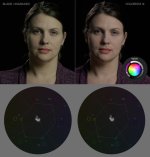
C100: Green tint on Ninja Blade recordings.

drummondb

Well-known member
Anybody else seeing this? It doesn't look like a big shift on the vectorscope, but it's enough to make someone look slightly more sickly than they should. This screen grab was from a DnxHD 222x recording, but I've confirmed it with other Prores and dnx settings, and with multiple HDMI cords.
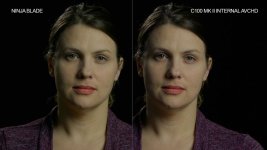
ninja blade green ****.jpg
 
I don't have this issue, no; but I'm using a mk1. The internal and the prores are identical on mine.
 
I've always thought the C100/C100mk2 had a green tint to it even internally. My C100mk2 does the same as yours and I think it might be because the recorder footage has more data for us to see the green. I just take out the green in post, takes me just a few seconds.
 
And the scene was lit with what?
Not saying there isn't a visible difference in green tint in the two pictures, just asking why there is one in the first place.
jameshealey's explanation makes sense, but no surprise the camera records a green tint (in various degrees according to color sampling and compression sceme in the used codecs)
if there's a green tint to beginn with - or am I missing sth...?
 
The key was a 4-foot Kino with tungsten lamps shot through Lee 251 1/4 white diffusion. The back light was an Arri 1k. There was also a 15 watt incandescent light bulb dimmed a bit off and behind her left shoulder for a wide shot test. The C100 mk2 was set to the tungsten light bulb preset so as to correct for color temperature and tint.
 
I've always thought the C100/C100mk2 had a green tint to it even internally. My C100mk2 does the same as yours and I think it might be because the recorder footage has more data for us to see the green. I just take out the green in post, takes me just a few seconds.


I think a lot of folks are shooting by dialing in the color temp manually, which doesn't affect the green/magenta axis. Ever since I started adjusting the green/magenta as well as the red/blue settings, I no longer have that green tint to everything. To the OPs question, yeah the one on the Blade is clearly greener than the internal. Question: do you have the latest firmware running on the Blade?
 
yup, firmware 5.2. Though the image above was taken a few days ago when I was on 5.1. I'm still seeing a shift with 5.2 though. Not sure it it's as bad as the example I posted. I also used the tungsten preset on the camera which I believe accounts for tint as well as temperature.
 
pretty sure it's a hardware problem by canon, I can still see green in the original avchd... just comes up worse on the ninja
 
Can anyone share the easiest and quickest way to dial out the green? I'd hate to have to this manually on every single shot I use from a Blade recording.
 
I mean, is it as easy as moving the highlights straight towards the magenta mark until the skin lines up with the line on the vectorscope?

colorista adjust blade green.jpg
 
Back
Top