
patrickssjj
New member
Hi,
Every time I manual white balance my DVX100B there's this tiny green tint on the footage - I have tried different completely white surfaces to white balance but the result is the same - I need help here.
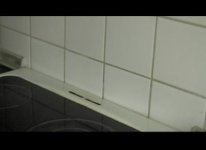
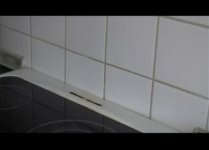
I have posted two photos - one of actual footage, and another footage after post editing in FCP (this is how it is supposed to look)
- The photos are not affected by artificial light, only daylight through the window.
My settings:
DETAIL LEVEL: -3
V DETAIL LEVE: 0
DETAIL CORING: 0
CHROMA LEVEL: 0
CHROMA PHASE: 0
COLOUR TEMP: 0
MASTER PED: -5
A. IRIS LEVEL: -2
GAMMA: CINELIKE
KNEE: AUTO
MATRIX: NORM1
SKINE TONE DTL: OFF
V DETAIL FREQ: THIN
PHOTOS:
Every time I manual white balance my DVX100B there's this tiny green tint on the footage - I have tried different completely white surfaces to white balance but the result is the same - I need help here.
I have posted two photos - one of actual footage, and another footage after post editing in FCP (this is how it is supposed to look)
- The photos are not affected by artificial light, only daylight through the window.
My settings:
DETAIL LEVEL: -3
V DETAIL LEVE: 0
DETAIL CORING: 0
CHROMA LEVEL: 0
CHROMA PHASE: 0
COLOUR TEMP: 0
MASTER PED: -5
A. IRIS LEVEL: -2
GAMMA: CINELIKE
KNEE: AUTO
MATRIX: NORM1
SKINE TONE DTL: OFF
V DETAIL FREQ: THIN
PHOTOS:
Last edited: