I've got a noob question regarding CineEI and the fact it's always capturing 2000 ISO... Is there metadata or something that can tell my editor (or even just as an attribute on the clip in my editor) what EI value I shot it in? For example, if I was using a LUT and switched between 1000 EI, 2000 EI, and 3200 EI... all the clips would be 2000 ISO. Would I just have to have a mental note of "overexposed = 1000 EI, properly exposed = 2000 EI, and underexposed = 3200 EI"? I'm hoping there is just something I'm not seeing that gets recorded.

Navigation
Install the app
How to install the app on iOS
Follow along with the video below to see how to install our site as a web app on your home screen.
Note: This feature may not be available in some browsers.
More options
You are using an out of date browser. It may not display this or other websites correctly.
You should upgrade or use an alternative browser.
You should upgrade or use an alternative browser.
FS7: Gotchas. quirks, problems & solutions
- Thread starter Lenilenapi
- Start date
S.Blanchardon
Well-known member
Hi guys, just diverging a bit from the "hot" LUT topic.
I think I understood what's happening with the Metabones Smart Adapter, at least the MK.II version paired with the Sigma 18-35.
In fact, it looks like the camera is making the adapter "forget" that it's in normal mode and switch back to green mode every time the camera is turned off.
When you turn on the camera normally, with adapter and lens on it, it's not stable AND the EVF screen reads f/1.7
When you turn it on when pressing the button on the adapter, it behaves as it should and it reads the correct value, f/1.8
What do you think ?
Cheers.
I think I understood what's happening with the Metabones Smart Adapter, at least the MK.II version paired with the Sigma 18-35.
In fact, it looks like the camera is making the adapter "forget" that it's in normal mode and switch back to green mode every time the camera is turned off.
When you turn on the camera normally, with adapter and lens on it, it's not stable AND the EVF screen reads f/1.7
When you turn it on when pressing the button on the adapter, it behaves as it should and it reads the correct value, f/1.8
What do you think ?
Cheers.
Erik Wittbusch
Well-known member
This is due to the firmware in the Smart Adapter MK II.
You need at least firmware 24.
Here's what Metabones send me:
HI, Erik,
Yes! If firmware version 24, so you can change the advance mode for default mode.
Thank you!
Alex
GBI Ltd
You can send your adapter to Metabones and they will update your adapter to the latest
firmware without cost. But you have to pay for shipping, which will be about 50$ for
both directions.
So, again qutoting from the Metabones mail (july 2013):
Hi, Erik,
Yes! New firmware version 24 now…
You can send your adapter to us for update,
service charge is free for you and you only pay US$25 return shipping by Fedex is ok….
If you accept it, pls send your parcel to us and direct pay US$25 to our PayPal account first.
Our PayPal account: camera@gbi-hk.com
Our shipping address:
Company name: Global Boom International Limited
Attn: Mr. Law
Address:Flat C, 6/F, On Loong Factory Building,
No. 11-13 Luk Hop Street,
San Po Kong, Kowloon,
Hong Kong
Tel: 23218817
Pls let us know when parcel shipped.
Thank you!
You need at least firmware 24.
Here's what Metabones send me:
HI, Erik,
Yes! If firmware version 24, so you can change the advance mode for default mode.
Thank you!
Alex
GBI Ltd
You can send your adapter to Metabones and they will update your adapter to the latest
firmware without cost. But you have to pay for shipping, which will be about 50$ for
both directions.
So, again qutoting from the Metabones mail (july 2013):
Hi, Erik,
Yes! New firmware version 24 now…
You can send your adapter to us for update,
service charge is free for you and you only pay US$25 return shipping by Fedex is ok….
If you accept it, pls send your parcel to us and direct pay US$25 to our PayPal account first.
Our PayPal account: camera@gbi-hk.com
Our shipping address:
Company name: Global Boom International Limited
Attn: Mr. Law
Address:Flat C, 6/F, On Loong Factory Building,
No. 11-13 Luk Hop Street,
San Po Kong, Kowloon,
Hong Kong
Tel: 23218817
Pls let us know when parcel shipped.
Thank you!
Regarding baseplate solution for FS7, I wrote a quick e-mail to Vocas to ask if FS7 can be used with their universal baseplate USBP-15F, which is actually cheaper (595EUR vs 650EUR) and lighter (571g vs 600g) than the FS7 specific base plate, and will work with alot different camera.
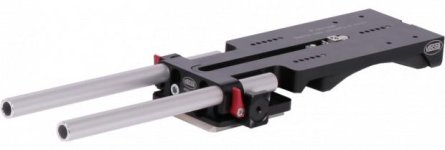
http://www.vocas.com/accessories/usbp-15f-15mm-universal-shoulder-base-plate-with-flat-base
-------------------
Question
Hello,
Will the usbp-15f listed here work with Sony FS7 and give it the correct lens height?
Answer:
Hello Lucas,
When mounting the USBP directly underneath the camera the distance of the rails to the centre of the lens is 2mm to high.
However this is within range of our most our height adjustable matte boxes and accessories, so it is still possible to use it.
If the exact height is required, you have the option on moving the USBP more forward so the adjustable part of it is underneath the lens.
This will allow the USBP to reach the exact height required but it will take some room underneath the lens.
So yes it is possible, but with some small notes.
Please let me know if you have any other questions.
http://www.vocas.com/accessories/usbp-15f-15mm-universal-shoulder-base-plate-with-flat-base
-------------------
Question
Hello,
Will the usbp-15f listed here work with Sony FS7 and give it the correct lens height?
Answer:
Hello Lucas,
When mounting the USBP directly underneath the camera the distance of the rails to the centre of the lens is 2mm to high.
However this is within range of our most our height adjustable matte boxes and accessories, so it is still possible to use it.
If the exact height is required, you have the option on moving the USBP more forward so the adjustable part of it is underneath the lens.
This will allow the USBP to reach the exact height required but it will take some room underneath the lens.
So yes it is possible, but with some small notes.
Please let me know if you have any other questions.
Morning folks
It looks like a new firmware for the FS7 is already out. (Below link to UK site - where I am).
http://www.sony.co.uk/pro/product/b...igital-motion-picture-camera/pxw-fs7/support/
Hope this sorts out some of the issues.
It looks like a new firmware for the FS7 is already out. (Below link to UK site - where I am).
http://www.sony.co.uk/pro/product/b...igital-motion-picture-camera/pxw-fs7/support/
Hope this sorts out some of the issues.

Erik Wittbusch
Well-known member
I will meet Sony guys on tuesday giving them a list:
1) Iris dial issue
2) WFM (needs to work always)
3) NR must be available in cineEI (they're already working on it as F5/55 users demand the same)
4) WB in cineEI
5) LUT issues
6) color spaces (S-Gamut3.cine) should be available in custom mode too
7) AF issue (jumps before adjusting in one-push AF mode with my Sony SEL18-200 lens)
Hi,
as I had a "Hands-on" with Sony today, I met one of the developing people from Sony who
is in very close contact to Sony Japan and the firmware developing team.
They are working hard on the new V5 firmware for the F5 right now, so that we have to wait
a little before they will keep their hands on the FS7 again... Fair enough.
What will they want to solve first:
1) Iris dial issue
- they try hard to change this and make it more usable/faster
- will possibly add a dedicated menu item because it works different with different type of lenses
2) WFM/histogram issue
- the WFM/histo will possibly only show the data of the viewfinder image: when a LUT is put on here
the WFM will show the image with LUT (the guy said it's only possible this way???)
3) Noise reduction in cineEI
- coming for the F5 as well with V5 upgrade in december, so most likely to come
5) camera doesn't recognize custom LUTs on SD-cards (only via renaming the folder to PMWF55_F5 instead of PXW-FS7)
- will be solved with the next fw
What they want to look for:
4) custom WB in cineEI
- not sure here, they said japan knows that some people want this)
What they won't look for in the near future
6) color spaces (SGamut color space will be strictly reserved for cineEI)
5) paint settings in cineEI (will most likely not come as they say this is what custom mode is for)
7) AF issue - comes from the typical contrast detection AF behaviour
It was told, that the FS/ shares the sensor with the F5, but the processing unit is totally different.
Things that work with the F5/55 do not automatically work for the FS7 as well...
So as I said in the thread about FS7 deliveries, I got mine today from local Houston retailer Microsearch. I rented a Canon 24-105L with the Metabones EF to E adapter. This thing appears to have no aperture ring so all I can do is open the Iris via the camera and bump the ISO. Is that correct? It would appear that the camera Iris control IS controlling the aperture of the lens. At least that is what the EVF shows.
Apologies if this is too basic as none of my other cameras have this type of setup.
Thanks,
Robert
BTW, at first the Iris control was slow but now at least the one on the grip is fast. Don't know if this was due to my mucking around with the settings or not.
Apologies if this is too basic as none of my other cameras have this type of setup.
Thanks,
Robert
BTW, at first the Iris control was slow but now at least the one on the grip is fast. Don't know if this was due to my mucking around with the settings or not.
Congrats on receiving the camera. That is correct about controlling the Canon lens. Which Metabones adapter are you using?
Hey,
The box says (Metabones) Canon EF to Emount Mark IV . IRIS works but apparently not autofocus.
Thanks for the confirm on the operation. If my lunch would get here, I could get my stuff together and go shoot.
Take it EZ,
Robert
I got the Call from Abel NY today.
I am delaying shipment until I am sure the iris control bug will be worked out.
I shoot doccos, and it is imperative to have good, quick, control of f-stop.
This should be a dealbraker for anyone shooting documentaries with native E mount or Canon glass via a smart adapter.
Anyone else going to the Abel NY event on the 1st?
I am delaying shipment until I am sure the iris control bug will be worked out.
I shoot doccos, and it is imperative to have good, quick, control of f-stop.
This should be a dealbraker for anyone shooting documentaries with native E mount or Canon glass via a smart adapter.
Anyone else going to the Abel NY event on the 1st?
Hey,
The box says (Metabones) Canon EF to Emount Mark IV . IRIS works but apparently not autofocus.
Thanks for the confirm on the operation. If my lunch would get here, I could get my stuff together and go shoot.
Take it EZ,
Robert
The Mark IV has been discussed on the forum as having some issues with certain lenses. Check the Metabones site for instructions to make certain that when you use the Mark IV, you use the "Advanced" rather than "Green" mode. The 1.01 FS7 firmware update as well as the Metabones update are supposed to address some of that. In actualty, the FS7 1.01 update does not seem to affect the Metabones issues, while the Metabones firmware udate for the Mark IV and the Ultra do have some effect.
Sony rebate will give you a free Mark II which is no longer available for retail sale but which did not seem to have issues with the FS-7.
Looking forward to seeing your footage and to hearing your impressions
Ned
I got the Call from Abel NY today.
I am delaying shipment until I am sure the iris control bug will be worked out.
I shoot doccos, and it is imperative to have good, quick, control of f-stop.
This should be a dealbraker for anyone shooting documentaries with native E mount or Canon glass via a smart adapter.
Anyone else going to the Abel NY event on the 1st?
Solution for the moment could be as simple as using adatper and glass with manual iris. Have you actually tested the FS-7 with E glass or EF glass via adapter to see if it is really a problem for you? Or are you just relying upon internet chatter?
Ned Soltz

Doug Jensen
Carbonite Member
Right on, Ned.
I mostly shoot with PL lenses that ONLY have manual control so it is not an issue for me at all. But I have done enough run & gun shooting with the 18-105 e-mount lens in the last couple of weeks to know that controlling the iris manually with the dial on the camera is plenty fast enough and works fine. You're never going to get the same response from a fly by wire lens that you get from a truly mechanical model, but it's certainly good enough and no reason to take a pass on the camera. Any video lens that doesn't have a mechanical manual iris ring isn't a very professional lens anyway, in my opinion . . . but now I'm drifting off topic.
I mostly shoot with PL lenses that ONLY have manual control so it is not an issue for me at all. But I have done enough run & gun shooting with the 18-105 e-mount lens in the last couple of weeks to know that controlling the iris manually with the dial on the camera is plenty fast enough and works fine. You're never going to get the same response from a fly by wire lens that you get from a truly mechanical model, but it's certainly good enough and no reason to take a pass on the camera. Any video lens that doesn't have a mechanical manual iris ring isn't a very professional lens anyway, in my opinion . . . but now I'm drifting off topic.
morgan_moore
Major Contributor
Did a shoot tonight with the FS100.
S+Q, watch playback, 2 more takes, then notice that entering playback cancelled S+Q - so 2 shots 'lost' or at least done on the wrong FPS
Totally my fault..* but this is the sort of thing one would hope has been sorted out on the FS7.
I want to concentrate on my talent and director, not on button mungling.
Makes me want to chuck the camera against a wall when that stuff happens.. and punch the next sony rep I meet.
We were also running the EX1 at 720p/50 to get some scratch sound at 50. The EX1 just felt so much more solid and reliable like it is on my side trying to help me not screw up.
S
*unusually I had 'display off' on my monitor to give the director a clean image to watch.
S+Q, watch playback, 2 more takes, then notice that entering playback cancelled S+Q - so 2 shots 'lost' or at least done on the wrong FPS
Totally my fault..* but this is the sort of thing one would hope has been sorted out on the FS7.
I want to concentrate on my talent and director, not on button mungling.
Makes me want to chuck the camera against a wall when that stuff happens.. and punch the next sony rep I meet.
We were also running the EX1 at 720p/50 to get some scratch sound at 50. The EX1 just felt so much more solid and reliable like it is on my side trying to help me not screw up.
S
*unusually I had 'display off' on my monitor to give the director a clean image to watch.
Last edited:
Alpha Beta Omega
Veteran
Speaking of the Metabones adapters I can't download firmware from the Metabones site. I end up with the link to the firmware app in my address window but nothing happens. Anyone else got it to download?
Last edited:
Doug Jensen
Carbonite Member
Did a shoot tonight with the FS100.
S+Q, watch playback, 2 more takes, then notice that entering playback cancelled S+Q - so 2 shots 'lost' or at least done on the wrong FPS
Totally my fault..* but this is the sort of thing one would hope has been sorted out on the FS7.
I want to concentrate on my talent and director, not on button mungling.
Makes me want to chuck the camera against a wall when that stuff happens.. and punch the next sony rep I meet.
We were also running the EX1 at 720p/50 to get some scratch sound at 50. The EX1 just felt so much more solid and reliable like it is on my side trying to help me not screw up.
S
*unusually I had 'display off' on my monitor to give the director a clean image to watch.
Three things that you're going to like about the FS7:
1) Playback does not drop the camera out of S&Q.
2) You can send a clean SDI feed to your client monitor while you have all the displays you want in your viewfinder and/or a second external monitor.
3) The overall build quality and design of the FS7 is several steps above the FS100. There good reasons why the FS100 is a $2400 camcorder.
morgan_moore
Major Contributor
Three things that you're going to like about the FS7:
1) Playback does not drop the camera out of S&Q.
2) You can send a clean SDI feed to your client monitor while you have all the displays you want in your viewfinder and/or a second external monitor.
3) The overall build quality and design of the FS7 is several steps above the FS100. There good reasons why the FS100 is a $2400 camcorder.
Great news. And thanks for the info.
Incidentally on (3) my FS100 has been in constant service since basically release day and is still 100% going strong - as are all my other Sonys EX1, F3.. but I have smashed an NEX5n!
S