Good codecs for editing in Premiere

parallactic-pictures

Active member
Hi guys,

I posted a similar thread in the Canon 7D forum, but realize now that I should have posted in here originally. (Note to moderators: Feel free to delete that thread)

I recently started using Adobe Premiere CS4. I'm liking it a lot more than Final Cut and Avid, b/c I just find it way more user-friendly and quicker to edit with.

I shot some test footage last weekend with the Canon 7D. I shot the footage in 24p, 1080... with some 60p, 720p shots as well. Anyway, I am having a terrible time getting this footage to play correctly in Premiere. I spent all day editing a rough cut, only to have Premiere go "Not Responding" and repeatedly crash. Since then, I have downloaded MPEG Streamclip and have tried converting the footage a couple of different ways.

First, I kept the files as Quicktime, but compressed them with Apple Cinepak. That was the initial format actually, that I used, that got me through almost a full day of editing a rough cut, only to have it crash on me.

I then tried MPEG 4, using Apple Compressor (only had two compression options for this one... Apple Compressor and H.264). That one didn't even make it past one clip. It forced Premiere to Non-Responsive mode almost instantly.

I'm now trying an AVI format, as I've been told AVI's work best with Premiere. Only, I don't have the Cineform codec handy (which I hear is the one to use), so my compression options are sort of flimsy. Right now, I'm trying AVI format in Apple Cinepak again.

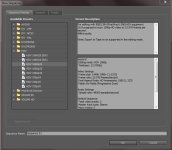
But here are my compression codec options:

http://www.parallacticpictures.com/mpeg-streamclip-codecs

Which codec would you recommend? And is AVI format the way to go?

Thanks for any help you can provide.
 
Are you looking for a proxy/offline codec format, or are you trying to do an online edit?

Download the DNxHD codecs from the Avid site. They will show up in Mpeg Streamclip and give you a good workflow. You can use DNx36 for offline, and DNx175 for online.

-P
 
I've been out of the editing game for a while. So could kindly remind of what the main differences are between an online and offline edit are?

And thank you so much for the suggestions.

ps
I'm on a Windows machine. I don't think I mentioned that and I know it's very important.
 
Okay, I see from the Avid download page that they offer the codec in both PC and MAC formats.

http://avid.custkb.com/avid/app/selfservice/search.jsp?DocId=263545

So two more questions:

1. Should I leave the native files as Quicktime then, and just compress them with the codec in MPEG StreamClip? Or should I also export them as an AVI or MPEG4?

2. If I was using Adobe Premiere CS4 on my Mac to edit this Canon 7D footage, would this DNxHD codec still be the ideal one? Or for Mac, would I be better off with something else?

Thanks, man.
 
Ok, one at a time...

1. An offline edit is where you make smaller or low-resolution small copies of your footage, do your edits with that, and then before final render, replace those temp copies with the full size copies. This allows you to work quickly and efficiently. But it does require that you make a full set of small files so it's not a fast workflow. The online edit is where you edit the full-sized, full bit rate files.

2. Yes, leave the native files alone and do a compression with Mpeg Streamclip into DNxHD.

3. Premiere doesn't really have it's own codec in the way that Avid has DNxHD, and FCP has ProRes. The DNxHD codec goes back and forth between Mac and PC better than anything else I've worked with. Avid needed this to be seamless and built something to do it properly.

It's a heck of a codec. (which is why Apple "borrowed it" and called it ProRes!)
 
If you have a Quad Core system you should be able to edit most codecs in their native format. There should be no reason to make use of Apple codecs or Avids. I can edit HDV in P2 timeline or even AVCHD in an HVD timeline.

I admit there maybe something funny about the Canon D7 codec but most codecs will not require an intermediate codec for editing if you have a Quad Core.
 
I have an 8 core and there is no way in he** to edit a 7D's files cleanly.

The 7D is shooting a bit rate DOUBLE what AVCHD does. In the same difficult codec. Even if he could edit it on the timeline, its a crappy codec to edit in. So is HDV.

Transcode the files and save yourself a lot of headache.
 
Ok, one at a time...

1. An offline edit is where you make smaller or low-resolution small copies of your footage, do your edits with that, and then before final render, replace those temp copies with the full size copies. This allows you to work quickly and efficiently. But it does require that you make a full set of small files so it's not a fast workflow. The online edit is where you edit the full-sized, full bit rate files.

2. Yes, leave the native files alone and do a compression with Mpeg Streamclip into DNxHD.

3. Premiere doesn't really have it's own codec in the way that Avid has DNxHD, and FCP has ProRes. The DNxHD codec goes back and forth between Mac and PC better than anything else I've worked with. Avid needed this to be seamless and built something to do it properly.

It's a heck of a codec. (which is why Apple "borrowed it" and called it ProRes!)

Okay, this was perfect. Thanks, I'll download the codec for PC only. I think for my Mac I'll stick with ProRes.

And yeah, this was just small test footage I shot. Nothing major, so I think I'll keep it as an online edit, and not bother with the extra time of compressing the files down.

As always, Perrone, thanks for the help. ;)
 
I have an 8 core and there is no way in he** to edit a 7D's files cleanly.

The 7D is shooting a bit rate DOUBLE what AVCHD does. In the same difficult codec. Even if he could edit it on the timeline, its a crappy codec to edit in. So is HDV.

Transcode the files and save yourself a lot of headache.


Double the data rate of AVCHD?

The fact that the data rate is double means nothing at all. Motion JPEG or MJPEG at 2:1 compression in SD resolution is about 10 Megabytes (not megabits) per second but it is an easy codec to play back. It would be a compression method simular to DV-25 or mini DV. As I stated the Canon D7 codec might be hard to playback but HDV is not . Not only can a Quad Core play it back but it is easy to get good keys with HDV using Premiere Pro. Below is a video clip that you should watch.

http://www.youtube.com/watch?v=Oj0JoFxoOyo

Native HDV was hard for most computers to play back 5 years ago but not today. Any Quad Core should handle native HDV with ease.
 
He is not recording in HDV.

I never stated he was. You had stated HDV is hard to edit and a crappy codec. That is incorrect. The P2 codec might be better but native HDV is a decent editing codec for any Quad Core system. The D7 codec might be a different story but now you will be a bit wiser when commenting on HDV. My video was intended for your eyes only.

:beer:
 
I never stated he was. You had stated HDV is hard to edit and a crappy codec. That is incorrect. The P2 codec might be better but native HDV is a decent editing codec for any Quad Core system. The D7 codec might be a different story but now you will be a bit wiser when commenting on HDV. My video was intended for your eyes only.

:beer:

"Even if he could edit it on the timeline, its a crappy codec to edit in. So is HDV."

That is my statement. Nowhere does it say that HDV is difficult to edit.

The P2 codec (whatever that means) is better on the timeline but has it's issues as well. I am speaking of DVCProHD and not AVC-Intra.

HDV is not a decent editing codec on ANY system. It was not built to be an editing codec. And my reasoning has nothing to do with whether it can be cut quickly. As for being wiser, maybe you ought to spend a bit more time learning about editing, codecs, and NLEs before you start lecturing folks.
 
...Download the DNxHD codecs from the Avid site. They will show up in Mpeg Streamclip and give you a good workflow. You can use DNx36 for offline, and DNx175 for online.

What I'm about to ask is not meant to add to the earlier fireworks (nor to create more).

Here goes:
If my understanding is correct, these codecs were meant to be open-standard; however, they've remained Avid's proprietary formats. Thus, why are they being recommended for use with Premiere?
 
Here goes:
If my understanding is correct, these codecs were meant to be open-standard; however, they've remained Avid's proprietary formats. Thus, why are they being recommended for use with Premiere?

Your understanding is incorrect. The codec *is* open standard (SMPTE VC-3), and they are being recommended for use with Premiere because they are fast, efficient, available in either 8 or 10 bit, and very high quality. They are able to move from PC to Mac without gamma shift. And either platform can both read or write them.

I am unaware of a better codec that moves from platform to platform, without issue, and for free. If you are aware of such a codec, please share what you know.
 
Well, this is good news, Perrone. looks like the Wikipedia entry requires updating. I haven't been using my hf10 because I didn't like what I had seen as the free solutions and have been wondering when it would change in order to purchase a 7D. Glad I saw this thread; I'll give it a shot.
 
"Even if he could edit it on the timeline, its a crappy codec to edit in. So is HDV."

That is my statement. Nowhere does it say that HDV is difficult to edit.

The P2 codec (whatever that means) is better on the timeline but has it's issues as well. I am speaking of DVCProHD and not AVC-Intra.

HDV is not a decent editing codec on ANY system. It was not built to be an editing codec. And my reasoning has nothing to do with whether it can be cut quickly. As for being wiser, maybe you ought to spend a bit more time learning about editing, codecs, and NLEs before you start lecturing folks.

To transcode HDV into the Apple Pro Res of even the Cineform codec would not be wise when using Premiere Pro. I admit FCP can not get as good of keys with native HDV but using an intermediate codec is kind of like a generation loss. Kind of like going from one Beta tape to another Beta tape. Data and image quality does get lost from each generatiion. It is true that HDV does not have 4:4:4 color space or even 4:2:2 color space but most NLE programs (Premiere, Speed Edit, Edius )can pull of decent keys and CC with native HDV. The folks at Adobe would even tell you there is no need to use an intermediate codec.

On the fliip side. I am not saying the HDV codec is as good as a Sony Cinealta camera or the Red One (R3D) codec. I am saying there is no need for an inermediate codec for HDV when using Premiere Pro as of 2009 if you have a Quad Core. FCP might be a different story. If I were editing cuts only with AVCHD clips I would not use an intermediate codec either. If you have a slow system or plan on doing motion graphics with AVCHD clips then I would agree that using the native AVCHD might not be wise. I do dissagree that it is always best to make use of an intemediate codec when using Premiere Pro.
 
Okay, here's an update:

I just finished converting all my Quicktime clips into DNxHD. I didn't have any other options for this codec, such as DNx36 or DNx175. I just had DNxHD in my dropdown box for codecs, once I selected Quicktime as my Export. So I went ahead and converted all 17 of my clips into DNxHD.

The total folder size went from 1.91 GB to 7.55 GB! So this conversion caused a massive jump in file size to my clips.

I was pleased to see though, that they imported into Premiere Pro CS 4 very quickly. Problem is, once they were in there, they play very, very stuttery. Worse than any other codec I've worked with so far to edit with these past few days. I did a test though, and made a mark in and mark out and then Exported a clip into AVI format, using the same DNxHD codec compression. And the exported clip played fine. Looked great and played smoothly.

So the playback issues are only happening within Premiere. If they weren't so drastic, I'd be able to just edit around them. But it's going to be too difficult.

So now I'm thinking that either I'm not doing something right during the MPEG StreamClip conversion process. OR, my machine can't handle Adobe Premiere.

So here are a couple of stats about my machine:

Windows 7 Pro 64bit
Adobe Premiere Pro CS 4
Intel Core 2 Duo CPU E7400 @ 2.8 GHz 2.27 GHz
Installed RAM: 4GB

Should I be okay with this setup to run Premiere with no hiccups?
 
One more thing I forgot to mention, is what my current Premiere Project Settings are. The closest thing I could find that suited my needs was HDV 1080 p24. I took a screenshot of the settings window to show you.

This too, may be affecting my playback.
 

Attachments

  • premiere-project-settings.JPG
    premiere-project-settings.JPG
    74.9 KB · Views: 0
I wish you had come back in here and asked. Yes, you can select which DNxHD bit rate to use. But there is a little glitch with the display window. When you click to customize the DNxHD codec, there is just a little sliver of a window at the bottom. It's hard to see the first time. But if you click that pulldown menu. you'll get the WORLD of choices.

So go back and just do one file, and Select DNxHD 36. See how it looks and how it plays in Premiere.
 
I wish you had come back in here and asked. Yes, you can select which DNxHD bit rate to use. But there is a little glitch with the display window. When you click to customize the DNxHD codec, there is just a little sliver of a window at the bottom. It's hard to see the first time. But if you click that pulldown menu. you'll get the WORLD of choices.

So go back and just do one file, and Select DNxHD 36. See how it looks and how it plays in Premiere.

Okay, I found that secret (glitchy) window that was hiding in StreamClip and then selected 1080p/23.976 DNxHD 36 8bit. Though I will be doing this as an online, so perhaps I should have went with one of the 175s instead. Still, for the purposes of this test, I don't think it matters.

Regardless, it didn't make any improvement. The footage was just as stuttery. :(
 
Back
Top