GH5 with Atomos Ninja V

insch

Member
I have been having issues with my GH5 and Atomos Ninja V for some time. I get stable recording at 4K 25P but it's unstable at 50P. Although Atomos could find no fault they replaced the Ninja V. I have tried several Atomos 4K 60P rated HDMI cables and I get the issue across both my Angelbird AtomX SSDs. So that leads back to the GH5. But what?

In my most recent test records I used the exact same settings on the GH5 apart from ‘Rec Quality’:

1) 4K, ALL-I, 400M, 25P - stable recording on the Ninja V throughout
2) 4K, 8 BIT, 150M, 50P - stable for a bit and then 'skippy' errors on the Ninja V - an unusable recording

The other relevant settings on the GH5 are format = MOV and HDMI output is set to 422 10bit - I bought the Ninja V in the first place to take advantage of this resolution. I've also set HDMI rec to on.

Has anyone ever come across this issue? If so, did you resolve it?

Thanks
 
My first thought would be that the Angelbird AtomX SSDs are dropping frames as users have reported this in the past. (And I know they are recommended which makes it more annoying, but it wouldn't be the first time.)

I've recorded 4K/60p with the GH5S and a Ninja Inferno with Sandisk SSDs back in 2018 with no issues.
 
My first thought would be that the Angelbird AtomX SSDs are dropping frames as users have reported this in the past. (And I know they are recommended which makes it more annoying, but it wouldn't be the first time.)

I've recorded 4K/60p with the GH5S and a Ninja Inferno with Sandisk SSDs back in 2018 with no issues.

Thank you. I had no idea that the AtomX had this reputation. It should certainly be ruled out. I'll feed this back to the dealer who is helping me troubleshoot.
 
I'd say it's more of a random user experience than a reputation. (Even maybe bad luck from QC, it happens to all companies.)

If you can, try another SSD...you can use regular SSDs in the Ninja V with a caddy (they'll stick out a little).
 
I'd say it's more of a random user experience than a reputation. (Even maybe bad luck from QC, it happens to all companies.)

If you can, try another SSD...you can use regular SSDs in the Ninja V with a caddy (they'll stick out a little).

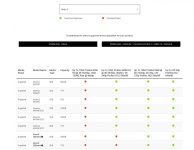
Just had a loot at Atomos' recommended SSDs for the Ninja V and, unless I'm reading this incorrectly, the AtomX is not recommended for 50P - see grab. Surely the dealer wouldn't have made that mistake. I made it very clear I'd work at 50P. https://www.atomos.com/drives Screenshot 2020-10-29 at 21.35.25.jpg
 
I tried to load that document earlier when I saw your thread but couldn't.

Yes, it appears the AtomX SSDminis were either untested or failed in those two categories.

As far as dealers, consider ones that know any deep technical information very good ones as most general sales people have a limited amount of knowledge about what they sell (unless they are specialists whom only deal with certain hardware/software).

[I'm assuming you didn't purchase the drive straight from Atomos after speaking with someone there.]
 
I tried to load that document earlier when I saw your thread but couldn't.

Yes, it appears the AtomX SSDminis were either untested or failed in those two categories.

As far as dealers, consider ones that know any deep technical information very good ones as most general sales people have a limited amount of knowledge about what they sell (unless they are specialists whom only deal with certain hardware/software).

[I'm assuming you didn't purchase the drive straight from Atomos after speaking with someone there.]

I did buy from a pro dealer so it would surprise me if they didn't know about this issue
 
I did buy from a pro dealer so it would surprise me if they didn't know about this issue

Truth is...it's not really an issue; it's how media works.

There are dozens and dozens of different cards out there and even the best-of-the-best can't keep track of all of the options and which ones work in which systems and with which specifications over the years (and the speeds, classifications, types, camera's various card slots, adapters, etc).

All most dealers know about is physical compatibility, and it's the user's responsibility to check resolution/framerate reliability (which could even be changed/improved later via official FW).
 
Last edited:
BTW, are you recording ProRes?

If so, I suspect you're in HQ, and even though you're way below that 300MB/s note it might still be too much for the drive.

If you haven't tried yet, drop your flavor to 422 (or LT), and see what happens.

There's also this mentioned about those SSDminis:
"Please follow the guide from Angelbird to perform secure erase on drive before each use."
 
Thank you. The dealer is engaged with this whole process though and they are being very helpful. One thing I am trying for the first time now is using 'Secure Erase Format' on the Ninja. Apparently using this with the SSD can help - it goes deeper than a regular format and can give more stability. I am now doing a 50P test record on that SSD and so far no skippy errors. Early days though. Thanks for your help.
 
After a long journey with this issue - my rig being checked out by the dealer and Atomos and the latter replacing my Ninja V - I seem to finally have a solution. It all seemed to be down to the need for a 'Secure Erase Format' of the SSD. That is a small check box by the format option on the Ninja. No-one had told me this was essential for stability. I had always just formatted on the Ninja without the secure version. Now I have done the latter I can finally do stable 4k 50P recordings without skippy errors. What a shlep and huge number of hours spent troubleshooting.

Thank you for your help.
 
Back
Top