GH4 (GH5) E-Stabilizer stuttering when panning. Is that normal?

daktulus

Well-known member
I tested the GH5 with E-stabilizer on (other stabilizers were greyed out) with the Lumix 12-35 lens in 4K .mov (OIS on).

All my GH4 4K files play back on my PC without problems, the GH5 .mov file only plays sound in windows media player (do I need a special codec for wmp GH5 files?)

I played the original back with the qt-player then and it stuttered in pans. I imported the file into Avid Media Composer and it stuttered in pans. I exported it as H264 and it still stutters in pans.

So I suppose the original file really does stutter in fast pans, it cannot be a computer problem, because I rendered to a codec that can easily be played back on any system.

Has anyone experienced the same?

I never had a problem with the GH4 and 4K files and fast pans.

Can it be that in fast pans the E-stabilizer stutters?
 
Are you shooting 60p or 10-bit 4K? My GH5 4K 30p files play back in Win. Media Player on my 5year old Gateway same as my GH4's, but not at 60p or 10-bit.

With the v.1 12-35, which I assume you have, with OIS on you get "Dual IS" - a lite version of the IBIS combined with the OIS. It would be simple enough to repeat your pans with the E-stab. off. Have you tried direct HDMI camera output to see if it stutters?
 
I didn´t buy the GH5, I just tested it, so I can´t use direct HDMI-out now or find out which codec I used by looking at the camera-settings.

Is there a way to find out which codec a .mov file is (this could be helpful in many cases for many users)?

But it should not stutter anyways after rendering, no matter which codec, right?

The SD card has a Write-Speed of 85MB/s (should be OK).

I used my own 12-35 lens, so it probably is v.1. (how do I check the version of a lens?).

In the GH5 menu I couldn´t choose Dual IS (or is this applied automatically when using OIS lenses?), the only option I could choose, was E-stabilizer.
 
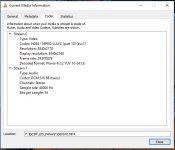
I use free VLC Player. For codec and other file properties (Windows) R-click on screen after opening (whether plays properly or not) >Tools>Codec and the following screen appears for 4K 30p 10-bit:
cODEC.JPG

If it's a typical 8-bit 4:2:0 file, the 8-bit not noted.

As far as stabilization, as long as OIS switch on, you have IBIS assisted Dual IS with the v.1 12-35 and several other lenses; but not the 5-stop Dual-2 IS of the v.2 12-35. On flaw of the GH5 is the inability to turn off lens OIS with the 2-stop OIS of older lenses such as my adapted Pana-Leica 14-150, and take advantage of the much better IBIS - lens off, no IS at all.
 
Thanks.
It´s not even 10bit, it´s only H264 4:2:0 YUV, 3840x2178 50fps (I am in PAL-land). I imported it again into Avid and it still stutters at the exact same parts (pans).

So did I understand this right: When I use the Lumix 12-35 OIS lens (OIS on), the GH5-in-camera-stabilisation is automatically switched on (no need to switch 5 axis stabiliation ON in the GH5 menu?) and I should turn E-stabilization OFF?

My lens firmware is vs. 1.2.
This seems to be the latest firmware. As far as I know there is no vs. 2.0 for the 12-35 2.8 Lumix lens.
 
Last edited:
Can it be that in fast pans the E-stabilizer stutters?

Does it stutter when played back on the camera? If not it could be your computer/graphics card not handling the variable bit rate that increases during pans. Static scenes don't generally push the bit rates up.
 
Thanks.
It´s not even 10bit, it´s only H264 4:2:0 YUV, 3840x2178 50fps (I am in PAL-land). I imported it again into Avid and it still stutters at the exact same parts (pans).

So did I understand this right: When I use the Lumix 12-35 OIS lens (OIS on), the GH5-in-camera-stabilisation is automatically switched on (no need to switch 5 axis stabiliation ON in the GH5 menu?) and I should turn E-stabilization OFF?

My lens firmware is vs. 1.2.
This seems to be the latest firmware. As far as I know there is no vs. 2.0 for the 12-35 2.8 Lumix lens.

My 12-35 is v.1.3, but can't remember when I last updated it.

4K 50p will definitely be a challenge to most players/computers, as is the 10-bit.

Yes, IBIS auto-activates with lens OIS switch on with compatible lenses, for Dual IS, or Dual-2 IS with latest lenses. I would turn off E-Stabilizer shooting 4K 10-bit or 50p due to the already very heavy processing demands. Might be OK with standard 4k, but I've never used it.
 
Last edited:
4K UHD 50/60P on the GH5 is 8 bit 4:2:0 internal recording. While internal recording 8bit 4:2:2 external through HDMI and can be set to 10bit 4:2:2 external recording but then there will be no internal recording. So the only way to get 10 bit 50/60P in UHD or 4K is with an external recorder. You can get 10bit 4:2:2 internal recording at 4K 24P or 30P but not 50P or 60P.
 
Back
Top