
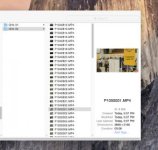
I shot an event tonight with my GH4 and when I offloaded the footage I noticed that the file numbering structure was off. The file numbers skipped from P1040832 to P1050001. This happened right in the middle of a series of shots and I did nothing to the camera, not even turn it on & off, to make it happen.
Here's a screen grab to show what I mean:
So far this glitch hasn't reproduced itself in my other GH4 which also is running the current V.2.4 firmware.
Has anyone else experienced this sort of malfunction? Should I be worried about it?
Here's a screen grab to show what I mean:
So far this glitch hasn't reproduced itself in my other GH4 which also is running the current V.2.4 firmware.
Has anyone else experienced this sort of malfunction? Should I be worried about it?
 rogar-Shock(DBG): I'll have to try that

