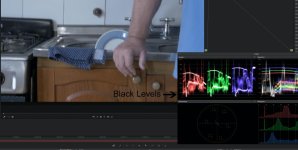
Gh4: crushed blacks?

fcineaste

New member
Hi everyone,

How come, no matter what profile picture I am using, I am always experiencing crushed blacks with my Gh4? Dacinci Resolves 's spectrogram clearly show the loss of details in the bottom.

Anyone experienced that? All my other settings (pedestal, dynamic, curves...) are neutral.

PS: I hope I am posting in the right section, it's the first time I am writing :)
 
Yes, the exposure is correct. I'll try to share a clip. Thanks for the quick reply.

How could I share this with you guys?
 
How could I share this with you guys?

A free Google GMail account gives you 15 GB of free online space to share items with others. Simply start a GMail account then add the free Google Drive app, then upload your video and set the "sharing" to "anyone with a link", then publish your link for others to download.
 
Here's a 3 sec sample straight from cam :

https://we.tl/vKOUTuCvfU

I have to admit this one is slightly underexposed, but it's still the same when I am 2 steps above correct exposure. The profile here is CineD, the flattest possible.

Any thoughts ?
 
Here's a 3 sec sample straight from cam :

https://we.tl/vKOUTuCvfU

I have to admit this one is slightly underexposed, but it's still the same when I am 2 steps above correct exposure. The profile here is CineD, the flattest possible.

Any thoughts ?
Your clip is full range, however DaVinci interprets the clip as video range.
I would advice to record Rec709 sources always with video range, it is an industry standard.
Alternatively you could edit the clip properties and change the range from auto to full or just pull in the blacks/white using the Lift/Gain sliders.

black-levels.jpg

The small white horizontal stripe in the waveform is the interpreted black level.

By the way I would not recommend using Saturation -5 or Contrast -2 for CineD, all it will do is introduce rounding errors it does not increase the dynamic range or increase the editability of the footage.
 
Last edited:
Thanks Bern and Cary for introducing me to this range concept. I understand now that the industry standard requires an export 16-235 range. I have a few questions on that matter though :

1) Isn't it better to have a full-range source if you plan on color grading later ?
2) When working full-range on Resolve, is exporting video-range automatic ?
3) For what I know, the GH4 doesn't allow Rec709, only sRGB right ?
4) What do you mean by "interpreted black level" ?
5) Thanks for the advices for the picture profile. How do you know my settings ?
 
Last edited:
How do you know my settings ?
To answer your questions:

1) Isn't it better to have a full-range source if you plan on color grading later ?

No, I would advice to stick with video levels unless specifically required to use full range as some log formats do. Note though that many cameras use 235+ as overflow, when color correcting you should be able to pull this in if desired.

2) When working full-range on Resolve, is exporting video-range automatic ?

On export you can specify video or full levels. Again I would strongly recommend video levels, but there are exceptions for instance when the export is 444 RGB or P3 etc.

3) For what I know, the GH4 doesn't allow Rec709, only sRGB right ?

No it is Rec709 albeit modified.
Rec709 and sRGB are technically not the same but for all intents and purposes there is no difference.

4) What do you mean by "interpreted black level" ?

The clip is full range, Resolve interpreted the clip as video level hence the interpreted black level is 16.

5) Thanks for the advices for the picture profile. How do you know my settings ?

It's in the meta data!
 
Last edited:
Thanks for this extensive, precise and rapid answer ! You made it clear that I should work in a rec709 video-range environment.

Now that I unfortunately have a series of full-range clip to edit, I'm wondering about the best workflow. Is changing the clip properties to "full" and later export to "video" enough ?
 
Thanks for this extensive, precise and rapid answer ! You made it clear that I should work in a rec709 video-range environment.

Now that I unfortunately have a series of full-range clip to edit, I'm wondering about the best workflow. Is changing the clip properties to "full" and later export to "video" enough ?
That's what I would do.
 
Back
Top