
If you are a GH2 user, there’s a high likelihood you shot on SMOOTH with Contrast at -2 and Sharpness at -2. These were the settings I used almost always with great success.
I acquired a GH3 a few months ago and, out of the box the imagery looks quite different than my GH2 on the above Smooth settings.
Let’s face it, some of us GH3 owners are not convinced that the GH3 can deliver the cinematic imagery the GH2 so successfully output. In my opinion, the current settings many people are using have demonstrated a rather “blah”, video-ish look.
This weekend, I finally endeavored to do some tests, with the goal of trying to replicate the sexy look of the GH2, without sacrificing the advantages the GH3 brings to the table. I think I succeeded.
The point of these tests was to confirm my own hunches about the look I like. They were meant for me, but I figured my tests and observations might be helpful to you, too, in understanding the differences between the GH2’s Film Modes and the GH3’s Photo Styles.
The most important findings are these:
CONTRAST
1. Almost all of the Photo Styles in the GH3 are flatter than the GH2’s Smooth -2 contrast, which was arguably as flat as the GH2 could get.
2. GH3 STANDARD and NATURAL at -5 Contrast are both way, way flatter than GH2 Smooth at -2.
3. The Photo Style that matches Smooth at -2 most closely on the GH3 is STANDARD with a Contrast of 0. That’s right. Zero.
This was the key for me. I personally like a healthy amount of contrast. Not insane amounts, but the Smooth -2 look was perfect for me. I never complained that I needed a flatter image. So I have now set my GH3 Photo Style to STANDARD with Contrast at 0 and …boom! The images now look much more like the sexy GH2 imagery I’ve grown to love.
SHARPNESS
-5 Sharpness on the GH3 is less than -2 on the GH2. In fact, I think setting the GH3 Sharpness to -2 is the same as -2 on the GH2.
GH2 CINEMA Film Mode
There are no Photo Styles on the GH3 that even come close to the GH2 Cinema setting, which had a curve that favored room in the highlights at the expense of shadows.
All GH3 Photostyles have curves that see deeper into the shadows than any Film Mode on the GH2.
NATURAL lifts the exposure of the entire image compared to STANDARD, but mostly in the shadows and midtones. This is probably the best setting for low light shooting.
Here’s something I learned about the SMOOTH setting on the GH2:
The colorimetry is weird and inaccurate! Blues and greens look nothing like they do in the real world. All other Film modes in the GH2 have more accurate colorimetry.
SATURATION
GH3 STANDARD Saturation at 0 is more saturated than GH2 Smooth Saturation at 0.
Based on these findings, here are my new favorite GH3 settings (for vintage lenses):
STANDARD
Contrast 0
Sharpness -3
Saturation -2
NR -5
Now, with Lumix lenses, I have a different setting. Compared to my old, Nikon prime set, the Lumix lenses are sharper, contrastier, warmer and more saturated. So here’s my GH3 settings for Lumix lenses:
STANDARD
Contrast -1
Sharpness -5
Saturation -3
NR -5
(I also adjust white balance to “cool off” the image to match my Nikons.)
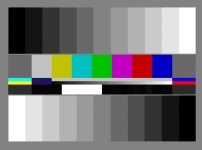
Below are some stills from my tests. Please forgive the lack of quality, as I wasn’t originally planning to post any of these. I displayed the chart on my computer monitor, and set the exposure intentionally hot, so that the brightest white chip was one “click” below clipping. I intentionally set the focus a bit fuzzy to avoid moire from my computer monitor. I set my WB to Daylight, and there's an obvious WB difference between the original chart image and my footage. If you load these photos into Phtoshop or an NLE, you can view them with scopes and check out the gamma curve and saturation. They were shot in the 50mb/s 1080/24p mode. Shot on a Nikon 50mm at f2. 400 ISO.
There are many other tests I did to come to my conclusions. These photos are only one experiement I performed. The "real world" footage I shot outdoors I can't yet post because it's for a TV program that will air on PBS soon.
Enjoy!





I acquired a GH3 a few months ago and, out of the box the imagery looks quite different than my GH2 on the above Smooth settings.
Let’s face it, some of us GH3 owners are not convinced that the GH3 can deliver the cinematic imagery the GH2 so successfully output. In my opinion, the current settings many people are using have demonstrated a rather “blah”, video-ish look.
This weekend, I finally endeavored to do some tests, with the goal of trying to replicate the sexy look of the GH2, without sacrificing the advantages the GH3 brings to the table. I think I succeeded.
The point of these tests was to confirm my own hunches about the look I like. They were meant for me, but I figured my tests and observations might be helpful to you, too, in understanding the differences between the GH2’s Film Modes and the GH3’s Photo Styles.
The most important findings are these:
CONTRAST
1. Almost all of the Photo Styles in the GH3 are flatter than the GH2’s Smooth -2 contrast, which was arguably as flat as the GH2 could get.
2. GH3 STANDARD and NATURAL at -5 Contrast are both way, way flatter than GH2 Smooth at -2.
3. The Photo Style that matches Smooth at -2 most closely on the GH3 is STANDARD with a Contrast of 0. That’s right. Zero.
This was the key for me. I personally like a healthy amount of contrast. Not insane amounts, but the Smooth -2 look was perfect for me. I never complained that I needed a flatter image. So I have now set my GH3 Photo Style to STANDARD with Contrast at 0 and …boom! The images now look much more like the sexy GH2 imagery I’ve grown to love.
SHARPNESS
-5 Sharpness on the GH3 is less than -2 on the GH2. In fact, I think setting the GH3 Sharpness to -2 is the same as -2 on the GH2.
GH2 CINEMA Film Mode
There are no Photo Styles on the GH3 that even come close to the GH2 Cinema setting, which had a curve that favored room in the highlights at the expense of shadows.
All GH3 Photostyles have curves that see deeper into the shadows than any Film Mode on the GH2.
NATURAL lifts the exposure of the entire image compared to STANDARD, but mostly in the shadows and midtones. This is probably the best setting for low light shooting.
Here’s something I learned about the SMOOTH setting on the GH2:
The colorimetry is weird and inaccurate! Blues and greens look nothing like they do in the real world. All other Film modes in the GH2 have more accurate colorimetry.
SATURATION
GH3 STANDARD Saturation at 0 is more saturated than GH2 Smooth Saturation at 0.
Based on these findings, here are my new favorite GH3 settings (for vintage lenses):
STANDARD
Contrast 0
Sharpness -3
Saturation -2
NR -5
Now, with Lumix lenses, I have a different setting. Compared to my old, Nikon prime set, the Lumix lenses are sharper, contrastier, warmer and more saturated. So here’s my GH3 settings for Lumix lenses:
STANDARD
Contrast -1
Sharpness -5
Saturation -3
NR -5
(I also adjust white balance to “cool off” the image to match my Nikons.)
Below are some stills from my tests. Please forgive the lack of quality, as I wasn’t originally planning to post any of these. I displayed the chart on my computer monitor, and set the exposure intentionally hot, so that the brightest white chip was one “click” below clipping. I intentionally set the focus a bit fuzzy to avoid moire from my computer monitor. I set my WB to Daylight, and there's an obvious WB difference between the original chart image and my footage. If you load these photos into Phtoshop or an NLE, you can view them with scopes and check out the gamma curve and saturation. They were shot in the 50mb/s 1080/24p mode. Shot on a Nikon 50mm at f2. 400 ISO.
There are many other tests I did to come to my conclusions. These photos are only one experiement I performed. The "real world" footage I shot outdoors I can't yet post because it's for a TV program that will air on PBS soon.
Enjoy!
Last edited:


