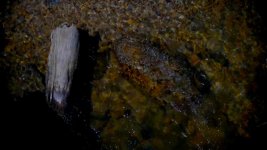
greeches Veteran Mar 14, 2011 #1 You can see the compression artifacts pretty well just above the wood to the left. This is from a Screen shot of footage in Sony Vegas.
You can see the compression artifacts pretty well just above the wood to the left. This is from a Screen shot of footage in Sony Vegas.
C Cosimo Bullo Veteran Mar 14, 2011 #2 We've had bad results with 720 and a lot of movement on the GH2, to such an extent that we're considering buying a GH1 again just for the 720.
We've had bad results with 720 and a lot of movement on the GH2, to such an extent that we're considering buying a GH1 again just for the 720.
greeches Veteran Mar 14, 2011 #4 flinty: You don't get any compression artifacts in 720P? This was a high motion clip (water flowing over rocks) where i first noticed the 'mud'. Have you shot high motion shots when its been "cleaner"? I'm just a little bummed. Now if I want real slowmo shots, I have to carry along the T2i. Last edited: Mar 14, 2011
flinty: You don't get any compression artifacts in 720P? This was a high motion clip (water flowing over rocks) where i first noticed the 'mud'. Have you shot high motion shots when its been "cleaner"? I'm just a little bummed. Now if I want real slowmo shots, I have to carry along the T2i.