GH2 mts file posted

So my ignorance as a Canon shooter, what do I use to view the footage? MPEG Streamclip doesn't recognize the format. VLC shows it with terrible interlacing. This clip is outside my workflow of .mov to ProRes -> FCP.

It plays in Premiere Pro CS5 but looks less than good. No go in FCP.
 
From the associated website:
Here are some sneaky shots taken in full HD, Cinema 24p / 24Mbit mode. You can download the original file from Vimeo in XDCam EX format.
 
So my ignorance as a Canon shooter, what do I use to view the footage? MPEG Streamclip doesn't recognize the format. VLC shows it with terrible interlacing. This clip is outside my workflow of .mov to ProRes -> FCP.

It plays in Premiere Pro CS5 but looks less than good. No go in FCP.

Final cut wants the whole directory structure. Try transcoding it to ProRes with Adobe Media Encoder...took me a few tries to get settings right for max quality last time I did that though.
 
I think it looks pretty good. I run CS5 and FCP on my Mac Pro, and the file just imports and drops into the timeline and plays in real time without rendering or stuttering. I'm in PAL-land so this interlaced 1080 clip (for what it is) looked very smooth and detailed on a Sony 1080 HD broadcast CRT monitor. There is no moire, artefacts or aliasing of any kind as far I can see, and I am super-fussy. But no 25P.... hmmm. There's a little bit of blur/noise on the tilt-up at the start, but I'm not sure what it is.
 
Interesting?

Interesting?

Viewed on a hd 18inch laptop its not fantastic but not bad, however, I see no interlacing artifacts and on win7 in media player its super smooth, dare I say it, it looks videoish! but super robust like you could throw it around all day, but it doesnt have that "filmic" progressive look at all, it has that "live" look for sure which is what Panasonic has said it will have in 1080i.
 
... There is no moire, artefacts or aliasing of any kind as far I can see...

Same here. - Don´t make the mistake and watch this interlaced footage on a progressive screen without deinterlacing. I dragged this footage into a PP CS5 timeline (1080i50) and it ran pretty smooth without any artefacts (PP does the deinterlacing job automatically). In the project window it is recognized as 25p footage...
 
Yes I won't be sellng my two GH13's until I really see some definitive work from the GH2. I really like the 1080 25P images I get from the GH1. It is quite filmic and closely resembles the look from Panasonic's broadcast cameras.
 
Mixed 1080i50 + 720p50... I gave it a quick go. Exported as 1080p25. The 720p50 footage was interpreted as 25p (slomo) and upscaled to 1080. Maybe with an extra good deinterlacer you´ll get a slightly better result... I don´t know so far:

 
Ok, so bunch of folks have downloaded a file, which is no longer downloadable via Vimeo and no one has posted a screenshot from GH13 Stream Parser or Elecard StreamEye Pro yet? At least please reshare on another web-hosting site or somesuch. Thanks.
 
I uploaded the clip to youtube and it deinterlaced it. At least this footage will be shareable without showing interlaced artifacts. However, it is nothing more than 1920x540 footage. Even if you render it to 1920x1080 you are just interpreting in the extra 540 lines.

Isn’t this 1080i footage basically the same as the Canon DSLRs that line skip. The 1080i footage basically skips every other line and then your display or rendering program has to interpret it back in. For the Canon cameras they just do the interpreting in the camera.

I think this footage looks better than the Canon footage when deinterlaced properly. However, it will never come anywhere close to the 1080p @ 24 mbps footage. I can’t imagine I will ever use the 1080i mode on my GH2. I will use 1080p for all low light shots and the 720p @ 60 FPS mode for all action shots.
 
I uploaded the clip to youtube and it deinterlaced it. At least this footage will be shareable without showing interlaced artifacts. However, it is nothing more than 1920x540 footage. Even if you render it to 1920x1080 you are just interpreting in the extra 540 lines.

Isn’t this 1080i footage basically the same as the Canon DSLRs that line skip. The 1080i footage basically skips every other line and then your display or rendering program has to interpret it back in. For the Canon cameras they just do the interpreting in the camera.

I think this footage looks better than the Canon footage when deinterlaced properly. However, it will never come anywhere close to the 1080p @ 24 mbps footage. I can’t imagine I will ever use the 1080i mode on my GH2. I will use 1080p for all low light shots and the 720p @ 60 FPS mode for all action shots.
Please upload the original .MTS file somewhere. Andrew himself stated the footage is no eye-candy. I want to look at the raw files, for presence of B-frames and such.

Full HD interlaced footage is still "1920x1080," however two 1920x540 fields taken at two points in time (the length of a shutter speed apart) are used to combine into each "full" frame, because no one uses interlace-scan displays (CRT) anymore, except for perhaps Panasonic and Sony "managers" and marketing people :). But yes, technically at each discreet point of a time-line (1/60 or 1/50th of a second) you only have 540 "real" lines of resolution. If there isn't much motion in the frame, it is possible to combine two separate fields into one progressive frame to get 30p or 25p footage, but expect artifacts galore when shooting anything but turtles.

I guess you can call this process "time-domain aliasing", but I wouldn't try to draw too many similarities with "spatial-domain aliasing," such as the alleged line-skipping behaviour, beyond the usual question of whether a given image element (pixel) is "real" for the given time-space coordinates. But yes, in this day and age releasing a camera with interlaced video acquisition format is if not borderline "criminal," then definitely retrograde.
 
Last edited:
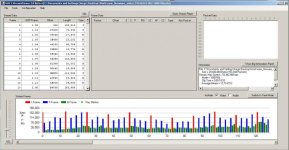
Ok, I've got a hold of the original file mentioned by OP (thank you e-steve!). Here is the screenshot of the latest Stream Parser beta version.

attachment.php


I've checked for frame rate information:
timescale=50000
num_of_units_in_tick=1000
Together with num_ref_frames=2 I believe this is consistent with 50i stream. Bitrates are around 17Mbps mark as you can see.
 

Attachments

  • 29346343 GH2 1080 50i Stream Parser.jpg
    29346343 GH2 1080 50i Stream Parser.jpg
    81 KB · Views: 0
But yes, in this day and age releasing a camera with interlaced video acquisition format is if not borderline "criminal," then definitely retrograde.

No its not - 24p is retro, and nothing else. 50p would be the way to go, but it looks like Panasonic is not willing to give it to us for such a low price.

The smeared 24p was only a (bad) solution for the technical and financial possibilities decades ago. Every one back then would have been very happy if they could have done it in 50p.

Only because you are used to something doesn't mean its better...!

Get better displays an set them to 50 oder 100 Hz and 50i will look very good - cheap displays conform only to the US standart of 60 Hz, and that will look like s**t with 50i footage.

:tongue:
 
my computer told me this was 50p footage using media info and vlc...

looks like crap either way whatever the hell it is...
 
Back
Top