GH2 GH2 24p or weird strobe effect

Hey how can you do this? I have a 60hz LG monitor and while my 24p GH13 files and blu-rays look great I bet they would look even better and NEVER tear if i was at 48hz. How do you do it? I have an ati hd 4870 x2 but I can't see a way to custom set the hz.. it has a 24hz mode but my monitor doesn't support it.


It depends on your monitor. LOTS do support it, especially with Windows 7, so it's worth a try (the results are simply stunning; it's like you're at the cinema). I have an LG too, and with XP I couldn't set it to anything other than 60hz, but with Win 7 it's as easy as pie! Even 24hz is possible, except that would be a bit pointless as your mouse would be all 'filmic', and provide no benefits to motion rendition. ;) Either 48hz or 72hz is ideal (I'd personally go with the latter for smoother mouse movements etc).

I have no idea how to do it with ATI cards though (I'm an nVidia guy), but there will probably be a way. Do a search on google for something like 'ATI custom resolutions', or similar.

Good luck.
 
It's not resolution it's refresh hz. Looking through the catalyst drivers can't find it.


Yeah, I know, but usually the two are tied together and 'resolution', is likely to throw up more results as that's what's most common. ;) Find custom resolutions, and you'll find custom refresh rates.
 
My GUESS, would be... something to do with the monitor, having to switch between DARK and Bright Colours, quite fast, with no feathering around them, leaving the eye thinking... what just happened to the bright pixels. a simple test would be doing something MotionGFX at 24p with some high contrast stuff, moving at roughly the same pace as the trees do at in this film... do they appear to strobe... yes

Prohaps people with smooth results have monitors with lower contrast... therefor less distance to cover interms of switching between pixels various colours

Tree mov.... possibally with less strobe...


https://files.me.com/jordancadby/3a1see


motion graphics test of strobey goodness on that definatly shouldnt strobe...


ps sorry for my terrible grammer and spelling!

files.me.com/jordancadby/k5urrw.mov

this is probally why broadcast signals have to top and bottom ends of the colours cut off.
 
It depends on your monitor. LOTS do support it, especially with Windows 7, so it's worth a try (the results are simply stunning; it's like you're at the cinema). I have an LG too, and with XP I couldn't set it to anything other than 60hz, but with Win 7 it's as easy as pie! Even 24hz is possible, except that would be a bit pointless as your mouse would be all 'filmic', and provide no benefits to motion rendition. ;) Either 48hz or 72hz is ideal (I'd personally go with the latter for smoother mouse movements etc).

I have no idea how to do it with ATI cards though (I'm an nVidia guy), but there will probably be a way. Do a search on google for something like 'ATI custom resolutions', or similar.

Good luck.

do you think maybe because i use dual screens the Nvidia is failing to complete a 48Hz/72Hz on one of them ?

Blackout, have you found fluid motion 24P mts file to send me?
 
As in the other thread, I believe that the answer lies within the fact that each frame is lacking motion blur. You might have true 24p but it's going to be cut from a 60p stream(sensor native) and constructed through software into a 24p stream. The shutter setting is just software processing. Who knows what you are really getting or what the artifacts of this are.. I think we might know more as VK gets into the code a bit more but for now, everything I've seen shows very clean frames with almost no blur at any "shutter" setting.
 
As in the other thread, I believe that the answer lies within the fact that each frame is lacking motion blur. You might have true 24p but it's going to be cut from a 60p stream(sensor native) and constructed through software into a 24p stream. The shutter setting is just software processing. Who knows what you are really getting or what the artifacts of this are.. I think we might know more as VK gets into the code a bit more but for now, everything I've seen shows very clean frames with almost no blur at any "shutter" setting.

you're saying this as oppose to the GH13 which DOES have motion blur?
 
My GUESS, would be... something to do with the monitor, having to switch between DARK and Bright Colours, quite fast, with no feathering around them, leaving the eye thinking... what just happened to the bright pixels. a simple test would be doing something MotionGFX at 24p with some high contrast stuff, moving at roughly the same pace as the trees do at in this film... do they appear to strobe... yes

Prohaps people with smooth results have monitors with lower contrast... therefor less distance to cover interms of switching between pixels various colours

Tree mov.... possibally with less strobe...


https://files.me.com/jordancadby/3a1see


motion graphics test of strobey goodness on that definatly shouldnt strobe...


ps sorry for my terrible grammer and spelling!

files.me.com/jordancadby/k5urrw.mov

this is probally why broadcast signals have to top and bottom ends of the colours cut off.

yes jordan your answer is confusing..
i watched the trees file. i think it's the same as Rigby. when you pan slowly, no strobe. when you start to be to fast, it starts to strobe.

so - did you mean your footage does not suppose to strobe ? or you meant that it DOES strobe?

and of course the graphic b&w stripes strobe, yes.

that's what you meant? or i didn't understand your reply?
 
do you think maybe because i use dual screens the Nvidia is failing to complete a 48Hz/72Hz on one of them ?

Blackout, have you found fluid motion 24P mts file to send me?

Found that my projector DOES support true 24p and WOW ... looks great, but it still is not the cause for the GH2 issue. The only think that a 60hz monitor does is sometimes cause tearing if you are not full screen.. just like when you play a video game and don't have frame sync on. For everything else, my full screen 24p looks great even on my 60hz LG monitor. Not as good as my projector of course but it's not the 24p thats the issue.

I have a LOT of clips up on youtube and vimeo that are 1920 1080 24p did you look at them or dl them?

just look at my vimeo account http://vimeo.com/michaelbiggins

The prince stuff is 24p with either a 30 or a 50 shutter... the In Love with you is 50.. maybe 60 shutter... they all look filmic and not strobey...
some of the prince stuff gets a lil normal film strobe cause I pan too fast or someone bumps into me but pause it and you see nice motion cadence blur.

The shutter speed is not crazy looking like these GH2 clips I'm seeing on this thread.
 
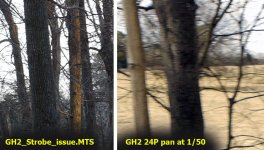
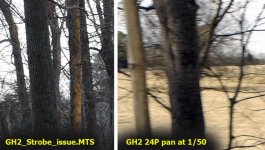
Here's a comparison of what a frame from the footage that kicked this thread off looks like during a pan, versus footage I took at 1/50th. I was likely panning a little faster at that point, but not that much faster. I wonder if OIS on vs. off could play a role (I had it off)?

Edit - I should clarify that these are 1:1 grabs of a small section of each 1920x1080 frame.

GH2_strobe.jpg
 

Attachments

  • GH2_strobe.jpg
    GH2_strobe.jpg
    127.1 KB · Views: 0
  • GH2_strobing.jpg
    GH2_strobing.jpg
    88.8 KB · Views: 0
Last edited:
Here's a comparison of what a frame from the footage that kicked this thread off looks like during a pan, versus footage I took at 1/50th. I was likey panning a little faster at that point, but not that much faster. I wonder if OIS on vs. off could play a role (I had it off)?

Edit - I should clarify that these are 1:1 grabs of a small section of each 1920x1080 frame.

GH2_strobe.jpg

can you please uploads the native file somewhere?
 
Yeah... pic 2 is how it should look.... motion blur in the counter direction of the pan like a slight trail. Why did the other clips not do that? Some setting must be overriding what you THINK your shutter speed is.
 
Found that my projector DOES support true 24p and WOW ... looks great, but it still is not the cause for the GH2 issue. The only think that a 60hz monitor does is sometimes cause tearing if you are not full screen.. just like when you play a video game and don't have frame sync on. For everything else, my full screen 24p looks great even on my 60hz LG monitor. Not as good as my projector of course but it's not the 24p thats the issue.

I have a LOT of clips up on youtube and vimeo that are 1920 1080 24p did you look at them or dl them?

just look at my vimeo account http://vimeo.com/michaelbiggins

The prince stuff is 24p with either a 30 or a 50 shutter... the In Love with you is 50.. maybe 60 shutter... they all look filmic and not strobey...
some of the prince stuff gets a lil normal film strobe cause I pan too fast or someone bumps into me but pause it and you see nice motion cadence blur.

The shutter speed is not crazy looking like these GH2 clips I'm seeing on this thread.

hmmm... those videos won't do.. i need some daylight pan video and a native file would be best.. no way of comparing till then, sorry.
 
Grahamh,

Thanks for posting those pics. You probably read that I returned my camera. It was definitely messed up in some way. Changing the shutter speed didn't seem to do anything. I'm going to purchase another and see how it goes. So, I gather, you have no issues when you pan? Besides the normal 24p stuff, right? You feel as if your GH2 handles like every other video camera you've ever owned in that respect? I'm assuming it does.

Roei,

If your GH2 footage looks like mine then you have a problem. Yeah, movies might look better with different refresh rates on your monitor but I don't think you're going to find an answer to your GH2 woes messing with that stuff. At some point your camera looks like crap or it doesn't. You must feel like something is wrong or you wouldn't be on this thread. Why not send it in for repair? Eventually, that is going to be your only option anyway unless an update fixes it down the road. Hopefully........ I just shot on Canons all day today and played them, from the camera ,on my tv. It looked great. Just like it should and not a single worry about refresh rates. I wish you luck but either you're doing something wrong or your camera is screwed up.
 
30 shutter grab.jpg40 shutter grab.jpg50 shutter grab.jpg60 shutter grab.jpg80 shutter grab.jpg100 shutter grab.jpg160 shutter grab.jpg


did some quick shutter tests form 1/30 to 1/160
doesn't look like my cam have a problem..
 
Last edited:
hmmm... those videos won't do.. i need some daylight pan video and a native file would be best.. no way of comparing till then, sorry.

Those videos have the exact same settings as the .mts file you can DL them.. 23.976! 50 and 60 shutter! what else are you looking for?
 
i would be happy with an MTS of some exterior shot 1/50 with some kind of similar pan as those trees... the prince and b&w shot are just not equal for comparing, see?
something recent, so you'll be absolutely sure about the details etc..

if you don't have one nevermind,
thanks for helping. at least i can now be sure my GH2 has nice motion blur and not too shutter sharp at 1/50.
and now i'm about to start my journey into anamorphics land, i saw this great footage of a new filter ring that saves you the trouble of those old uncomfortable lenses :)
 
Here's a link to the mts clip I referenced earlier - a pan back and forwards on some trees using 24P at 1/50: http://www.mediafire.com/?29ozmv954842mfb Sorry it's cr*ppy in terms of color/contrast, but I don't have an opportunity to shoot anything new this week.

I do think there's something to the "PC Monitor/Player theory" - this footage does not strobe on my 50" HDTV nor on my editing computer, but on the monitor of the computer I'm typing this post on it does look a bit nasty.

@Rigby - the 24P on my GH2 is the same in its motion characteristics, at least so far as I can tell, to what I get from my Panasonic HMC40.
 
Back
Top