
Navigation
Install the app
How to install the app on iOS
Follow along with the video below to see how to install our site as a web app on your home screen.
Note: This feature may not be available in some browsers.
More options
You are using an out of date browser. It may not display this or other websites correctly.
You should upgrade or use an alternative browser.
You should upgrade or use an alternative browser.
GH1 firmware research volunteers required
- Thread starter Vitaliy Kiselev
- Start date

Vitaliy Kiselev
Carbonite Member
By definition the tool will revert to original 1.22 level albeit under another number, if you don't check any boxes or alter any values. Perhaps this should be better explained on the first page.
I have beta version for patch that make firmware not check new firmware version number. I don't want to publish it, as it is quire risky thing (not to brick your camera, but not being able to upgrade again).
But in case on any service center trouble, I'll provide version that have it.

Chibs
Active member
Thanks, it is good to know that you are at least trying.I have beta version for patch that make firmware not check new firmware version number. I don't want to publish it, as it is quire risky thing (not to brick your camera, but not being able to upgrade again).
But in case on any service center trouble, I'll provide version that have it.
I have tried increasing the 1A parameters, but I see little change. No crashes or freezes however, with the following settings on a cheap Transcend Class 6 16Gb card.
Bitrate 1: 20000000
Bitrate 2: 24000000
VA 720p50 GOP size: 3
VA 1080P25 GOP size: 9
[VA Param 7: 208896]
VA Param 1080p 1A: 1166400
VA Param 720p 1A: 518400
How can I best test these to see if there is any changes? Should I use this in combination with a GOP number that previously didn't allow long recordings, or should I just change these variables and leave all else default?
Vitaliy Kiselev
Carbonite Member
For people who want to have a go at testing but have lost the plot in terms of what you need to do to trial the development s/w?
Look at first page.
We don't know that added parameters mean exactly, so you must shoot some controlled footage (high detaild is preferable) change them (not by 10x
 ) and shoot again.
It is preferable to see something in form that K.S. provided (GOP.txt files).
General MediaInfo things are not that useful.
I'll try to edit third post on first page to include more guides and explanations later,a s well as current state. Just don't have time for that.
BTW Ben B have second post in this theme, so he can do it also collecting info from last theme pages.
Vitaliy Kiselev
Carbonite Member
How can I best test these to see if there is any changes? Should I use this in combination with a GOP number that previously didn't allow long recordings, or should I just change these variables and leave all else default?
May be.
Try to provide info like K.S. did.
We need more low level info here.
And always try lowering parameters first. Like 2x lower all three.
Vitaliy Kiselev
Carbonite Member
Chibs
NTSC thing still don't work?
I changed it two times already a little and don't understand how it can not work.
NTSC thing still don't work?
I changed it two times already a little and don't understand how it can not work.
Vitaliy Kiselev
Carbonite Member
Tester, I have not yet ever tried the NTSC change.
Could you or KS provide me with the information on how to prove this low-level info?
Also, in the tool window it keeps saying 1080/24 for NTSC, but isn't this 30, or am I missing something here?
All is correct,
NTSC have 1080p24 (23,97 to be exact)
PAL have 1080p25 (25.00)
About low level info we must ask K.S. about tools he used.
I hope he could explain shortly and/or provide some tools.
spamrakuen
Active member
Please read below if you're going to download these:
http://www.megaupload.com/?d=5UCOHVTI
Wow! Looks amazing!
Can see some mud on 1080p video, but 720p looks great! Thanks for uploading!
Chibs
Active member
However, you still have the frame skipping too, correct?Wow! Looks amazing!
Can see some mud on 1080p video, but 720p looks great! Thanks for uploading!
@ Tester:
I am currently testing the NTSC change, I upgraded the firmware and it gave me an error that it could not record because of the PAL data on the card. I am currently backing up all my shots so I can format the card in-camera with the NTSC settings, and I will try again. It looks promising.

alignment1
Well-known member
But of course! I have uploaded some samples. If you backtrack in this thread, you can get some of the same sort of clips from my garden without modification, and with a first try. They are all full of mudd, as you can see. Quick sweeps, pans, and shakes.
Please read below if you're going to download these:
http://www.megaupload.com/?d=5UCOHVTI
Can not view these samples- can't use splash- I'm on a MBP-OSX. Clipwrap only shows me black image I can hear audio- and the second clip just crashes the program.
suggestions?
Vitaliy Kiselev
Carbonite Member
Wow! Looks amazing!
Can see some mud on 1080p video, but 720p looks great! Thanks for uploading!
Panasonic can make firmware update that will include 1080p options selection and make quality even better.
At least now we have data to pressure them.
And about how it happens to have buggy impelementations - normally bug can be cause by many things from low level programmer mistake to (more probably) wrong specifications. If you have 17Mbps specification, and only I and P frames (with motion prefiction not working propertly) you have serious trouble. Managment just did not understand that camcorder AVCHD hardware uses B frames and normally working motion vectors estimation and can live with 17Mbps quite fine. Here it is not the case.
Hope that someone at Matsushita read this, as I like thir products and wish them to correct this small mistake.
try with vlc
http://www.videolan.org/
http://www.videolan.org/
spamrakuen
Active member
However, you still have the frame skipping too, correct?
Yes. I can't open the video file on my NLE system, but a friend says that the 720p video playbacks ok from 0 to 24 frame, and the image stucks until frame 50. And in frame 87 it happens again until frame 100. And again it works until 136, and again freezes until 150. And so.
Frames between 0-24, 50-87, 100-136 are ok.
Vitaliy Kiselev
Carbonite Member
However, you still have the frame skipping too, correct?
@ Tester:
I am currently testing the NTSC change, I upgraded the firmware and it gave me an error that it could not record because of the PAL data on the card. I am currently backing up all my shots so I can format the card in-camera with the NTSC settings, and I will try again. It looks promising.
At least it is quite a progress from early private releases of this patch.
Vitaliy Kiselev
Carbonite Member
Guys, you need to use some generic player, with ffmpeg or CoreAVC software decoders. VLC could be also good.
As such GOP things don't work propertly on any hardware accelerated things.
As such GOP things don't work propertly on any hardware accelerated things.
spamrakuen
Active member
If a GOP of IPIPIPIP... is achieved in 50fps 720p, this means that if we ignore the P frames, a 25fps 720p INTRAFRAME AVCHD is posible.

K.S.
Member
However, both clips show quite some framedrops during the large sweeps. I sincerely hope this is due to the slow card, but I'm afraid there's no way for me to test this.NURBS, do you have ANY framedrops in your video if you make quick sweeps and pans in detailed shots? Please scrub through your video frame for frame to be sure. What are your last working settings that worked without any problems?
you're not suffering dropped frames... in one GOP you managed to get 8 P frames instead of 7

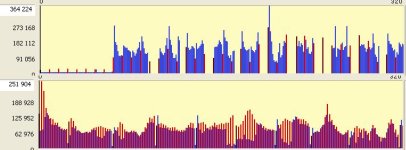
keep in mind: no dropped frames & take a look at the following screenshot (the 1080 clip at the top, the 720 clip at the buttom)... the gaps in the 1080 clip are not missing frames but virtually nonexistent (regarding framesizes). numbers about avg framesizes are missleading, if you only take into account frames with relevant size, you get the following figures.
I avg 125504
P avg 143584
i've attached the full stats from the 1080 clip, in the 720 clip almost all P frames are
I think people are not hesitant because of bricking risk, but because being unable to upgrade to any new Panasonic original firmware later on, as a firmware revert function is not yet built.
full ack, i hope tester13 gets the body fast to test this revert function he pointed at, thats keeping me off from testing atm & thats also the reason i said get faster cards for those who do test

Attachments
Last edited:
K.S.
Member
If a GOP of IPIPIPIP... is achieved in 50fps 720p, this means that if we ignore the P frames, a 25fps 720p INTRAFRAME AVCHD is posible.
720p intra might be possible, the frame sizes (I/P) are not much apart
about the problems with 1080 & increased bitrate / changed GOP: would be interesting to know it its something card related thats the restriction or if it is something related to DSP/internal bus/whatever else internal that's the bottleneck. sensor readout should not be the matter (that should be the same to original atm)...
Vitaliy Kiselev
Carbonite Member
720p intra might be possible, the frame sizes (I/P) are not much apart
about the problems with 1080 & increased bitrate / changed GOP: would be interesting to know it its something card related thats the restriction or if it is something related to DSP/internal bus/whatever else internal that's the bottleneck. sensor readout should not be the matter (that should be the same to original atm)...
It'll be good to see someone with good AVCHD encoder implementation knowledge.
Parameters that I added today can help with small GOPS, I hope that increasing them about 2x can help. But I am not sure here.