GH1 firmware research volunteers required

Well, I was asking from the point of view of using the GH1 audio as your only choice or if you wanted a high-quality backup of the external audio recorder.
I wouldn't want to shoot with the onboard audio as my only choice though. When we did Depth of Phil and Shady, Texas, we actually tried multiple ways -- we had a Zoom H4N, and simultaneously we had a Beachtek going straight into the GH1. I preferred the Zoom.

I hate sync'ing in post, and having to have double-system (which is one reason why I prefer the form factor and convenience of a traditional camcorder much more than the current dslr system). But I also think sound is extraordinarily important, and I would do whatever it took to get great quality audio. And no combination of bits and pieces recording down to a 1/8" minijack in a consumer still camera is going to produce great audio.
 
And no combination of bits and pieces recording down to a 1/8" minijack in a consumer still camera is going to produce great audio.

Why do you think quality audio is not possible in such case?
I know that are a pro in this, so it will be very interesting to get your opinion.

From pure electrical side, if you have short cord from active microphone to even 1/8" mini-jack quality must be the same as balanced XLR (of course, XLR have lock and less ability to cause noise if touched).
 
I wouldn't want to shoot with the onboard audio as my only choice though. When we did Depth of Phil and Shady, Texas, we actually tried multiple ways -- we had a Zoom H4N, and simultaneously we had a Beachtek going straight into the GH1. I preferred the Zoom.

I have a BeachTek also and have never been happy with the quality of audio from that adapter so I still don't think that is a fair comparison between the Zoom and the GH1 since the BeachTek is the weak link.

All I can think of as far as not wanting to record audio with a higher bitrate on the GH1 is if the audio hardware/encoder in the GH1 is capped at 192kbps quality so even if you raised it to 448 you would end up with exactly the same audio quality and waveform, it would be exactly the same file except a larger file size. Is that the case here?

Randy
 
All I can think of as far as not wanting to record audio with a higher bitrate on the GH1 is if the audio hardware/encoder in the GH1 is capped at 192kbps quality so even if you raised it to 448 you would end up with exactly the same audio quality and waveform, it would be exactly the same file except a larger file size. Is that the case here?Randy

No, AC-3 is lossy audio compression, so this is quite advanched mathematical algorithm. At lower bitrates it removes more information parts, it uses some math and psychoacoustic models (derived from the listening tests) to do this. Like removing some info after very loud spike because human can not hearing any difference during short period after this (I oversimplificate here).
 
Do you have any ideas why encoder stops working after 448kbps?? Do you have working 96Khz AC-3 encoder?
All licensed Dolby codecs are required to pass formalized tests up to the limits of their certified specifications, and are also required to generate specified error codes when presented with invalid data. Consumer stereo AC-3 encoders are limited to 448kbps bitrate and will correctly reject anything higher than that. The minimum supported bitrate for AC-3 stereo encoding is 96kbps, and I believe this applies to consumer DD consumer encoders as well as professional encoders.

In practice, commercial DVD AC-3 tracks are limited to 448kbps max, though all Dolby AC-3 decoders are required to accept bitstreams up to 640kbps. A 640kbps bitrate may be generated by Dolby Digital Plus codecs that can dynamically transcode E-AC-3 streams into AC-3 for transparent playback on devices that only support Dolby Digital streams. There is no quality improvement (or loss) in that case, the increased bitrate only allows the transcoder to do its work with minimum latency.

Dolby Digital AC-3 encoders are restricted to 32khz, 44.1khz, and 48khz audio sample rates. You'd need a Dolby Digital Plus E-AC-3 encoder to support a 96khz sample rate.

...is there an easy quality test that can be done to compare 192 and 448kbps audio from the GH1 to see if there is any differences like if the 448 version would have more dynamic range or be less prone to distort?
Unlike fixed-range PCM encoding, Dolby Digital encoding uses algorithms that preserve the full, undistorted dynamic range of the audio source. The real-time dynamic range of the encoded audio is preserved as metadata embedded in the bitstream, which is continuously decoded by the Dolby codec and passed along to the audio player.

The dynamic range of decoded Dolby streams can thus be adjusted during playback or when transcoded into another format. High-end audio receivers typically provide user options for reducing dynamic range and leveling dialog levels of DVD audio playback (for example, for quiet nighttime viewing). Inexpensive music players or file converters, however, may preset these playback options at settings that compromise the dynamic range of the audio. If you're concerned to maintain the highest quality GH1 AVCHD audio, make sure the encoded dynamic range is correctly handled by your editing software.

In practice, the GH1's audio dynamic range is most compromised by what sounds like an analog headroom limiter on its microphone inputs. The only way to prevent this type of distortion is to reduce input levels below the threshold of the limiter, which would require trial-and-error testing to determine. The other major limitation is the lack of XLR inputs with regulated phantom power, a requirement for using high quality condensor mics. Given these restrictions, the Rode Video Mic would be my choice for on-camera audio recording.
 
lpowell

I like the level of discussion :-)
Thanks for useful info.

I also believe that we could have even three stages of quality degradation in GH1 : analog amplifier setting -> digital amplification inside CODEC -> software limiter that changes previous settings according to processed samples.

I have one interesting question.
Someone know how exactly AGC+SET option works in Panasonic camcorders (at low level)?
From my expirience it can be best option, so you have gain control, but setting allow it to kick in only in really loud, abnormal situation to prevent clipping.

P.S. We have Dolby techie, it is time for Panasonic engineers to appear in public. :2vrolijk_08:
P.P.S. We really need your help with AGC and video output. :violin:
 
Last edited:
In practice, the GH1's audio dynamic range is most compromised by what sounds like an analog headroom limiter on its microphone inputs. The only way to prevent this type of distortion is to reduce input levels below the threshold of the limiter, which would require trial-and-error testing to determine. The other major limitation is the lack of XLR inputs with regulated phantom power, a requirement for using high quality condensor mics. Given these restrictions, the Rode Video Mic would be my choice for on-camera audio recording.

I already did my own "limiter" tests using various XLR mics and mixers (phantom powered) directly into the GH1. All I needed was a short 1' XLR to Stereo 3.5mm mini cable and a 3.5 to 2.5mm adapter.

I also used a 4" barrel plug XLR adjustable attenuator, connected to the mic or mixer output (at mic level not line level) to reduce the overall audio level into the GH1 to where the limiter was not altering the audio quality. I had to attenuate the audio input level to the GH1 by 25 to 40dB and the audio was significantly better sounding after that.

Here is a link to that thread where I discussed my results:

http://www.dvxuser.com/V6/showthread.php?t=208746

Randy
 
From pure electrical side, if you have short cord from active microphone to even 1/8" mini-jack quality must be the same as balanced XLR.
A short, unbalanced high-impedance audio cable can work flawlessly if you are running your equipment entirely on battery power. But if there are any AC power line fields near the camera, it may pick up noise that a balanced low-impedance cable would reject. In particular, if you're shooting anywhere near AC-powered fluorescent lights or dimmers, I'd use XLR cables on the mics, and drive the GH1 audio input with a low-impedance active pre-amp (e.g. a Zoom H4N used as a mic pre-amp).
 
Hello, I took some time to check the remaining languages which are currently listed as unknown and I propose the following changes:

Deutsch --> German
Francais --> French (1)
Unknown 9 --> Thai
Unknown 11 --> Portuguese (1)
Unknown 12 --> Classical Arabic
Unknown 13 --> Modern Arabic
Unknown 14 --> French (2)
Unknown 15 --> Finnish
Unknown 16 --> Danish
Swenden --> Swedish
Portugal --> Portuguese (2)

Portuguese 1 seem to be Brazilian portuguese while portuguese 2 seem to be european portuguese but I cant say for sure right now, the same goes for the two french languages. Perhaps I will give it a try some other time or someone else who speak these languages could lend a hand.

Other than that I just want to say good work and thank you to those involved in this project (especially tester13)

Someone reported that 15 is Dutch - Netherlands/Holland
 
Ok, I'm still a little confused about this 192kbps AC3 standard/limit on the GH1.

Why is it that the Canon HF200, and I'm sure other AVCHD consumer camcorders, record audio at 256kbps 48kHz stereo AC-3 and not 192kbps?

Here is some good related info also:

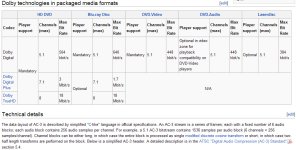
http://en.wikipedia.org/wiki/Dolby_Digital

and a screen grab of some specs below

Randy
 

Attachments

  • DolbyDigitalAC-3_Specs.jpg
    DolbyDigitalAC-3_Specs.jpg
    265.3 KB · Views: 0
Last edited:
So they had this 3 (?) camera Canon 5D interview with Cinematographer Shane Hurlbut, Bandito Brother's Jacob Rosenberg, and Hesh Rephun and guess what happened to their audio using what looks like a Zoom H4n? Unusable, they had to use the audio from the camera which they luckily were using shotguns on. Here is what they said happened:

"There’s an audio recorder on a small stand just behind the A camera. Unfortunately it was acting up that day. We ended up using the backup audio from the 5D MKII DSLRs equipped with shotgun mics (with manual audio levels set)."

Imagine if they had not used those shotgun mics directly into the 5D's because they were so confident about how their Zoom recorder was going to capture such awesome audio? Uh sorry Shane we got no audio, can we shoot the interview over again, take 2 ok?

This is exactly why I want to use best possible audio quality in the GH1 and if a higher bitrate is going to provide that then there is no reason not to use it. Scratch audio? I say use backup audio instead on the GH1 just in case things like this happen.

Here is a link to the interview and the audio ain't that great since the shotguns were too far away but I guess it was better than what was on the Zoom recorder and much better than the audio would have been with the built-in mic:

http://www.freshdv.com/2010/05/conversations-bandito-hurlbut.html

Randy
 
Last edited:
There is no field of human endeavor more fraught with the problems of objective assessment than audio! For instance, see http://drewdaniels.com/audible.pdf where a long term series of tests demonstrated that no individual (in these large-scale tests) could reliably spot the difference between the much vaunted 24/96 audio and normal CD audio, despite the internet being full of people who claim they can. Increasing the bitrate of the GH1 audio is highly unlikely to be evident (and I choose that word carefully) to listeners other than under the most stringent testing conditions, if that. I'd hope that viewers of my material were more interested in the picture and story than in probably unspottable tweaks to audio quality.

But of course if it can be done without slowing up other aspects of the project, there's no harm in individual options and personal choice!
 
what Ozpeter said +1,........
....although i can tell the difference between say 16/44.1 and 24/96 only certain times the difference stands out ... really to 99% of the world the lower 16/44.1 just works and is why cd's can sound fantastic still after 25 years. I have more interest in the visual aspects being fixed/ improved as these are things that you cant fix/increase beyond the cam , where as there exists plenty of ways to add better audio to a project already, not saying its not important, but to me i come here to see what breakthroughs are happening with the image.

good work to all still..
 
AVCHD audio - why bother?

AVCHD audio - why bother?

I, too, have the opinion that the audio part of the AVCHD is not a very important issue. It is pretty good as it is. Just because there is a way of increasing bitrate/sampling rate does not mean that it also makes sense. It is like repainting your car while in fact your engine is broken.

I can't think of any geeks who want to record 96kHz 448kbps studio quality AC3 audio coupled with the muddy picture we currently have. The AVCHD image is what needs fixing. Am I wrong here?

P.S. I am talking about the AVCHD audio here. The MJPEG audio on the other hand does indeed need improvement, as that is audibly worse than the former.
 
AVCHD compression, what does it affect?

AVCHD compression, what does it affect?

How does the AVCHD Compression patch optimize the settings? Does it change the GOP structure, like adding B frames? What does it optimize?

I just started testing and so far here are the parameters that seem to be working well in 1080 24 (FHD mode).

Video Buffer: 28.000.000
Bitrate Adjustment 1: 20000000
Bitrate Adjustment 1: 24000000
AVCHD Compression
1080p24 GOP Size: 12

Note: As another poster said anything over 20000000 for BA1 and 24000000 for BA2 and the camera locks up as soon as you start recording.
 
Last edited:
I can't think of any geeks who want to record 96kHz 448kbps studio quality AC3 audio coupled with the muddy picture we currently have. The AVCHD image is what needs fixing. Am I wrong here?

I've never mentioned the desire for 96kHz audio for the GH1, I have no problem with the 48kHz that the GH1 already records at.

So if you just spent a bunch of money on a great voice-over to use in your 30 minute documentary and they only gave you the choice of having it downloaded as a 64, 96, 128, 192 or 320kbps mono audio file, which one would you choose to download and drop into your timeline to edit with? Are you going to just set your Zoom recorder at 192kbps instead of a less compressed setting since most people wouldn't be able to tell difference?

24bit - 96K audio compared to 16bit - 44.1K audio, yes that would be hard for pretty much anyone to tell the difference.

But I think the better comparison is between the Canon 5D which now records audio at 1536kbps and the GH1 at 192kbps. And from what I gather from the Dolby info is that since the AC-3 audio is stereo and using 2 channels, the bitrate is actually 96kbps per channel compared to 768kbps with the 5D. So are you ok with only 96kbps per audio channel to start with before editing?

At least by using Tester13's adjustable bitrate setting at 384kbps you can now get each audio channel back up to 192kbps which I think is more reasonable level. 192kbps (2 channel) stereo might be fine for the final file format quality but I'm talking about the original audio file that still needs to be at the highest quality possible to survive being edited, mixed, EQ'd, remastered and then be re-compressed again into the final distribution format.

Anyways we now have the option to set the audio bitrate (kbps) higher, thanks to Tester13, so it's really no longer an issue since the work has already been done and it looks like it's working.

Randy
 
Last edited:
How does the AVCHD Compression patch optimize the settings? Does it change the GOP structure, like adding B frames? What does it optimize?

Video Buffer: 28.000.000
Bitrate Adjustment 1: 20000000
Bitrate Adjustment 1: 24000000
AVCHD Compression
1080p24 GOP Size: 12

It is pointless set of patches and parameters.
Please see latest Note to Testers, and use it.
For all else read help hints.
 
But I think the better comparison is between the Canon 5D which now records audio at 1536kbps and the GH1 at 192kbps. And from what I gather from the Dolby info is that since the AC-3 audio is stereo and using 2 channels, the bitrate is actually 96kbps per channel compared to 768kbps with the 5D. So are you ok with only 96kbps per audio channel to start with before editing?

This is wrong comparison, you can't compare PCM and AC-3.
Good explanations were already given why.
 
Back
Top