GH1 does not have ALC

Without knowing how you recorded that, it's hard to comment.

You can get the reliable data only by performing controlled experiment. I have done that by inserting constant 1kHz signal of 200 microvolts RMS (by signal generator). Then I added some additional noise (higher-level signal) and then stopped. The measurement showed that audio level dropped immediately, but got back into normal level after several seconds. This is a typical AGC characteristics.
 
Last edited:
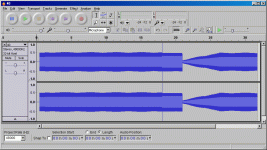
Measurements II

Measurements II

So, here are my most recent measurements. There was a signal of 1kHz with 0.5mV RMS amplitude (not sinus, more between square and triangle) and 2kHz signal with amplitude 10mV RMS (sinus) which was switched on between 18s and 21s. Note that 2kHz signal has about 20-times higher amplitude.

Signal 1kHz is immediately reduced when 2kHz signal appears (at 18s). The speed of reducing the volume is about 5ms. When 2kHz signal disappears (at 21s), it takes about 5s for 1kHz signal to reach the original audio level. I suppose that this is the proof that there is some kind of AGC involved within GH1. At least it works in mine GH1.
 

Attachments

According to some definitions on this thread, limiter should bring back the previous sound level almost instantly when stronger sounds disappear. However, I might be wrong. Anyhow, the background sound level is attenuated (or less amplified) for some period after nearby stronger sound source fades away. Namely, in this thread it was stated (several times) that background audio signal is not attenuated any more after the main sound source fades. I do not agree, at least my measurements (and my ears) show it.

If nearby sound is higher than background noise, but still not high enough, GH1 won't attenuate input signal (or decrease amplification). However, beyond some level the sound will be attenuated and when nearby sound fades it takes some time to come back to basic (higher) amplification again.
 
I had a chance to use the GH1 this weekend for a shoot at a music festival and I can say that it performed very well in the audio department. I wanted to be low profile so all I brought was the GH1, small tripod and Sennheiser wireless.

I was able to record interview audio, with bands playing in the background, and it sounded surprisingly good. I used the stock lav and a Shure beta 58 for the xlr plug. AF output on the reciever was set to -30 and I managed the sensitivity controls on the individual transmitters from -10 to -30, depending on the sound situation.

With the band playing in the background, you would expect AGC to ramp up the volume. It did not do that. It did compress in some sections when recording music, as I would expect it to, but overall it worked.

When recording a live band, I used the sm58, set to -20 or-30 sensitivity. The sound was not half bad considering it was an sm58 through a wireless setup. Using the lav on interview subjects set to -20 or -30 yielded decent results, even 30 feet from stage during sound check.

Like I have said in earlier posts, 1mV seems to max out the preamp, then it will limit, which is not always bad.

The real problem comes from over modulating the input, which is quite easy to do considering the high sensitivity. That is when audio gets distorted. Limiting an over modulated signal is even worse.

If my input from the wireless was too hot, the background band noise would have certainly ruined recorded voice.

Simply put, without variable attenuation, in my case adjusting the sensitivity on the transmitters and receiver output, it would have been impossible to handle that situation. A nice portable mixer, set up properly would do just fine, provided it had a decent noise floor. It also helped to have the monitor levels on the wireless, it gave me confidence that the signal was okay without headphones to monitor audio.
 
So basically all the sound circuit in the GH1 is doing is overdriving a limiter (which will then act like an AGC circuit). I wonder is the level to the audio op amp software driven or hardware set, as you would really need to drop the level by -20dB (or raise the limiter threshold by 20dB) on both the built-in mic and the 2.5mm jack socket.
 
I wonder is the level to the audio op amp software driven or hardware set, as you would really need to drop the level by -20dB (or raise the limiter threshold by 20dB) on both the built-in mic and the 2.5mm jack socket.

I think that increasing the gain (after some audio "spike") should be SW driven, since I noticed small gradual steps when audio gain is increasing to basic level.

However, maybe you'll be interested in the following thread as well:

http://www.dvxuser.com/V6/showthread.php?t=217755

I have just tested some electronics which I developed in the last two days.
 
If possible, you shouldn't be hitting the limiter at all in the GH1 since it colors the sound of the audio and not in a good way. I've done enough testing to recognize it.

Simple solution here, not sure why everything got so complex, use an attenuator (to lower the mic level signal to an even lower GH1 mic level) at the proper level and you will get very usable audio with the GH1. I'd recommend a 25dB attenuator so you won't hit the limiter using most mics.

There are both XLR (adjustable) and stereo 1/8" attenuators out there so you don't have to make your own.

Randy
 
If possible, you shouldn't be hitting the limiter at all in the GH1 since it colors the sound of the audio and not in a good way. I've done enough testing to recognize it.

Interesting. I haven't noticed that. Will try to test it as soon as possible and give you the results.
 
If possible, you shouldn't be hitting the limiter at all in the GH1 since it colors the sound of the audio and not in a good way.

True, this is the case with all limiters / compressors and is usually seen as a asset (think Optimods). But in our case, you really don't want the limiter kicking in unless you have a sudden loud noise over and above your basic audio levels. Although an external attenuator will work, it makes more sense to attack the problem at source as you will have less noise introduced into the system.
 
Well, I would prefer to attack the problem with an external audio mixer that has a much higher quality limiter so that the limiter in the GH1 doesn't need to be used. Not always possible but preferred.

Mic/mics to external mixer to attenuator to GH1. I would also have a mic/mics to external mixer to audio recorder setup since my mixer has 2 main audio mono XLR outputs which can be Mic or Line level. One output going to the GH1 and the other going to the audio recorder.

Randy
 
Makes sense but what counts to me is what my ears hear and not charts since charts never really tell the whole story about how the audio sounds. Looking at a waveform in Adobe Audition is about as far as I go when looking at audio graphically.

Randy
 
I've at last had a closer look at the GH1 limiter and it appears to be an "intelligent" limiter varying its operation according to the nature of the incoming audio.

In response to a short impulse, it has a fast attack/decay time, while in response to a steady tone at 440Hz rising in level it appears to have no effect until the limiter threshold is reached, at which point it clamps the level at about -9dB below full scale (in the case of a tone which in impulse form hits -3dB and clips slightly on the first cycle). When the tone cuts off, recovery time appears to be about 4 seconds, whereas transient recovery time is less than a second.

In the presence of a music signal which can be seen to invoke the limiter by about 20dB (judging from the level of room noise which rises over 4 seconds if the music is suddenly cut off) there is plenty of transient activity going through, as high as -3dB, so although a steady test tone is "squashed flat" a music signal retains some dynamic range.

In the presence of a test tone rising in volume I noted (once I'd notch filtered it out from the recording) that the GH1 will attenuate in a series of steps heard as faint ticks. I don't think you'd hear that under any normal circumstances. I also noted a fair bit of harmonic distortion once the limiter was triggered by the tone. This could be that the limiter is in the digital domain (highly likely) and that distortion is arising in the mic and/or preamp before the signal reaches the limiter.

What does all this boil down to? Well, if you record an interview next to a railway line, a normal voice level will be unlikely to trigger the GH1 limiter, or if it does, attack and decay from speech transients are likely to be rapid enough not to be noticed. But if a train comes along, it won't become nearly as loud as it should on the recording, and after it passes it's possible that background sound levels will be heard to recover over a four second period.

I would say that as these things go, the GH1 limiter produces good results in real world conditions, given that there's no manual alternative and no metering or headphone socket. Under the circumstances that you wouldn't want to have the limiter in operation, you wouldn't want to be using the GH1 audio system in the first place. IMHO.
 
Ozpeter,

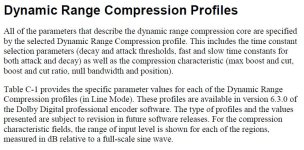
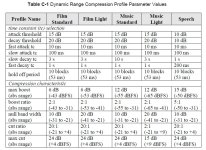
I have come to some of the same conclusions about the adaptive limiter functions of the GH1. In my initial tests, earlier in this thread, I indicated it was the Dolby encoder settings on this camera that dictates the way it behaves with audio, assuming you are properly attenuated to match the input. They call it Dynamic Range Control.

The GH1 uses Dolby Digital Stereo Creator. All .ac3 audio must have Dolby encoding, including AVCHD. The Dynamic Range Control is based on a few settings, some controllable with the right hardware/software.

Check out the attachments, it shows attack and decay time for the limiter/compressor/expander functions of the Dolby encoder. That is a software function, so it may be programmable by the geniuses who built the PTool software. The codes are clearly written on the ATSC and Dolby site, so if it is possible to change it shouldn't be that hard to find better values for the compression and limiting.


The stills attached are taken from page 88 of the Dolby Encoding Guidelines, you can read it at the link below.

http://www.dolby.com/uploadedFiles/...PDFs/Professional/46_DDEncodingGuidelines.pdf


The ATSC has a bunch of code that may help change the encoding values in the software.
Pages 84-90 in the document below.

http://www.atsc.org/cms/standards/a_52b.pdf
 

Attachments

  • dolby encoding 1.JPG
    dolby encoding 1.JPG
    107.4 KB · Views: 0
  • dolby encoding 2.JPG
    dolby encoding 2.JPG
    141.8 KB · Views: 0
A very quick google suggests to me that Dolby's Dynamic Range Control (DRC) is encoded during recording, but isn't actually used unless turned on at the playback end (by the listener). In the case of the GH1, though the data may be there, it would only be activated at the point of playback. Now if this was playback direct from the GH1, I could imagine that Panasonic might have it turned on within the GH1 itself. But once transferred to an NLE, then the DRC stuff would only apply if turned on in the NLE itself (or possibly on playback of the output from the edited video - I don't know whether the DRC metadata would survive editing).

So - I think Dolby's DRC may not be relevant to this discussion but I'm not going to be dogmatic about it if someone tells me I'm wrong! :)
 
Did you see the attachments. I can't say 100% that the limiter is Dolby, but all the signs point at it. attack and release times, expanding lower sounds. Look at the links and the white papers from Dolby. It explains why the compression acts that way. My tests for MJPEG. Yield different results than AVCHD. Are your results thesame between both formats?
 
What needs to be fixed in the GH1 is the mic input sensitivity level and maybe that can be changed in the firmware. If it can, it would be great to lower it by at least 10dB and make it adjustable in -5dB increments down to -40dB so that it can handle various mics and mixers that output a mic level signal. This is basically what I'm doing now with external attenuators.

Randy

Seconded!
 
Back
Top