Getting to the bottom of the noise complaints - is it h.264 uncompression software?

LET'S BACK UP FOR A SECOND!

So, you might not have noticed, but the frame in question on the QT is the last frame of the video, and the others are the first frame (look at the lips). Actually comparing the correct frame to the correct frame, bingo, they look the same (in terms of noise). *sigh* wish I would have caught that earlier.

Some additional notes. I used 2 different H.264 formats in Premiere, subtracted the pictures and they are identical. I also wrote out a ProRes 422(HQ) from Premiere and compared. Noise was the same, slight differences in the red output (but not a noise difference). (Noted as interesting).

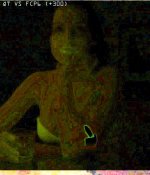
So, here is two images places over top of each other (using +300 brightness)

LEFT = Premiere - QuickTime
RIGHT = Premiere - AVCCAM utility
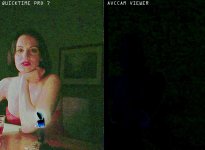
compare_both.jpg

This of course shows how the green is different like observed earlier in what AVCCAM and Premiere is showing. I also see a little blue difference as well. Given I am using +300, that's a lot of gain to show the difference.

Now, the QT diff on the left IS a lot different. Given visually the noise DOES look the same between the two, I am back in the GAMMA only camp. Also, we can clearly see that gamma on R/G/B is being treated differently.

Looking into trying to figure out how to fix the gamma. Going to work with the test chart and see if I can figure something out. If I can get rid of the gamma, and the noise is gone, then we know that is the only culprit.

What a pain in the neck.
 
Also note, I am going to still check FCP as I want to see what it is doing with the videos internally AS WELL as once I write it out. We had problems with FCP changing gamma on 7D footage before.

System notes: 10.5, QT7, FCP6, CS5 (just for those who don't want to read everything)
 
My testing of one of our AF100's so far has shown noise in many scenes and chroma du monde chart, 3200 or 5600K, whatever ISO, black balanced, white balanced, different lenses, live via HD SDI, PB of AVCHD from the camera, in Blu Ray player, from Mac and PC laptops, viewing on Flanders 17", Optoma 1080P DLP projector on 100" screen. Recording with Ki Pro on ProRes 422 doesn't make any difference. The noise level looks similar to our HPX170 in level, although the 170 grain is different, more granular vs. the 100, due to CCD vs. CMOS, I would assume. I can see grass at capped black on both cameras on a scope, and the noise goes well up in IRE. There is also plenty of chroma noise.

I also see banding than I'm not used to seeing from other cameras. There is no question in my mind that the 100 is a noisier camera than an EX1. Our HPX2700 has noise as well, but more luma than chroma and not blotchy/digital looking. When I first watched footage on my MacBook Pro via AVCCAM Viewer, I almost jumped out of my seat, it was so noisy. Then I checked the laptop's gamma setting and it was a 1.8 vs. 2.2. Switching to 2.2 made a big difference by pushing the noise in the blacks down, but it's still there. My PC looked better with AVCCAM Viewer noise wise. The Flanders is what I use on set most, and I'm not used to seeing noise and banding with it when shooting with other cameras.

I would not characterize the AF100 as being a clean camera, but it does seem to be scene dependent, because I've seen some scenes that are very clean, but these are typically low contrast, bright scenes. I've never had a complaint about our 170 being too noisy, so it will be interesting to see if clients complain about the 100.

For reference, I've been shooting with the AF100 in Cine D Gamma, Cine Like matrix, -7 Detail, 0 V. Detail, +2 Coring, 0 Chroma. I have no doubt there are some post workflow/computer gamma issues that accentuate the noise, but I'm dealing with camera original or live images only. I don't think the AVCHD codec is a contributor at all either.
 
I never noticed a gamma shift between GH1 source and finished projects (edited in FCS3) and played/viewed on both Apple and PC monitors. So I assume this gamma shift only jumps in when playing/viewing AVCHD clips on an Apple? In Quicktime only or also in VLC player? Or does FCS3 shift the gamma when converting AVCHD to ProRes?
 
I must say that VLC plays back GH1/2 PAL footage horribly anyway, I only use it for very rough clip browsing, for proper viewing I convert to ProRes first. So maybe it does shift gamma but I don't notice it due to all the other distortions. I'm trying ClipWrap now. And what is the best way to check gamma of a videoclip apart from using your eyes? And thanks a lot Grimepoch and Barry for getting to the bottom of this, you're both doing a lot of work on this with a lot of patience. My AF101 should arrive today (Thursday) by the way even though I didn't receive a shipping confirmation from the supplier, but 6 Jan is what they promised last week.
 
My testing of one of our AF100's so far has shown noise in many scenes and chroma du monde chart, 3200 or 5600K, whatever ISO, black balanced, white balanced, different lenses, live via HD SDI, PB of AVCHD from the camera, in Blu Ray player, from Mac and PC laptops, viewing on Flanders 17", Optoma 1080P DLP projector on 100" screen. Recording with Ki Pro on ProRes 422 doesn't make any difference. The noise level looks similar to our HPX170 in level, although the 170 grain is different, more granular vs. the 100, due to CCD vs. CMOS, I would assume. I can see grass at capped black on both cameras on a scope, and the noise goes well up in IRE. There is also plenty of chroma noise.

I also see banding than I'm not used to seeing from other cameras. There is no question in my mind that the 100 is a noisier camera than an EX1. Our HPX2700 has noise as well, but more luma than chroma and not blotchy/digital looking. When I first watched footage on my MacBook Pro via AVCCAM Viewer, I almost jumped out of my seat, it was so noisy. Then I checked the laptop's gamma setting and it was a 1.8 vs. 2.2. Switching to 2.2 made a big difference by pushing the noise in the blacks down, but it's still there. My PC looked better with AVCCAM Viewer noise wise. The Flanders is what I use on set most, and I'm not used to seeing noise and banding with it when shooting with other cameras.

I would not characterize the AF100 as being a clean camera, but it does seem to be scene dependent, because I've seen some scenes that are very clean, but these are typically low contrast, bright scenes. I've never had a complaint about our 170 being too noisy, so it will be interesting to see if clients complain about the 100.

For reference, I've been shooting with the AF100 in Cine D Gamma, Cine Like matrix, -7 Detail, 0 V. Detail, +2 Coring, 0 Chroma. I have no doubt there are some post workflow/computer gamma issues that accentuate the noise, but I'm dealing with camera original or live images only. I don't think the AVCHD codec is a contributor at all either.

Dino,
Try your exact same settings, except change the Matrix to "Fluo" and see if that helps. I was using very similar settings to yours and saw a good deal of noise in the shadowy gray area's. I took Editman's suggestion of using the "Fluo" Matrix and I haven't seen any noise since. Not on my MBP and definitely not on my TV. You can check out the test I posted on my Vimeo page.
 
I am using Flou as well and think the noise floor is much better.

RieniO, once you get your AF100 you can download AVCCAM from the Panasonic site and view MTS files in it. When I compare what it shows with what QuickTime shows of a clipwrapped file, the QuickTime is much higher and it is noticeable right off the bat. In addition to this, if I bring that clipwrapped mov into Premiere (and another user said the same thing of FCP) when the playhead is still, it is correct gamma. When I scrub, it switches the gamma brighter, then back down when the playhead stops. When I play, it switches the gamma brighter when it is playing and then when it stops, returns back to correct.

We need to ask the clipwrap developer if they are setting that flag.
 
Ok thanks for this info about AVCAM, didn't know this. I've started a thread about the Apple gamma shift in the FCP forum because here it may be too off-topic.
 
Let me make sure my intentions are clear.

(1) Shooting out of the box with the default settings, the AF100 is noisier to me than my 7D. With the settings derived from Barry, Timur, and Editman, I believe the results I am getting now seem to be on par with my 7D (which I like). Regardless of gamma setting, I am happy with these results and they are what I expect. I will be doing some side by side comparison as I explore the AF100.

(2) While the calibrated monitor can hide the noise better (because it is there, regardless), I absolutely agree that the solution is not in just having people calibrate their displays, it's in getting the camera settings that work best in the majority of viewing situations. Part of exploring why the image looks different between AVCCAM and QuickTime on the same machine is important because at one point, they were wildly different and I am understanding why.

Step one is to identify where there is a difference.
 
Dino,
Try your exact same settings, except change the Matrix to "Fluo" and see if that helps. I was using very similar settings to yours and saw a good deal of noise in the shadowy gray area's. I took Editman's suggestion of using the "Fluo" Matrix and I haven't seen any noise since. Not on my MBP and definitely not on my TV. You can check out the test I posted on my Vimeo page.

Fotojorno,

Wow! Great call from Editman. "Fluo" makes a BIG difference in noise, "Norm 2" even a tiny bit better and I think I liked it a bit better on my flesh chart, but I'll do more testing.

This was NOT a subtle difference. I know that "Cinelike" matrix adds saturation, which can add some noise, but I didn't expect this much of a difference. Now I need to see how much, if any the Chroma control makes in noise reduction.

I'm feeling much better already!!
 
Okay, so some more testing happened (still no FCP yet, but that is coming, I promise). I have not been using the FCP compatibility in QuickTime so I wanted to test what it did. From the setting it says this:

"When enabled, video is not displayed using ColorSync. Source colors are read with 2.2 gamma and are displayed in a color space with 1.8 gamma."

Which means, we darken your image by a multiplier, but I don't believe what is says. I say this because all four of these have different results, from lightest to darkest:

GAMMA 1.8 - FCP COMPAT OFF
GAMMA 1.8 - FCP COMPAT ON
GAMMA 2.2 - FCP COMPAT OFF
GAMMA 2.2 - FCP COMPAT ON

The difference between changing the gamma and the FCP compatibility is much different in magnitude. The last setting gets the closest to what AVCCAM/PREMIERE basically sees and is the cleanest looking in QT. It has some slight difference and not sure why. These are 1:1 grabs from QT and PREMIERE, overlayed on each other and subtracted (+300 brightness):

newdiff.jpg

You'll notice that are not the same, but if you remember, I said that adobe was changing green. Well here we see red/blue that is different, so that goes along with what I saw Premiere doing. Also notice the flame, which is blown out, is black and the rest of the image isn't zero difference, there is still some gamma shift, but it is not as noticeable.

Okay, now for some FCP....
 
Fotojorno,

Wow! Great call from Editman. "Fluo" makes a BIG difference in noise, "Norm 2" even a tiny bit better and I think I liked it a bit better on my flesh chart, but I'll do more testing.

This was NOT a subtle difference. I know that "Cinelike" matrix adds saturation, which can add some noise, but I didn't expect this much of a difference. Now I need to see how much, if any the Chroma control makes in noise reduction.

I'm feeling much better already!!

That's great to hear. I had the same reaction when I switched to the "Fluo" matrix. I'll try "Norm 2" and see how it compares. The color in footage I've shot with "Fluo" looks fine to me but it just seems like a odd/specific matrix to use all the time. Would be happy to read any further results you have with "Norm 2".
 
Guys, I've just gone through and deleted about 40 posts out of this thread that were off-track or off-topic. This thread is for getting to the bottom of what specifically is causing a certain section of viewers to perceive footage as noisy, whereas others view that exact same footage and declare it clean or noise-free. If a post doesn't relate to the testing of the specific hypothesis posed at the start of this thread, or a compelling alternative (such as the gamma shift), then it's gotta go. This is an important topic because I want the end users to see the footage as it was intended, and not to be panicking because of some issue which makes the footage seem a lot noisier than it rightfully would be. Thanks for understanding and for keeping it on track.
 
Okay, I am full into testing FCP6 at the moment. I am at a loss for some of the differences I am seeing, but still trying to figure out what is going on.

Pulling the MTS -> ClipWrap -> MOV -> FCP letting FCP set the sequence to the same settings as clip and then putting the canvas at 100% and taking a 1:1 snapshot shows some CRAZY differences in the noise. Compared to the difference above between (QT and Premiere), this is QT versus FCP. (+300 brightness) gain. (Final cut looked slightly darker, but noise was increased)

(ignore the areas around the outside, 1:1 not cropped idential)

qtfcp300.jpg

If you have ANY clue why FCP6 is manipulating the image in such a way, I'd love to know why. Even though this is gained up +300 to show, remember, the above is +300 in the other post and look how little difference most of the image has. This DEFINITELY translates to a render. I rendered out to ProRes422 and checked and all this noise was still like this. It has added some banding as well it looked like.

But get this, both the ProRes422 and ProRes422HQ files had duplicated frame 3 as frame 1! ???? So it went 3->2->3->4....... I even moved the video on the timeline before exporting and it still did it.

Something with the clipwrap and MTS doesn't seem to be liked in either FCP or Premiere.

So, next thing was log it right from the card.

1) I think there is something corrupt with this clip, it's missing the first frame altogether after importing directly from the card. (remember, this was a pre-production camera).

HOWEVER - The gamma is much more correct. It is NOT THE SAME as MTS -> clipwrap -> MOV

Also, whatever settings the MOV for clipwrap had, they are different than the log and capture version, and final cut asked me to change sequence settings for this clip and said it was different.

So I go back and compare it to the AVCCAM and PREMIERE and guess was.....FCP imported from the card DARKER than both AVCCAM and PREMIERE!!! It looks to me as if they are accounting for the gamma because if I go and set the gamma back to 1.8, then the FCP looks much closer to what the AVCCAM and Premiere were showing at 2.2. (confused yet).

So final test, write out the captured and open it in quicktime and see what is going on....it's darker just like in FCP. (and darker than AVCCAM and PREMIERE).

Summary coming next....
 
Leo is saying he's not seeing some artifacting in footage shot with his production camera that he saw in the footage he shot with the pre-production camera. It might be a good idea to do all this testing with footage shot with a production camera since there seems to possibly be some changes that were made from pre-production to production. Thanks for continuing your investigation. Once solved it will be beneficial all.
 
Yeah, at this point I'd say ditch the preproduction clips. Now that real production cameras are out there, let's use clips from those instead.

Sorry to put you through more work, but if you'd do the same FCP test with a clip you shot on your own production unit, it would be very, very interesting to see if the results you get are the same as with the pre-pro clip, or if the clip "behaves" the way one would think it should, throughout the import & edit process.
 
That's a lot of information to digest, so let me break it down into the different sections and talk about each one. There are some serious work flow issues here that need to be addressed, and just some general guidelines.

MAC OSX GAMMA 10.5

Gamma defaults to 1.8 on OSX which is very bright. Even in the calibration settings it says to use 2.2 if you are doing work for tv. This is something you should be aware of because if you work at 1.8, your material WILL look darker on TV and on other systems.

QUICKTIME 7

Pays attention to a gamma flag in .MOV files. QT ups the gamma on clipwrap clips as compared to original MTS file played in AVCCAM. QT also has a flag in settings to show what Final Cut sees in terms of gamma which essentially makes things darker. All these gamma shifts are not consistent with each other.

MTS->CLIPWRAP->MOV->FCP->OUT horribly noisy, gamma really high, looks horrible
LOG&CAP->FCP->OUT Shows darker in QT, flag makes no difference on this file in QT, this file in PREMIERE matches MTS in premiere perfect.

Feeling: QT7 is horrible. It has problems ALL over the place. Gamma is all over the map depending on where files come from. Not a good judge of your footage AT ALL.

Clipwrap AF100 footage not correct in QT.

ADOBE PREMIERE PRO CS5

MTS files, or files from Final cut that used log and capture then out match perfect. Both Final Cut and Premiere pull the green down a bit I notice. Most consistent good results using premiere. Matches AVCCAM the closest.

Clipwrap AF100 footage is not working properly either. During playback or scrubbing the gamma changes. Would avoid until clipwrap can comment (going to email them).

FINAL CUT PRO 6

This is not the latest version, I have not bought the update because I've been waiting on the next revision.

Files from clipwrap have some serious issues going on. Not only gamma changes, but instability with final cut I noticed, and some REALLY bizzare noise structures being added. Would avoid.

Log and capture works perfect. However, things to note:

1) Image in Final cut is darker than AVCCAM.
2) Rendered image is then darker than final cut image in QT!!!!
3) Rendered image matches AVCCAM inside premiere.

I say this because what bothers me is that the gamma is not matching in final cut, so you'd be editing darker. Then, if you tried to watch in QT, it's even darker. But then inside premiere, it looks perfect.

Now, the one caveat is that this one clip came from a pre-production camera. Maybe something with the H.264 changed between then? Given the files work perfect in Premiere and log and capture, I am going with that there is a serious problem with QT7 and clipwrap at the moment.

These tests are actually pretty simple to test for others with a mac. I will keep everyone posted on clipwrap.
 
Agreed. I need to find some candles though :) And I am also shooting at my optimum settings. I will do this before contacting clipwrap because I agree. Who knows if something in the H.264 was not working exactly correct?!?

I think what I want to do is shoot at my settings, and then at the default settings and compare the two.

Does this sound good? Will probably take me a day or so to get through all this.
 
Your work is much appreciated. I'd love to be doing more, but with a pre-pro camera and no Mac, what I can accomplish is limited in comparison to what you're able to do because you have the tools that are introducing the problems. Your summary in post 218 seems pretty clear and easy to follow. What I'd ultimately love to get to is a step-by-step of what to do, and what to avoid. Thanks for all the effort you're putting in to this!
 
Back
Top