
Barry_Green
Moderator
There's a controversy going on about the AF100, and whether its image is "clean" or "noisy". Many of us have seen AF100 footage in high-end post-production suites and seen it look absolutely fantastic, but some people who have viewed it on their computers have declared that there's "horrid" levels of noise. How can both these statements be true? There is a disconnect here, there's something happening, and I'd like to get to the bottom of it.
Background: I am an ex-computer programmer who made my living for two decades in the videogame industry, working on some of the biggest computer game releases (such as Command & Conquer and Disney's The Lion King). Much of my time was spent on low level graphics systems and implementing the graphics libraries across multiple platforms. In other words, I'm pretty confident I know what I'm talking about in this discussion. :thumbsup:
Hypothesis: I have seen enough footage to know that the AF100 delivers a rich, lush, full, sharp, beautiful, and CLEAN high-def image. Noise is absolutely, positively, not a problem in the original footage. But I've also seen enough complaints from people downloading footage, to know that they're seeing something. I believe that the computer is somehow introducing a dramatic (and unwanted) level of noise into the display. And I'd like to get to the bottom of what exactly is doing it.
I would like to use this thread to gather facts, which we can then use to get to the bottom of what is the real problem here. And I will aggressively, heavily moderate this thread. This is not the place for people to spout off opinions about how noisy the camera itself is, or any other such thing. This is a place for people to report their experiences as to what hardware and software they're using. Posts will be deleted or edited as necessary to keep the discussion on track and useful. I want to explore this specific hypothesis, so the only posts we need in this thread are from those who are experiencing the noise issue, and will share their exact hardware and software configurations that are showing this noise.
-----------------------------
Here is what is known:
1) The footage from the camcorder, played back by the camcorder, to a properly-calibrated monitor, is clean clean clean. I've seen it myself, and we have reports of many, many people who have seen it as well, who can testify that the footage from the camcorder looks brilliant.
2) The footage, when played back on a blu-ray player, to a properly-calibrated monitor, is clean, clean, clean. We have several reports of that, and I've seen it myself. When using a fully-implemented h.264 hardware decoder chip such as found in a blu-ray player, even people who have previously complained about noise have changed their story 180 degrees and said it looks stunning and fantastic when played from the blu-ray.
3) The AF100 is not the only camera to garner "noise" complaints. We've seen reports of HMC150 owners reporting excessive/horrible noise. And we've seen reports of GH2 owners reporting excessive noise. What do these all have in common? They all use IBP AVCHD. They all use a highly-efficient, high-quality version of h.264 compression that is very, very processor-intensive to encode and decode. People have even said that the GH2 looks a lot noisier than the GH1. The GH1 uses a very simplistic h.264 codec, as does the Canon line of DSLRs. The GH2 uses the highly-optimized IBP version. I contend that it is this difference in the codec that is at the root of the issue.
4) Monitoring can introduce noise, and computer monitors frequently make lousy video monitors. I used my Dell 2405's component inputs to view HVX200 footage, and it was shockingly noisy. I then plugged the exact same P2 card into my computer and played the footage back through the monitor's DVI input, and it was clean as a whistle. The Dell's component inputs add a tremendous amount of noise. Not all monitors are the same and the monitor can introduce problems.
5) Codec quality can have a substantial impact on the quality of the decompressed footage. Not all codecs are the same, and they don't all decompress the same! When talking about lossless codecs (such as LZW), then yes decompression will always be exactly the same, but when talking about lossy video codecs, decompression is not the same. An example of this is the DVCPRO-HD codec that Panasonic distributes with the P2 Viewer program. It takes "shortcuts" for speed purposes, using the computer graphics card's MPEG hardware decoder to render the coefficients table, which is inaccurate for DVCPRO-HD's DCT-based compression. Both MPEG-2 and DVCPRO-HD are DCT, but they're not the same. However, the P2 Viewer's DVCPRO-HD codec uses the MPEG-2 DCT routines from the graphics card in a manner that is very fast, and "close enough"; the result is that DVCPRO-HD footage viewed in the P2 Viewer looks *very* noisy, when in reality the footage isn't noisy! This is at the root of what I suspect is happening to the AF100/HMC150/GH2 footage as well. I suspect that the computers are "cheating" in their decompression, in a way that is turning super-clean footage into what some have described as having "horrendous" noise problems.
For those who want to explore the concept of the codec a bit more, Marcus van Bavel of www.dvfilm.com has custom-written his own DVCPRO-HD codec, and has been the source for some of this information. Marcus discovered that "The artifacts in the Panasonic decoder are due to the fact that it uses MPEG-2 coefficient matrix and as a result the high frequencies are two times overemphasized." They did this because computer CPUs at the time (we're talking about five years ago) weren't fast enough on their own to play back full-screen, full-res, full-frame-rate HD footage, so they tapped into the video card to accelerate the playback. And the video cards had support for MPEG-2 hardware playback. While the MPEG-2 coefficient matrix wasn't the same as the DVCPRO-HD coefficient matrix, it was close enough that you could at least play the footage and it looked reasonably similar. But unquestionably, quality suffered. DVCPRO-HD playback on a computer monitor looks like a noisy, grainy mess as compared to the same footage played back from the camera onto an HD monitor. Here's one example picture of the difference that a codec can make:
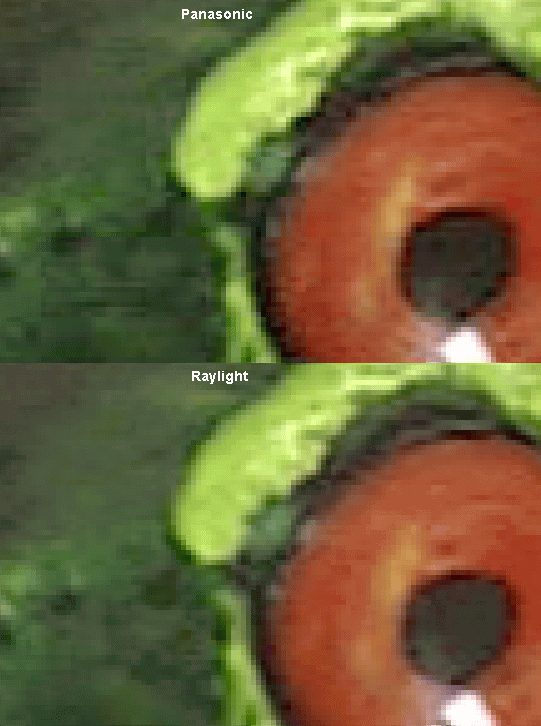
6) Monitor calibration can reveal noise that the end user shouldn't be seeing. In NTSC video, anything below about 7.5 IRE is all lumped together as "black". If there is crawling noise variation below 7.5, you shouldn't be seeing it, because it should all be classified as black. However, if your monitor is stretching the blacks or lifting the blacks, it might be magnifying the appearance of noise that nobody should rightfully be seeing. I have seen this on my own laptops; I have two, one showed clean footage, one showed noisy footage. I ran the Windows 7 Display Calibration tool and found out the monitor showing the noise was indeed out of calibration and the gamma was totally off. Using the calibration tool, the noise all magically disappeared. You should want your monitor to be properly calibrated anyway; I highly advise all users to run their display calibration tool.
7) Certain computers and codecs have a well-documented Gamma Shift. When working with footage, some NLEs can introduce a gamma shift into the footage. That can easily accentuate the appearance of noise.
--------------------------------------
So: how can you help?
If you're one of the folks who is seeing astonishing, ugly, "horrid" levels of noise on downloaded AF100 footage, you're a candidate to help us get to the bottom of what's happening. Describe your system, how you're viewing the footage, and let's start finding out what the common elements are.
Tell us:
1) What computer hardware are you viewing the footage on (platform, OS version, graphics card, and monitor)
2) What computer software are you viewing the footage with (an NLE, nero, VLC, Quicktime player, what?)
3) Are you viewing the raw downloaded .MTS files? Or have you done something to them (like ClipWrap or Log & Transfer or what?)
4) Have you calibrated your monitor and your television set?
5) Does the footage show noise on your calibrated HDTV television, when played by an AVCCAM camera (HMC150, HMC40, HMC80, or AF100) or when played back directly from the card on a blu-ray player? In other words, play the original footage from an SD card on your blu-ray player or in your camera, onto a calibrated HDTV. Are you seeing the noise in that case?
If you need assistance on how to calibrate a television, please refer to this article.
If you need assistance on how to calibrate your computer monitor in Windows 7, go to the Control Panel, choose Display, and then "Calibrate Color".
If you need assistance on how to calibrate your computer monitor in Apple's OSX 10.6.3, go to System Preferences -> Hardware -> Displays, choose the "Color" tab, and then choose the "Calibrate..." button to open the Apple Display Calibrator Assistant.
--------------------------------------------------------------
For sample footage: I have uploaded a card image that contains three clips.
1) a Chroma Du Monde Billups VF/X28 test chart, showing gray bars and color chips
2) ten seconds of SMPTE color bars, as recorded on the AF100.
3) ten seconds of a "still life" scene
To download the footage, go here:
http://www.mediafire.com/?wzdcba84rbaj9tg
Extract it all to a standalone PRIVATE folder and all its associated subdirectories, and copy that PRIVATE folder onto a freshly-formatted SD or SDHC card, preferably Class 4 SDHC or faster (I don't really know if some of the clips will play properly from a Class 2 or unrated SD card, actually, so def. use Class 4 or faster).
Background: I am an ex-computer programmer who made my living for two decades in the videogame industry, working on some of the biggest computer game releases (such as Command & Conquer and Disney's The Lion King). Much of my time was spent on low level graphics systems and implementing the graphics libraries across multiple platforms. In other words, I'm pretty confident I know what I'm talking about in this discussion. :thumbsup:
Hypothesis: I have seen enough footage to know that the AF100 delivers a rich, lush, full, sharp, beautiful, and CLEAN high-def image. Noise is absolutely, positively, not a problem in the original footage. But I've also seen enough complaints from people downloading footage, to know that they're seeing something. I believe that the computer is somehow introducing a dramatic (and unwanted) level of noise into the display. And I'd like to get to the bottom of what exactly is doing it.
I would like to use this thread to gather facts, which we can then use to get to the bottom of what is the real problem here. And I will aggressively, heavily moderate this thread. This is not the place for people to spout off opinions about how noisy the camera itself is, or any other such thing. This is a place for people to report their experiences as to what hardware and software they're using. Posts will be deleted or edited as necessary to keep the discussion on track and useful. I want to explore this specific hypothesis, so the only posts we need in this thread are from those who are experiencing the noise issue, and will share their exact hardware and software configurations that are showing this noise.
-----------------------------
Here is what is known:
1) The footage from the camcorder, played back by the camcorder, to a properly-calibrated monitor, is clean clean clean. I've seen it myself, and we have reports of many, many people who have seen it as well, who can testify that the footage from the camcorder looks brilliant.
2) The footage, when played back on a blu-ray player, to a properly-calibrated monitor, is clean, clean, clean. We have several reports of that, and I've seen it myself. When using a fully-implemented h.264 hardware decoder chip such as found in a blu-ray player, even people who have previously complained about noise have changed their story 180 degrees and said it looks stunning and fantastic when played from the blu-ray.
3) The AF100 is not the only camera to garner "noise" complaints. We've seen reports of HMC150 owners reporting excessive/horrible noise. And we've seen reports of GH2 owners reporting excessive noise. What do these all have in common? They all use IBP AVCHD. They all use a highly-efficient, high-quality version of h.264 compression that is very, very processor-intensive to encode and decode. People have even said that the GH2 looks a lot noisier than the GH1. The GH1 uses a very simplistic h.264 codec, as does the Canon line of DSLRs. The GH2 uses the highly-optimized IBP version. I contend that it is this difference in the codec that is at the root of the issue.
4) Monitoring can introduce noise, and computer monitors frequently make lousy video monitors. I used my Dell 2405's component inputs to view HVX200 footage, and it was shockingly noisy. I then plugged the exact same P2 card into my computer and played the footage back through the monitor's DVI input, and it was clean as a whistle. The Dell's component inputs add a tremendous amount of noise. Not all monitors are the same and the monitor can introduce problems.
5) Codec quality can have a substantial impact on the quality of the decompressed footage. Not all codecs are the same, and they don't all decompress the same! When talking about lossless codecs (such as LZW), then yes decompression will always be exactly the same, but when talking about lossy video codecs, decompression is not the same. An example of this is the DVCPRO-HD codec that Panasonic distributes with the P2 Viewer program. It takes "shortcuts" for speed purposes, using the computer graphics card's MPEG hardware decoder to render the coefficients table, which is inaccurate for DVCPRO-HD's DCT-based compression. Both MPEG-2 and DVCPRO-HD are DCT, but they're not the same. However, the P2 Viewer's DVCPRO-HD codec uses the MPEG-2 DCT routines from the graphics card in a manner that is very fast, and "close enough"; the result is that DVCPRO-HD footage viewed in the P2 Viewer looks *very* noisy, when in reality the footage isn't noisy! This is at the root of what I suspect is happening to the AF100/HMC150/GH2 footage as well. I suspect that the computers are "cheating" in their decompression, in a way that is turning super-clean footage into what some have described as having "horrendous" noise problems.
For those who want to explore the concept of the codec a bit more, Marcus van Bavel of www.dvfilm.com has custom-written his own DVCPRO-HD codec, and has been the source for some of this information. Marcus discovered that "The artifacts in the Panasonic decoder are due to the fact that it uses MPEG-2 coefficient matrix and as a result the high frequencies are two times overemphasized." They did this because computer CPUs at the time (we're talking about five years ago) weren't fast enough on their own to play back full-screen, full-res, full-frame-rate HD footage, so they tapped into the video card to accelerate the playback. And the video cards had support for MPEG-2 hardware playback. While the MPEG-2 coefficient matrix wasn't the same as the DVCPRO-HD coefficient matrix, it was close enough that you could at least play the footage and it looked reasonably similar. But unquestionably, quality suffered. DVCPRO-HD playback on a computer monitor looks like a noisy, grainy mess as compared to the same footage played back from the camera onto an HD monitor. Here's one example picture of the difference that a codec can make:
6) Monitor calibration can reveal noise that the end user shouldn't be seeing. In NTSC video, anything below about 7.5 IRE is all lumped together as "black". If there is crawling noise variation below 7.5, you shouldn't be seeing it, because it should all be classified as black. However, if your monitor is stretching the blacks or lifting the blacks, it might be magnifying the appearance of noise that nobody should rightfully be seeing. I have seen this on my own laptops; I have two, one showed clean footage, one showed noisy footage. I ran the Windows 7 Display Calibration tool and found out the monitor showing the noise was indeed out of calibration and the gamma was totally off. Using the calibration tool, the noise all magically disappeared. You should want your monitor to be properly calibrated anyway; I highly advise all users to run their display calibration tool.
7) Certain computers and codecs have a well-documented Gamma Shift. When working with footage, some NLEs can introduce a gamma shift into the footage. That can easily accentuate the appearance of noise.
--------------------------------------
So: how can you help?
If you're one of the folks who is seeing astonishing, ugly, "horrid" levels of noise on downloaded AF100 footage, you're a candidate to help us get to the bottom of what's happening. Describe your system, how you're viewing the footage, and let's start finding out what the common elements are.
Tell us:
1) What computer hardware are you viewing the footage on (platform, OS version, graphics card, and monitor)
2) What computer software are you viewing the footage with (an NLE, nero, VLC, Quicktime player, what?)
3) Are you viewing the raw downloaded .MTS files? Or have you done something to them (like ClipWrap or Log & Transfer or what?)
4) Have you calibrated your monitor and your television set?
5) Does the footage show noise on your calibrated HDTV television, when played by an AVCCAM camera (HMC150, HMC40, HMC80, or AF100) or when played back directly from the card on a blu-ray player? In other words, play the original footage from an SD card on your blu-ray player or in your camera, onto a calibrated HDTV. Are you seeing the noise in that case?
If you need assistance on how to calibrate a television, please refer to this article.
If you need assistance on how to calibrate your computer monitor in Windows 7, go to the Control Panel, choose Display, and then "Calibrate Color".
If you need assistance on how to calibrate your computer monitor in Apple's OSX 10.6.3, go to System Preferences -> Hardware -> Displays, choose the "Color" tab, and then choose the "Calibrate..." button to open the Apple Display Calibrator Assistant.
--------------------------------------------------------------
For sample footage: I have uploaded a card image that contains three clips.
1) a Chroma Du Monde Billups VF/X28 test chart, showing gray bars and color chips
2) ten seconds of SMPTE color bars, as recorded on the AF100.
3) ten seconds of a "still life" scene
To download the footage, go here:
http://www.mediafire.com/?wzdcba84rbaj9tg
Extract it all to a standalone PRIVATE folder and all its associated subdirectories, and copy that PRIVATE folder onto a freshly-formatted SD or SDHC card, preferably Class 4 SDHC or faster (I don't really know if some of the clips will play properly from a Class 2 or unrated SD card, actually, so def. use Class 4 or faster).
Last edited:


