Getting to the bottom of the noise complaints - is it h.264 uncompression software?

That's not true. There's a gamma shift in the video regardless of Quartz. In Quicktime 7 there's an option in preferences for FCP compatibility. If it's off then it will show the gamma shift. If it's on then it doesn't show the gamma shift. All Macs running OS X have the Quartz system now so it's nothing to do with Quartz.
Ok,
I remembered it a bit wrong.
Was it that you need supported hardware to be able to enable "FCP compability"?
 
Well, here's my contribution to the thread... I ran a series of tests today looking at the noise levels from -6db, 0db, 6,12, and 15db at three IRE levels; 15,50, and 75. I shot a white card out of focus and used the waveform monitor to "hit" each IRE level using shutter, ND and f-stop to control exposure. Then I cropped out a center 1:1 extraction from representative frames and built a matrix/grid in Photoshop. Next I added level adjustments to "pop" the noise slices at each IRE and expand to full values (0-255) for examination.

On top of that, I recorded each clip as both native AVCHD and on the nanoFlash at full bore 280Mb/sec i-frame. I rolled all that up into a layered Photoshop file so you can do things like toggle on/off the adjustment layers and toggle between the AVCHD and the nano codec. Here's what that looks like without the level adjustments on it...

http://ftp.datausa.com/imageshoppe/outgoing/AF100/AF100_grain_samples.png

But the real fun is to take the layered file and start messing around. Here's the zip...

http://ftp.datausa.com/imageshoppe/outgoing/AF100/AF100_grain_samples.zip

Looking at the noise in higher db settings you'll see a vertical banding pattern in the AVCHD that isn't there in the nano footage. Also the noise is more accurately rendered in the nano grabs. This is all from non-demanding subject matter (a grey field with no detail). Comparing the blue channel, the AVCHD "slabs" the noise in an impressionistic fashion while the nano codec records more faithfully what the signal actually looks like.

Again, this is SUBTLE, and you need to put a levels adjustment on it to bring it out. But, it's there and worth mentioning. I spent too many hours on this today... and it ain't real shooting.

More practically, I can see almost every level of noise at every db and IRE that make up my matrix grid when played out of the camera or the nano on a properly setup monitor. None of it will stop me from using the camera, but to test a thing is to know a thing. I'm pretty sure Black Press, and -4 ped will be my new friends. Test and move on. I hope this helps.

Regards,
 
Thanks for the comprehensive tests Jim. Over the years I've always found your post super informative.

Three cheers for Jim!

Well, here's my contribution to the thread... I ran a series of tests today looking at the noise levels from -6db, 0db, 6,12, and 15db at three IRE levels; 15,50, and 75. I shot a white card out of focus and used the waveform monitor to "hit" each IRE level using shutter, ND and f-stop to control exposure. Then I cropped out a center 1:1 extraction from representative frames and built a matrix/grid in Photoshop. Next I added level adjustments to "pop" the noise slices at each IRE and expand to full values (0-255) for examination.

On top of that, I recorded each clip as both native AVCHD and on the nanoFlash at full bore 280Mb/sec i-frame. I rolled all that up into a layered Photoshop file so you can do things like toggle on/off the adjustment layers and toggle between the AVCHD and the nano codec. Here's what that looks like without the level adjustments on it...

http://ftp.datausa.com/imageshoppe/outgoing/AF100/AF100_grain_samples.png

But the real fun is to take the layered file and start messing around. Here's the zip...

http://ftp.datausa.com/imageshoppe/outgoing/AF100/AF100_grain_samples.zip

Looking at the noise in higher db settings you'll see a vertical banding pattern in the AVCHD that isn't there in the nano footage. Also the noise is more accurately rendered in the nano grabs. This is all from non-demanding subject matter (a grey field with no detail). Comparing the blue channel, the AVCHD "slabs" the noise in an impressionistic fashion while the nano codec records more faithfully what the signal actually looks like.

Again, this is SUBTLE, and you need to put a levels adjustment on it to bring it out. But, it's there and worth mentioning. I spent too many hours on this today... and it ain't real shooting.

More practically, I can see almost every level of noise at every db and IRE that make up my matrix grid when played out of the camera or the nano on a properly setup monitor. None of it will stop me from using the camera, but to test a thing is to know a thing. I'm pretty sure Black Press, and -4 ped will be my new friends. Test and move on. I hope this helps.

Regards,
 
Agreed! Thanks Jim. Quite interesting. Cheers!

Can you elaborate on your conclusions? Also, what is your feeling on shooting 3200K vs 5400K? (in the previous test) They seem quite similar.
 
Agreed! Thanks Jim. Quite interesting. Cheers!

Can you elaborate on your conclusions? Also, what is your feeling on shooting 3200K vs 5400K? (in the previous test) They seem quite similar.

Thanks guys, but I don't really feel I've found anything new here. If I have any conclusion it's that the camera is noisier than I'd like, and noisier than I've been used to for the last couple years (EX1). Everything is a trade off. It's got the shallow depth of field that "all the kids love", and you don't have to sell your tech soul to the devil via a dslr to get it.

I sort of feel like it's HVX200 all over again, and since the sensors are so absolutely different in every respect, it's got to be the Panasonic image processing "special sauce" that is responsible for the issues. But I don't know, just guessing, leave that to responsible adults like Barry to figure out. I just want to know how it will work for me personally, and I figure I'll know by the end of the week.

It won't get in the way of story telling. Just watched "Men of a Certain Age", certainly the most grain of any current cable/network show (IMDB says Super 16mm 500T) and enjoyed the heck out of it.

Yeah, shoot 3200K, the camera seems killer in tungsten. I'll try a green screen and/or blue screen test both ways in the next couple days and report back.
 
How was the AVCHD footage decoded ? (ie. how did you take a screenshot for import into photoshop?)

The vertical banding pattern is interesting - is it fixed or does it move like noise? (hard to tell from a single screenshot)

Would it be possible to upload a sample clip? (That way Barry's hypothesis can be tested with a variety of decoders on different platforms)
 
How was the AVCHD footage decoded ? (ie. how did you take a screenshot for import into photoshop?)

The vertical banding pattern is interesting - is it fixed or does it move like noise? (hard to tell from a single screenshot)

Would it be possible to upload a sample clip? (That way Barry's hypothesis can be tested with a variety of decoders on different platforms)

Decoded via Sony Vegas 9, saved out from the timeline as a .png. As were the nanoFlash grabs.

The banding seems fixed.

Happy to upload a couple MTS files, they aren't terribly large. The 0db and 15db series makes the most sense... the clips have quite a few more IRE steps than I wound up using in the test, all are narrated on the audio track.

Regards,
 
So, I have been testing even further with the clips I received from Barry that have been very different on my system as compared to his system. I can finally PROVE that there is a disconnect, but I am not sure of a solution yet.

First, we were going to attempt to use the free x264 codec, and I am still looking at it, but from what I can tell, it allows you to use it as an encode, but not as a decoding algorithm for QuickTime. (But I don't think the 264 is actually the problem).

Instead, I remembered seeing the AVCCAM utility on the Panasonic site, so I downloaded it and convinced it to play the clips I got from Barry, and low and behold, it looks different and cleaner than the clips in QuickTime.

How did I verify this? Well that was easy. There is a utility in OSX called 'Digital Color Meter' that allows you to select a box size and it will report the color it sees in that box (I image it probably averages for larger areas). However, when I compared the noisy areas between the two, the luminance (since I was measuring gray areas) was off from 1% to 2%. Given that we know the gamma change is a curve, I didn't go through trying to figure out all the differences, but it was enough to know that the footage is being lightened by QuickTime when it shows it.

And, the noise looks the same in terms of how it is behaving between the clips, just one I have to bump down the gamma (Panasonic utility) to observe it.

So that solves the mystery of why some see it and some don't. I believe it is a gamma issue.

That said, comparing footage to my 7D, there are some settings I just don't like how much more noise they show on my system. The settings editman derived so far look the cleanest for me. I am going to do some more detailed analysis verses my 7D. Given I know the 7D so well, and I have really liked everything but the moire/aliasing, this is my image comparison. So far, I really like what I've seen of my AF100 and I am working on fine tuning it even further. The lack of moire brings a tear of happiness to my eyes :)

Stay tuned!
 
Okay, I know I was convinced that the gamma was the only issue earlier, but then I decided to really pixel peep. Gamma is one of the issues, and you can get the images closer by getting the gamma on the system closer, but now I have additional proof that not all H.264 decoders are working the same.

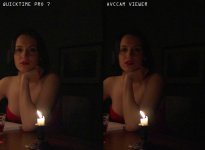
Now, understand that both these viewers were not at 100% pixel-pixel, but, I matched them exact window wise on the screen and took a PNG snapshot. What I am going to show you is, well, a bit shocking.

First, this is the candle lit image that we talked about earlier as shown by both programs. You can see the relative difference in gamma between the two pretty easy. I just wanted you to see that some of us are not crazy. If they look the same to you, well, they are not, without question. You can check the pixel values. They are roughly 1 to 2% off in value in some of the places I checked. Again, remember this is gamma we are talking about, so it's not a linear shift.

normal.jpg

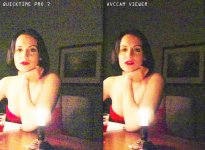
Now, for the shocking part. Take a look at these images. All I did was create two adjustment layers of +100 brightness each and exported the image from photoshop. I compared the jpeg to the original and trust me, the jpeg is NOT showing you what you see, it is there in the original png.

enhanced.jpg

Beyond just the gamma difference, look at the noise in the AVCCAM tool, it is much blurier in places whereas the quicktime results are very sharp all over the place. Look at the dress under her arms on the right. It is clear as day the difference in the decode there.

Which certainly explains why I am seeing such a difference.

So, next step, I bring up Premiere Pro and bring in the MOV file I created from ClipWrap (and didn't let it touch the file contents, just rewrap) and then the MTS file directly from Barry.

So, when I drag the cursor across the .MOV clip in the timeline, the gamma jumps down(brighter), then back up after I stop. WHAT THE HELL?!? When the clip plays, it jumps to the lower value (which means brighter) while it is playing. That's some serious bug right there!

Do any of you get that who have premiere pro CS5 with a clipwrapped clip on the timeline. It's not subtle either (also, make sure your mac is set to a gamma of 2.2 as this is more correct)

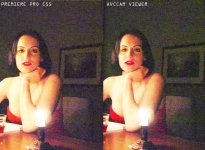
So I bring in the MTS file (by the way, the project is set to AVCHD 24p) and I don't see any of this tomfoolery. The image at this point looks comparable to the AVCCAM util. I blow up the image and do a snapshot, same thing, place it next to the AVCCAM and check this out:

update2.jpg

The noise signature looks the same between them, but for some reason in Premiere Pro, it has reduced the green channel (or pumped up the other two channels). What the hell?

So there you go.

1) I have proven that the gamma is not the same between QT and another app on the same system. We do not know if ClipWrap is introducing the gamma flag, we need to track that down and ask them to remove it if so. Would you like me to test this with Final Cut as well? That is the only other editing suite I have.

2) I have proven that the H.264 decode from quicktime is different than AVCCAM and Premiere Pro. Including, differences of color between AVCCAM/Quicktime and Premiere Pro.

The next steps would be this:

1) Test Final Cut Pro.

2) Try Premiere with different H.264 setting for project and look at results.

I will continue this tomorrow, but I do believe we are now finally getting somewhere.
 
Wowzer, one is used to getting such different renderings from different RAW processors for still images, but seeing it from different renders of supposedly baked-in H.264 is quite an eye-opener. There's obviously going to be some hoops to jump through to get a decent workflow for the AF101 when mine arrives :-(

Very glad to see people on the board chasing it down so hopefully I can have a good understanding of potential pitfalls when mine comes. Would be very interested to see the comparisons in FCP and with different H.264 project settings, Grimepoch.

... it would be worth doing at 1 pixel : 1 pixel on screen as well if you can, though, as one can imagine different renderers doing different resamples. Probably wouldn't affect the gamma but might affect the noise and relative softness of different blocks?

Cheers, Hywel.
 
I say the noise issue cannot be confirmed by the test above, because its not a 1 for 1 sample, but what it does show is difference in gamma.
 
Grimepoch, I downloaded some of the MTS files and brought them into ClipWrap, and turned them into .MOV files. I then imported those into FCP and put them in a sequence and let FCP create a sequence that matched the clip settings. When I pressed play, the clips also went darker then when the playhead was stopped on the clips. So, this is similar to what you were experiencing using the same workflow but in Premiere.

I dropped the same clips into a ProResHQ sequence and these did not do the same gamma shifting when I hit play. Also very strange.
 
I have been saying for over a month here, that gamma shifting is not literally "causing" excess noise, it simply allows it to be seen. If the camera is noisy, shifting gamma to allow it to be seen simply exposes noise that's already there. Shift gamma on a very clean sensor and your image will stay pretty clean. This gamma shift is downstream of the original introduction of noise.
 
I can finally PROVE that there is a disconnect, but I am not sure of a solution yet.
Thank heavens. Glad we're getting somewhere.

I have been convinced this was true, and I'm glad to see the proof.

Furthermore, let me guarantee you that the noise you've been seeing, does NOT accurately represent what the camera is supposed to look like. You're seeing a better representation in the AVCCAM Viewer version. I'm telling you, it looks clean on a proper production monitor.

Furthermore, the gamma shifting is just wrong. That's a bug in Quicktime, it looks wrong, and shouldn't be relied on as accurate. Anyone working with Quicktime files has to be aware of that -- and not just for the AF100, but for the HMC150 or any AVCCAM, or for any of the Sony NXCAM products too.

Dang it feels good to be getting somewhere! Now we just have to figure out a list of recommended practices, for people to develop a workflow that lets them see the footage the way it's meant to be seen, instead of the distorted way they've been seeing it.
 
I have been saying for over a month here, that gamma shifting is not literally "causing" excess noise, it simply allows it to be seen. If the camera is noisy, shifting gamma to allow it to be seen simply exposes noise that's already there. Shift gamma on a very clean sensor and your image will stay pretty clean. This gamma shift is downstream of the original introduction of noise.
That much is true, and obvious, although I still argue that unseen noise is unseen and therefore irrelevant.

But the real issue is an actual change in the noise, caused by different decompression algorithms. And that, we have finally isolated and proven. And that's what's causing the perceived noise problems, and once we figure out and isolate those things, we'll be on the way to being able to advise people on what's making their footage look wrong, and how to make it look right. Because those who are complaining about excessive noise, have been seeing the footage misrepresented.
 
I've uploaded a couple of the raw .MTS files if anyone wants to see how software other than Sony Vegas decompresses them. These are my step through IRE from 10 to 100, the 0db and the 15db series.

The noise fixed pattern "banding" can be seen in the 15db series all the way up the exposure ladder past 70, while the 0db series shows it in the darker areas, gone by 50 IRE.

Of course levels adjustments need to be applied around the noise "notch" to see this, if testing elsewhere.

I'm on to other areas of testing, but would love to hear if others decode with different noise results.

http://ftp.datausa.com/imageshoppe/outgoing/AF100/AF100_0_15db_noise.zip

Regards,
 
Gonna check 1:1 as well as I create my next samples. Will focus on the dress areas below the right side as that is the easiest to see what is going on.
 
I say the noise issue cannot be confirmed by the test above, because its not a 1 for 1 sample, but what it does show is difference in gamma.

Actually, yes, I looked at the images 1:1 and can confirm, the scaling was not introducing any perceptible difference. The AVCCAM image at 1:1 pixel has areas that are much blurier in the darks as the QT image. What I've shown you is what it looks like at 1:1 as well.

And it's not consistent where the blurriness in one is compared to the other.

For instance, in the AVVCAM version, when I look at the lower left of the picture on the wall in the back, the black of the picture has more detailed noise visible in it compared to the QT version, which is smoother in that area (relative to pixel luminance levels).

However, overall outside of the gamma, the QT has more detail being shown compared to the AVCCAM and so far Premiere Pro.

I am working on the other files. This also explains why when I record something with settings that have less detail in them, they look sharper to me as well, because I was viewing them in QT.

As a side note, I cannot say either of them is the 'correct' decoding. Just because the AVVCAM looks cleaner doesn't mean it isn't just hiding the noise in compression, which is what it looks like to my eyes personally. That said, given the 1:1 viewing of the footage at the correct gamma, with detail 0, the AVCCAM *looks* better. Pulling up the image, the AVCCAM looks splotchy whereas the noise in the QT decode is consistent across the image. Although the AVCCAM looks more consistent with other H.264 I have looked at, like the 7D. Makes you wonder if something in the QT decoder is not handling something in the H.264 structure right and is adding in more noise that really isn't there.

Another test, take the MTS in premiere, write it out to ProRes and then bring that in QT and look at the noise. This should take H.264 out of the equation. Stay tuned! :)
 
Back
Top