Getting to the bottom of the noise complaints - is it h.264 uncompression software?

Yeah, I tend to be long winded, as I want to cover many angles of my response so people see the whole picture, as on the internet, it is easy to assume someone hasn't thought of something, etc.

So I just went and watched the castle footage. It was AWESOME on this same Mac Book Pro. The detail setting...... -7

I don't know about you all, but the detail in the bark and the stone was absolutely AWESOME. For me, this just reiterates that I think the detail setting is the major contributor. What I will do when I get mine is shoot something in that gray range at all the detail settings so I can watch that footage and see what comes and goes on this system, because I am just curious.

Again, that castle footage was absolutely awesome. I'd really like to see that candlelit scene done in -4 and -7 and I bet it will look absolutely fantastic.

(The video http://vimeo.com/18277535)
 
I don't know that much about all the Panasonic settings, but Detail seems to be just some kind of artificial sharpening. Setting to the lowest setting is probably just turning that off.

However, page 52 of Vol. 2 of the manual says:

DETAIL LEVEL (Camera)
Adjusts the level of the image outline correction (in the horizontal and vertical directions).
-7...0...+7

V DETAIL LEVEL (Camera)
Adjusts the level of outline correction in the vertical direction.
-7...0...+7

By the description they give it would mean you move the outline correction in one direction or the other and zero would be none.

But then in actual use that we've seen it seems to be acting like a sharpening circuit with -7 being off, zero being halfway, and +7 being max.
 
Without quoting your long post (thanks for the detail btw), I can understand what you're doing. And it jives with exactly what I've been saying all along: it's going to end up being camera settings or black balance.
But it's not. The problem appears to be that certain programs are playing the footage inconsistently (which is why we're seeing more complaints about VLC and QT10, than we are about QT7).

But the main problem appears to be that certain playback systems are stretching the gamma out. They're distorting the playback. You can compensate for that by lowering the detail level, but that's putting a patch on top of a bug. The real solution would be for the gamma to not be stretched in the first place. However, people have been screaming at Apple for how many years about the QT gamma shift, and nothing has been done about it yet, so it probably never will be fixed.

What Grim and I have been doing is exchanging files offline because he's a programmer/engineer, and I'm a programmer, and we speak much the same language, and he sees the worst of the supposed problem, whereas I'm one of the many who see no problem at all.

For those who want to call "case closed" now, and just shoot detail -4 and below, go right ahead, that does seem to satisfy Grim and the Filippo footage is shot -7 and people seem happy with it. I am still bothered by the notion that footage that looks utterly gorgeous on proper calibrated displays, can cause such complaints among a certain section of users, and I'd like to find what the real, root cause is. But for those who want to move forward, using a lower detail level seems to satisfy Grim, and will likely satisfy many.

For my perspective, I have tested the detail settings extensively, and I think -4 is about as high as I would normally go. Not because of noise, but because any further than about -4 and you start seeing digital halos and edge enhancement, which is not a filmic trait. So I think most folks are going to stick to the -4 to -7 range just for overall aesthetics. However, it is true that the higher you set the detail level, the more visible noise will be (because, as noise is a tiny high-frequency detail fluctuation, the edge enhancement circuitry will find that noise and exaggerate the contrast of it to make it more visible). In The AF100 Book, I have a whole section on minimizing the appearance of noise, and one of the chief recommendations is to turn the detail level down.

The problem is, in a normal viewing environment, each increment of detail level results in a minor/tiny increase in perceived noise. But the way the noise-seers are responding, they're describing something that's more like a monumental massive shift -- the difference between -4 and 0, on a proper viewing environment, is the difference between maybe +3dB of gain and +4 dB of gain. But what some folks are describing ("horrendous", "horrid", and "unlike anything I've ever seen") makes it sound like the way they're seeing things is like the difference between +0dB and +40dB. So to me, that's a problem. Your system shouldn't be displaying it that way. It doesn't look like that on a production monitor, it doesn't look like that on a TV, and it doesn't look like that from a proper decode to a proper-gamma proper-calibrated monitor.

So I guess the easy way out would be to say "just shoot detail -4" and, if people are happy with that, hey, go forward in good faith. I still think there's something else at work and would love to find out what it is (along the lines of the BlackMagic/Kona/QT7/QT10/VLC things we've already discussed).
 
Last edited:
By the description they give it would mean you move the outline correction in one direction or the other and zero would be none.
No, it's an issue of translation here; but "detail level" affects both H & V simultaneously, whereas V Detail Level affects only V.

But then in actual use that we've seen it seems to be acting like a sharpening circuit with -7 being off, zero being halfway, and +7 being max.
Yes, that is correct.
 
Ok, I understand what you're doing now. I think it's a good idea. Hopefully something will come out of it. A few weeks back Jim Jannard posted on Reduser.net asking Apple to fix the gamma problem. There was a lot of discussion about it (and ripping on Apple) and a lot of people submitted bug reports and sent emails to Apple (me included). The thread was removed after a couple days. Hopefully Apple contacted Red and said they'd fix it and hopefully that's why the thread was removed. We can hope, but I'm not counting on it.

When you just mentioned that about VLC, I realized I never tried playing Leo's video through VLC and deleted the videos I downloaded. I went to the Vimeo page and there's a new version of the video there. Much, much less noise than the previous version. At one point does switch between 2 versions of a shot, saying "slight overexposure" and "fixed". I don't really see excessive noise in either shot anymore, but the entire video appears to have been color corrected (the skin tones don't look right anymore IMO and I see compression and banding issues I didn't see before). With the new version, VLC, QT7, and QT10 looked the same to me. I have a mid-2010 MacBook Pro 17" with NVIDIA 330M.
 
I downloaded the PRIVATE folder and played the clips. I don't see any excessive noise in any player I play the video back in. There's a little bit of noise in the table clip in the lower right corner of the video (where the shadow is below the table), at the bottom of the DSC Labs book (the black bar), and on the spine of the DVD case. But I really have to go hunting for the noise and it's mostly visible only when the scene is brighter. As the light changes to darker it's less noticeable to me. Again, I really have to go searching for the noise for it to stand out and it reminds more more of the HVX200 noise. It's nothing near what I was seeing with noise in Leo's original video.

Playback was on a mid-2010 MacBook Pro 17" with NVIDIA GeForce 330M graphics, 2.66 GHZ i7 processor, 8GB RAM. Display is calibrated.

Playback software used:
FCP 7.0.3 (ProRes HQ transcode)
QT Pro 7.6.6
QT X 10.0.0 (118)
Toast Video Player 3.0
VLC 1.1.5 64-bit
Also used Finder's Quick View feature with ProRes HQ clips

I didn't notice a difference between the players. FCP compatibility was turned on in QT7. When I turned that feature off I got the typical gamma shift but no increase in noise. I have Perian 1.2.1 and Flip4Mac WMV plugin 2.3.5.4 installed. I also have Adobe Premiere Pro CS5, After Effects CS5, and Photoshop CS5 installed in case that makes a difference (it shouldn't).

My setup (hardware and software) is the same as when I viewed the original version of Leo's video and saw excessive noise in that video in both QT7 and QTX, FCP, and with Quick View in Finder. I had tried Vimeo streaming, Vimeo download, and 2 different ProRes HQ files (from FTP download).

I also have a MXO2 Mini with 2.1.1.0049 software. When viewed through that (using FCP) to a calibrated Pioneer Elite Pro150FD 60" plasma the noise is even less (basically zero noise). With Leo's original video I couldn't really see any noise either. I suspect even with all noise reduction features turned off or to minimum (which is how I always have it) the plasma still does some kind of noise reduction.
 
Dear Friends,

Please forgive me as I have not read every post in this thread.

I just wanted to provide some of my experience.

We never recommend the VLC Media Player for critical viewing. Use something else.

One major player on another forum was thinking that another new camera was very noisy while using VLC Media Player. Then he used other software to evaluate the camera's footage and found out that the noise was not there.

I have nothing against VLC Media Player and I would expect this problem to be fixed in future releases.
 
We never recommend the VLC Media Player for critical viewing. Use something else.

One major player on another forum was thinking that another new camera was very noisy while using VLC Media Player. Then he used other software to evaluate the camera's footage and found out that the noise was not there.

I have nothing against VLC Media Player and I would expect this problem to be fixed in future releases.

I didn't notice any more noise in VLC than other players. VLC has always been buggy and unstable though. I rarely use it and I think it's being used here strictly for testing purposes.
 
I have spent many hours going over this footage at different settings with QT7, VLC, FCP, Premiere and a few other downloaded video playback mechanisms. I've spent a lot of time sliding the gamma settings around and observing the results. I'm also aware of the "gamma" issue that Apple has had for YEARS. As I told Barry, when I get my camera, I plan to investigate even further (gets here Monday). It is exceptionally noticeable with my Nvidia 9600GT-M and the glossy screen in my MacBook pro. It was even worse running out the external display to an HP monitor that I calibrated with the apple calibration tool.

Without doubt the video cards or LCDs could be the entire problem, I can dig up countless times when Apple has done things like include LCD displays that don't actually show full color depth but use dithered coloring that people were up in arms about. The fact of the matter on this machine is the detail enhancement algorithm is doing something that my mac book is definitely altering the intended gamma/color curve to where detail that is being enhanced in the noise is getting blown out of proportion. I'd also add that it is causing banding in the noise as well at 0 which I hadn't mentioned before which I think is just adding to the noise issue even further. It's not just a pixel peeper thing. At a gamma of 1.8, the candle lit shot was so bad, I wouldn't have even shown it to anybody. Which is why Barry was shocked I was seeing such a thing, and I was shocked he wasn't seeing it! :)

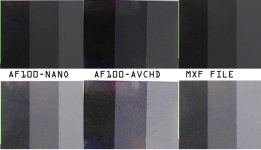
What Barry doesn't want to happen is that we all just use -4 or less without understanding why, or, if there is something else that can be done with footage shot at 0 that doesn't come across so noisy for those of us with display/card combinations that are showing this crazy phenomenon. I am personally MORE than happy with -4 to -7, but I am an engineer so the scientist in my head is like "why, why, why?" I've taken screen shots of the noise differences and amplified them as they are pretty extreme, which I'll show here:

compare.jpg

AF100-NANO is actually AVCHD at detail -4, and MXF is a NANO capture at detail -4 as well. The AF100-AVCHD is detail of 0. On my machine, AF100-NANO and MXF FILE are identical noise wise. They look great. Would be VERY happy with either. The AF100-AVCHD with detail of 0 is extremely noisy. Your eye instantly goes to the center gray bar as it is dancing all over the place. Everything else looks much better.

The bottom row I just enhanced the brightness in photoshop by around +100 just so the noise difference could be seen between the three. While it is probably darker for you, it's MUCH noiser than the other two without question in comparison with each other.

Why just that small range of luminance gets so much noiser on my machine is currently a mystery. But please believe me when I tell you, this isn't the pixel peeper in me speaking. I use a 7D, I mean, you know I'm willing to take a hit on quality to a certain level :)

For those that are nervous about the AF100, I wouldn't be. I can get the footage I want. But, as I said over and over, we still want to understand why OR what can we do in post to limit that strange noise if someone does want to use a more detailed setting.

The footage from my 7D never looks as sharp as the detail 0 setting on the AF100, so to that extent, it is hard to compare.
 
I wonder what the noise looks like at Detail +7. Regardless, if the Detail setting is simply a sharpening circuit, why not just leave it off rather than artificially increasing the detail? I'd think you'd get a more filmic, less video-ish look with the artificial sharpening turned off. If you needed to sharpen the image, couldn't that be done in post more cleanly if necessary? Or does sharpening in post also add this noise into the video?

Maybe Panasonic should be talking to Apple and/or the video card manufacturers about this problem. It seems to be isolated with the AF100 or the AVCHD codec implemented in the AF100. So it's something that Panasonic could fix in firmware with the codec or the video card companies can update drivers for. Assuming that is the issue and it could somehow be pinpointed and confirmed.
 
I would be interested to see what happens to opinions if this camera shot DVCPRO HD ( or an Intraframe codec) ..and was evaluated properly.

I asked previously who thought AVCHD was ready for the "big time" and professional workflows .

Nothing in this thread has absolutely convinced me it is.

Seems insane to me to "suggest" we shoot different settings for different media players or calibrated / un calibrated monitors !

Wonder what it would take for Panasonic to make and sell a "Pro" version of this camera with AVC Intra? (Is it it firmware , hardware or both?)

I am hoping (expecting) they will produce a P2 version . The "bones and concept" behind this camera" are simply is too good for AVCHD based workflows IMHO.
 
I would be interested to see what happens to opinions if this camera shot DVCPRO HD ( or an Intraframe codec) ..and was evaluated properly.

I asked previously who thought AVCHD was ready for the "big time" and professional workflows .

Nothing in this thread has absolutely convinced me it is.

Seems insane to me to "suggest" we shoot different settings for different media players or calibrated / un calibrated monitors !

Wonder what it would take for Panasonic to make and sell a "Pro" version of this camera with AVC Intra? (Is it it firmware , hardware or both?)

I am hoping (expecting) they will produce a P2 version . The "bones and concept" behind this camera" are simply is too good for AVCHD based workflows IMHO.

In my own personal opinion, I don't think AVCHD is the problem. I think the detail algorithm is too aggressive to handle all the circumstances the footage is watched on. Clearly a gamma of 1.8 on a fresh mac book with a clean install of the OS is a common viewing setting, and unfortunately, does not play nice with that aggressiveness. I mean, truth is, not all sharpening algorithms are created equal, so I am not really sure what the math is doing. I need to test with a Nano all the detail settings too, unfortunately, I do not have one yet so I won't be able to test what that looks like.

For me, for now, I am shooting at -4 to -7 (after I evaluate further) for ALL circumstances. I love how "Verse" and the new castle footage looks, and the detail is DEFINITELY enough for me. I will continue to investigate as of course I want to use my investment in the AF100 to its full potential. I want to discover how far I can push my footage and where.

Given we have the HVX200, if I compare the best footage on average out of it with what I have seen at -7 detail with the AF100, no thanks, I'll keep my AF100 :)
 
Regardless, if the Detail setting is simply a sharpening circuit, why not just leave it off rather than artificially increasing the detail?
That is a choice that many shooters will make, certainly.

If you needed to sharpen the image, couldn't that be done in post more cleanly if necessary?
It could be done in post, but ... you'd be sharpening the noise, and also any compression artifacts, and overall it just seems like if you wanted detail/edge enhancement, you're better off doing it in-camera, would be my guess. But yes, you can definitely also sharpen in post if that's the way you want to go.

Maybe Panasonic should be talking to Apple and/or the video card manufacturers about this problem. It seems to be isolated with the AF100 or the AVCHD codec implemented in the AF100. So it's something that Panasonic could fix in firmware with the codec or the video card companies can update drivers for.
No no no no no! Panasonic shouldn't be changing the video, to chase after some buggy gamma-shifting post-production error. That's exactly the wrong way to go about it. Panasonic should be making footage that looks fantastic -- and on a genuine proper calibrated production monitor, it does. The uncompression/NLE/computer guys should be trying to make their products able to accurately reproduce what the footage looks like -- and right now, that's not what's happening. That's where the error is. Whether it's entirely the "gamma shift" bug, or it's also a case of different uncompressors uncompressing differently, that's the part that needs to be fixed.

If they go screwing up the footage so that it doesn't look "wrong" when displayed on a buggy gamma-shifted bogus-uncompressing computer, then what will it look like when it's displayed on a proper professional broadcast monitor? Totally wrong.

Apple should fix their gamma bug -- not just for the AF100, but for every product on the market that gets affected by it. I bet 90% of the noise complaints would go away if that happened. And then for the rest, we have to look into things like the QT7 vs QT10 issues, or the VLC issues, that have been reported.
 
Seems insane to me to "suggest" we shoot different settings for different media players or calibrated / un calibrated monitors !
Agreed. Monitors and playback software should reproduce the images exactly as they're created and exactly as they're intended. Anything else is unacceptable.

Wonder what it would take for Panasonic to make and sell a "Pro" version of this camera with AVC Intra? (Is it it firmware , hardware or both?)
A lot of hardware. We've been clamoring for it for six months. It's not gonna happen anytime soon.

The "bones and concept" behind this camera" are simply is too good for AVCHD based workflows IMHO.
Depends on your AVCHD workflow. It worked brilliantly on "A Verse Before Dying". That's kind of what the whole point of this thread was, is to identify what workflows or programs introduce a problem, because for most of us, it just looks great all the time. But there are a few that are seeing grossly exaggerated noise issues. It is those who we want to find out what's different, and can they fix it on their end (through changing their playback software or calibrating their monitors or whatever) or is it something endemic (like the Apple gamma shift bug) that just needs to be fixed once and for all...
 
No no no no no! Panasonic shouldn't be changing the video, to chase after some buggy gamma-shifting post-production error. That's exactly the wrong way to go about it. Panasonic should be making footage that looks fantastic -- and on a genuine proper calibrated production monitor, it does. The uncompression/NLE/computer guys should be trying to make their products able to accurately reproduce what the footage looks like -- and right now, that's not what's happening. That's where the error is. Whether it's entirely the "gamma shift" bug, or it's also a case of different uncompressors uncompressing differently, that's the part that needs to be fixed.

If they go screwing up the footage so that it doesn't look "wrong" when displayed on a buggy gamma-shifted bogus-uncompressing computer, then what will it look like when it's displayed on a proper professional broadcast monitor? Totally wrong.

Apple should fix their gamma bug -- not just for the AF100, but for every product on the market that gets affected by it. I bet 90% of the noise complaints would go away if that happened. And then for the rest, we have to look into things like the QT7 vs QT10 issues, or the VLC issues, that have been reported.

Then I guess one question that should be answered is: Does footage shot at Detail setting of 0 have noise when viewed on a Windows computer with Quicktime? If yes, does the same footage have noise when viewed on a Mac and/or PC when transcoded to something other than Quicktime (i.e. Cineform, AVI, DNXHD, etc., avoiding any Quicktime codec entirely)? Basically, test it by taking Quicktime out of the equation on a computer that's never had Quicktime installed. That would have to be a Windows computer since all Macs have Quicktime and incorrect gamma by default. If the noise goes away on the same machine, then you can possibly blame it all on Quicktime. Otherwise it's something else (even though we all know Quicktime gamma is bad to begin with).
 
Barry, thanks for starting this thread.

Downloaded the PRIVATE folder and ingested using Final Cut Pro 2 to Apple ProRes 422.

GEAR/SOFTWARE USED:

- PowerPC G5 (Quad) OSX 10.4.11
- Final Cut Studio 2
- Quicktime 7.6.4
- Apple 23" Cinema Display
- Blackmagic Decklink HD Extreme
- Panasonic BT-LH1700W Monitor (via SDI)

and

- MacBook Pro 17" i7 OSX 10.6.5
- Quicktime 10.0

RESULTS:

- Clip #1: Noisy, excessively noisy on the table, over the model's left side;

- Clip #2: Dancer looks good, video banding and noise especially visible on screen right;

- Clip #3: Video noise in grey areas, excessive noise visible on screen left above the chroma key green square.

ANOMALY:

- When I view Clip #1 using the Final Cut viewer side-by-side to the Quicktime 10 player, the picture on the Quicktime player is noticeably brighter.

I hope this is helpful and a remedy is found because I want to buy this camera.

Also, most of my work requires me to shoot 30P over-cranked. Will there be an actual or theoretical quality loss using 30P verses 24P?

Thanks, -m
 
RESULTS:

- Clip #1: Noisy, excessively noisy on the table, over the model's left side;

- Clip #2: Dancer looks good, video banding and noise especially visible on screen right;

- Clip #3: Video noise in grey areas, excessive noise visible on screen left above the chroma key green square.

Where are you getting those videos from? What I downloaded had 3 clips: a test chart, SMPTE bars, and a small table with a few items on it.
 
Why this all or nothing mentality? Panasonic made the detail setting go from 7 to -7 for a reason, there are things you may or may not want to live with at either end of that setting spectrum for something that you do want. For instance, you don't want the haloing so you go at a max of -4 to prevent it from being too prevalent in the footage. Is that any more than having a variety of display mechanisms that show something else not wanted and you want to minimize it? Sure, in your case the result is showing up on a calibrated system, but for me, I and many thousands of other people are possibly going to see that extended noise in my situation. I have a target audience for a segment of our work that I know will be viewed on computers.

I fully understand that for Panasonic, their focus has to be the best footage in the best most accurate possible circumstances, and that is what it should be. But that said, to me, they've already provided the mechanism for me to tune the video to what works best on my system. What more could I ask for? Shooting at -7 is a more robust solution to me that handles a wider range of consumer devices that have less than adequate display characteristics when moving out of the perfect realm.

if Panasonic thought there was one solution for everything, they'd not have a range of settings to use. Period. Acceptable noise is a subjective argument and we all make decisions to what we feel is acceptable in what we are doing.

It's not the QT decoder. I had Barry send me an image sequence of the "noisy to me" footage and looked at still frames as well in QT, Preview and Photoshop. And I do trust Photoshop in terms of showing me the PNG files properly. All the same. Unless of course the decoder on Barry's machine is also faulty and the addition of the gamma issue on my mac is also a contributing factor.

Here are the facts; I view footage from the Red One, HVX200, 7D, T2I, 5DM2, HV30, D90, encoded film and AF100 on this machine. I know what noise looks like on this machine from a huge variety of settings and gain/ISO from the different cameras. It's not like I don't have a basis for what to expect. I've also seen the HVX200 footage itself played on probably 20 different TV, computers, monitors and 2 different projection systems. I am also familiar with how gamma is different and how the image changed in all those scenarios. I know how it looked different. I can say as well that 7D footage is more noisy on my system then on anything else I have seen it on, including my 47" Toshiba LCD or my Optoma 720p projector that I look at projected to 126". Believe me when I tell you, I know my equipment, and my viewing mechanisms.

When initially looking at footage shot at a detail setting of 0, I observed that it looked an incredibly lot more noisy in only certain areas of the image, and completely clean in others, which started all this. I wasn't alone. Regardless of the gamma setting, the detail algorithm does generate a lot of low level noise that is invisible on a properly calibrated system (or at least, acceptable), but with a little gain, it shows up because it's large blocky pieces that flash around a lot. If you tried to push this footage higher even on a properly calibrated system, that noise will eventually pop out for you, and it will be A LOT more than what you'd see at -4 or -7. My point is, with -4 and -7, because the noise floor in the images is pushed so much further down, which I can clearly see, you open up even the possibility of how far you can push that footage around.

My experimentation will be in trying to determine why the detail algorithm is making those blocky pieces I see. As I step through the settings, from 7 to -7, I will easily see the progression of how the artifact is formed and how it clears up. I want to understand why I don't see it in the blacks, but I see it in the dark grays. It is unlike any noise I have seen.

We can yell about Apple and their 1.8 gamma setting all day, but it is NOT going to change the fact that people have it and use it that way. I'm not willing to shoot with greater than -4 (as far as I can tell, camera gets here Monday) because I want every user to get THE BEST experience from my footage. I love the footage at -7 honestly so I have no complaints. I don't see the benefit at the zero setting from comparing the footage.

What I really want to see though is a chart shot at detail 0 with AVCHD and NANO. I am curious if H.264 of the higher sharpening is causing those artifacts I am seeing to look worse, or, if they are there to begin with and the H.264 is being accurate and just the gamma is pumping up that noise.
 
I think that is the first download, not the second. Go to post #72 on page 8 for the control footage for testing
 
Last edited:
Back
Top