Getting to the bottom of the noise complaints - is it h.264 uncompression software?

Interesting -- do you see armies of ants when not using Voltaic? You see them with VLC, obviously... so VLC is definitely contributing to it, but Voltaic isn't?

Very interesting, yes please let us know how the transcode goes.

Ok this was done very very late last night. upon looking again today I do see some ants crawling with Voltaic. Not as bad as VLC but still noisy. So now I transcoded with FCS 7.0.3 to ProRes 422 HQ and the noise is the same as with Voltaic! Its not visible in the 100% blacks but in the shades of grey! especially in clip #2 with the reflective Chroma Du Monde, in the area above where one sees your arm Barry, the noise is quite busy! No matter if I use Voltaic or FCS....thats really not nice! I want to get to the bottom of this and get it clean. Again this is macbookpro 15" 2.5 GHz intel with OSX 10.5.8 and QT 7.6.9 with FCS grading and HQ video prefs ticked. Graphics card is GeForce 8600M GT.
 
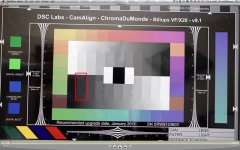
Okay, so here is a quick screen cap that I reduced to 640x480, it is NOT meant to look at any of the pixels and such. All it is meant to show is where I am seeing an excessive amount of noise:

chart.jpg

I am not sure why, but this one area is really bad, everywhere else to me looks great. Small changes in my Gamma settings HUGELY magnify the noise in just this area.
 
Black balance your cameras everyone. Dont forget. Do this after every single ISO change, Framerate change, resolution change, power on and Off, and battery change. It's vital for getting good images out of an AF100. It really helps to quiet down the lower 20% of the signal.


This is 1600 ISO, under Sodium Vapor, mixed with Blue Neon. look how much low grey tones there are. IF its gonna be noisy, its gonna be noisy here.....
 
Okay, so here is a quick screen cap that I reduced to 640x480, it is NOT meant to look at any of the pixels and such. All it is meant to show is where I am seeing an excessive amount of noise:
I am not sure why, but this one area is really bad, everywhere else to me looks great. Small changes in my Gamma settings HUGELY magnify the noise in just this area.
Okay, well, let's clarify what you mean by "really bad" and "excessive", because... while on my screen that chip is the noisiest, I would say that it looks "minimal" to "barely noticeable". So when you say "really bad", are you saying that it's more than any other? Would you say that someone who knows nothing about video, asked to look at the chart, is likely to say "whoa, what's up with that gray bar, why is it so speckly?"

Or, while this is somewhat insane, how about video'ing your screen to see if you can make a vimeo that shows us what the noise looks like? Because if we have a case of definitive "really bad", then we have what we need to go about finding a solution to it.
 
Exactly my findings! the total 100% black is clean but the greys are full of white tiny busy bees flying around like mad.
Just like in my last post -- let's quantify it. Can you show us in video what it looks like? Can you ask someone who wouldn't otherwise have any knowledge or bias about it (a mom, a little brother, whoever) to look at it as in "hey, take a look at this screen -- do you see anything to comment on?" and see if they point out the noise in that chip. If so, then we definitely have a contained case of "excessive" and can go forward.

Because, I reiterate -- on my system, I would classify the noise in that chip as "barely perceptible".
 
Okay, so here is a quick screen cap that I reduced to 640x480, it is NOT meant to look at any of the pixels and such. All it is meant to show is where I am seeing an excessive amount of noise:

View attachment 27579

I am not sure why, but this one area is really bad, everywhere else to me looks great. Small changes in my Gamma settings HUGELY magnify the noise in just this area.

on my calibrated 27" iMac I can see the noise/compression artifacts. But when sending that same clip from FCP on a Mac Pro with a Kona 3 card to a calibrated broadcast monitor, the noise/compression hardly registers. In fact if I wasn't looking for it in that block, I would have missed it, it's that faint. which is leading me to believe that it's not the codec, it what's decoding the codec.

I dont want to start a wild goose chase but a difference between my iMac and Mac Pro is that the iMac has Perian installed and the mac Pro doesn't.
 
Bingo!

on my calibrated 27" iMac I can see the noise/compression artifacts. But when sending that same clip from FCP on a Mac Pro with a Kona 3 card to a calibrated broadcast monitor, the noise/compression hardly registers. In fact if I wasn't looking for it in that block, I would have missed it, it's that faint. which is leading me to believe that it's not the codec, it what's decoding the codec.

I dont want to start a wild goose chase but a difference between my iMac and Mac Pro is that the iMac has Perian installed and the mac Pro doesn't.
 
Timur,

Could you make your night clip available for download, I see no noise in that clip and would like to compare it at full size to Barrys. Thanks!
 
Of the three places I've played the same clips they rank as follows:

1. 27" i7 iMac with 1gb vram (in FCP, QT, VLC, Color) (worst - obvious noise/compression artifacts in sub 40 IRE footage)
2. PS3 to calibrated 67" Samsung DLP/LED television (better)
3. Mac Pro with AJA Kona 3 card to broadcast monitor (best)
 
In fact if I wasn't looking for it in that block, I would have missed it, it's that faint. which is leading me to believe that it's not the codec, it what's decoding the codec.
Exactly what I see, and exactly my conclusion as well. That's what we should all be seeing. Seriously, I have to strain to make out any noise at all.

I dont want to start a wild goose chase but a difference between my iMac and Mac Pro is that the iMac has Perian installed and the mac Pro doesn't.
That's not starting a wild goose chase, that's proposing one potential difference and now it's up to the community to verify or discard that notion.
Another possible difference between the two is the graphics card.
 
4) Monitoring can introduce noise, and computer monitors frequently make lousy video monitors. I used my Dell 2405's component inputs to view HVX200 footage, and it was shockingly noisy. I then plugged the exact same P2 card into my computer and played the footage back through the monitor's DVI input, and it was clean as a whistle. The Dell's component inputs add a tremendous amount of noise. Not all monitors are the same and the monitor can introduce problems.

Didn´t read all the pages now, but I wonder why my Dell 2405 makes some AF-100-clips look noisy on vimeo, but almost every other clip on vimeo looks "normal". If it is the monitoring then there is noise in the image before and vimeo (or h264 or x264) only enhances the effect. I have yet to see a flat image from an AF100 noisefree. I saw great clean footage with contrast, but not really anything with a high dynamic range. But now the cam´s out so we should soon see what´s going on.
 
Didn´t read all the pages now, but I wonder why my Dell 2405 makes some AF-100-clips look noisy on vimeo, but almost every other clip on vimeo looks "normal". If it is the monitoring then there is noise in the image before and vimeo (or h264 or x264) only enhances the effect. I have yet to see a flat image from an AF100 noisefree. I saw great clean footage with contrast, but not really anything with a high dynamic range. But now the cam´s out so we should soon see what´s going on.
What you're describing is not what I'm talking about. Once a clip gets to vimeo, the damage is done. I'm talking about plugging the camera directly into the Dell 2405 and using it as a monitor -- it's awful. Makes things look horribly noisy, even when they're not.
 
The component inputs on the 2405 are the best example of completely useless junk. Run the image through an HDLink and you'll get a fantastic image, with the exception of the overly bright backlighting.
 
It's not perian. I just tested another user on the same system that does not have Perian installed with the same calibration settings and the noise looks the same on all shots. That said, I am not sure which codec is being used when I decode in quicktime, so I am trying to determine that now. Maybe Perian is not being used if OSX already has a decoder, and I know it does.
 
Does anyone know if installs of other codec packages or Viewer apps will overwrite the default QT MPEG/MT2/M2V default methods of decoding? Or perhaps not overwrite, but install it's own codec/decoder and then hijack the system's default mapping from the default QT version, to the similar one that it installed? I have Flip4Mac, VLC, and MPEG StreamClip installed.
 
We already have confirmed cases that people are seeing substantially different results depending on what decoder they're using. QT7 produces cleaner output than QT10, and VLC produces consistently noisy output according to many of our responders.

I'm pretty confident that we are on the right track and that cheating/lazy decoders are responsible for much of the noise confusion we're seeing on the forum.
Do we have any screen shots / sample footage? Sorry if it's been posted, but I don't have enough time to read all the pages right now. I'd like to see these differences.
 
I just got my AF100...did a quick test in the office and saw a ton of noise in the dark areas of the frame, on both my 30" Cinema Display and my output monitor. Outputting using Blackmagic Decklink Extreme HD. I made a DVD of the footage and played it on a 42" LCD and it looked GREAT. Turns out I had to update my Blackmagic software. Check your software on your output devices.
 
Back
Top