Getting to the bottom of the noise complaints - is it h.264 uncompression software?

Nope, I didn't miss anything. Re-calibrated my monitor (again), footage looks great to me. Other footage looks great. Footage I have shot with my 5D, HPX500's, GY-HD110's, etc. All look great. I dunno...

its the decoding of the avchd footage not when viewing the footage on a monitor.
i.e. you can view a clear footage of other footages from other cameras because it is not in avchd. thats obvious.

however, avchd supposedly, if not decoded properly, footage will have noise. so the research is finding if this is true. if so, what would be the right way to decode avchd
 
I think it's better to wait until we can do all this testing with footage shot with production cameras. All the footage so far has been from pre-preduction cameras. The reason why I think this? Because I've viewed non-graded footage from the AF100 that hasn't shown any noise and really only the video from Leo's shoot exhibited the noise. Joe Walker said what the post process was and it was very typical and nothing out of the norm. It's very possible there was a problem with the camera that caused the noise, even if it's for only some people and some monitors. This is the only thing that makes sense. If it was because of the computer hardware or monitors or anything like that then you'd see the noise in nearly all AF100 footage, but no one is saying it's in all AF100 footage, and even non-AF100 footage. So I say wait until someone can shoot a test with a production AF100 and distribute the footage for testing.

EDIT: I also graded the ProRes download of Leo's shoot and couldn't get rid of all the noise. So the fact that "A Verse..." and other videos have been graded doesn't mean anything, because if they had the kind of noise Leo's video did then they wouldn't have been able to get it out of those either. This is especially true for "A Verse..." which doesn't really have any noise at all.
 
Last edited:
excuse me if this is a stupid question, but if this is all a function of the codec, this playback problem (if it is indeed a problem) would be fixed by using an external higher bitrate recorder right?

im just trying to decide if i need to buy a nanoflash or not.
 
1) iMac 2.93 Ghz i7 quad, OS 10.6.5, ATI Radeon HD 5750, 27" side-lit LED LCD iMac monitor, FCP 7.0.3
2) Viewed with VLC, Quicktime X, and converted with ClipWrap to view in FCP Canvas
3) Raw in VLC and QT X, and ClipWrap converted for FCP Canvas
4) Have not calibrated, using default iMac gamma
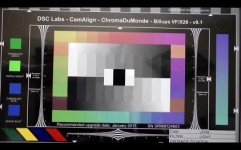
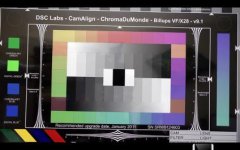
5) I'm seeing the same noise when viewed with VLC, QT X, and FCP's Canvas. It's not in the blacks, but the dark greys, most noticeable in the first dark grey bars (not black) on the chart, and especially in the dashed circles. Basically, the chart wouldn't look too bad at all (very nice, in fact), if it were'nt for this range of greys. Unfortunately, in this chart shot, all of the reflections of the white wall that are on the blacks of the chart, appear noisy. What it looks like to me, is definitely a chroma related issue in the compression -- it's showing a fast moving compression blockiness pattern. I'd best describe it as taking a huge image of a digital cammo pattern (aka., blocky pixelated cammo), shifting the hue of the pattern to a green leaning toward yellow, reducing the opacity of the image to ~5% and dropping it over an otherwise clean chart, matting it to show only in the dark greys, and then randomly keying the transformations of the cammo layer all over the place at a rapid pace. The color bars look good. The still scene looks good overall, but with some slight hints of noise coming through in the same spots -- the reflections on the shiny blacks, like the right side of the girl's hair on the far right of the photo.

Notes: I have Flip4Mac installed, but not Perian, I have the drivers/codecs for a Matrox MXO2 LE w/ Max installed, my Quicktime settings are not set to adhere to Final Cut Pro's gamma. While not calibrated, my monitor looks good to my eyes. The blacks are very black for an LCD. I'd speculate from my observations, that if I calibrated I would find that my gamma is correct, but my color is leaning to green/yellow slightly in the blacks, but that's just speculation based on what I'm seeing vs. others. I have my backlighting set to about 90%, but I can clearly see the noise even with the backlighting set to 50-60% range. I'm no stranger to noise having shot exclusively in Cine-D gamma on the original revision of the HVX since it was released. I'm confident that I could clean up the image with grading or DeNoise, but the amount of noise seen in the dark greys on the chart is more than I was expecting from the AF100.
 
excuse me if this is a stupid question, but if this is all a function of the codec, this playback problem (if it is indeed a problem) would be fixed by using an external higher bitrate recorder right?

im just trying to decide if i need to buy a nanoflash or not.

I wouldn't be buying anything yet. While there is speculation, that is it. NOTHING has really fully pointed to anything at this point.
 
"normal" 400 ISO. Interestingly enough, this is the exact same camera that was used to shoot Leo's footage, and the exact same camera that was the "A" camera on "A Verse Before Dying".[/QUO

Really? That's interesting. What a big difference the interpretation makes.... though, leos footage looks pretty darn good to me. :)
 
1) iMac 2.93 Ghz i7 quad, OS 10.6.5, ATI Radeon HD 5750, 27" side-lit LED LCD iMac monitor, FCP 7.0.3
2) Viewed with VLC, Quicktime X, and converted with ClipWrap to view in FCP Canvas
3) Raw in VLC and QT X, and ClipWrap converted for FCP Canvas
4) Have not calibrated, using default iMac gamma
5) I'm seeing the same noise when viewed with VLC, QT X, and FCP's Canvas. It's not in the blacks, but the dark greys, most noticeable in the first dark grey bars (not black) on the chart, and especially in the dashed circles. Basically, the chart wouldn't look too bad at all (very nice, in fact), if it were'nt for this range of greys. Unfortunately, in this chart shot, all of the reflections of the white wall that are on the blacks of the chart, appear noisy. What it looks like to me, is definitely a chroma related issue in the compression -- it's showing a fast moving compression blockiness pattern. I'd best describe it as taking a huge image of a digital cammo pattern (aka., blocky pixelated cammo), shifting the hue of the pattern to a green leaning toward yellow, reducing the opacity of the image to ~5% and dropping it over an otherwise clean chart, matting it to show only in the dark greys, and then randomly keying the transformations of the cammo layer all over the place at a rapid pace. The color bars look good. The still scene looks good overall, but with some slight hints of noise coming through in the same spots -- the reflections on the shiny blacks, like the right side of the girl's hair on the far right of the photo.

Notes: I have Flip4Mac installed, but not Perian, I have the drivers/codecs for a Matrox MXO2 LE w/ Max installed, my Quicktime settings are not set to adhere to Final Cut Pro's gamma. While not calibrated, my monitor looks good to my eyes. The blacks are very black for an LCD. I'd speculate from my observations, that if I calibrated I would find that my gamma is correct, but my color is leaning to green/yellow slightly in the blacks, but that's just speculation based on what I'm seeing vs. others. I have my backlighting set to about 90%, but I can clearly see the noise even with the backlighting set to 50-60% range. I'm no stranger to noise having shot exclusively in Cine-D gamma on the original revision of the HVX since it was released. I'm confident that I could clean up the image with grading or DeNoise, but the amount of noise seen in the dark greys on the chart is more than I was expecting from the AF100.

Okay, so that is a VERY excellent description of exactly what I am seeing as well on my MacBook Pro. I am use Perian by the way. Everything looks good on the test chart except the gray area. And it looks as you describe as well.

When you look at the still video, do you see noise in the black parts of the DVD case edge that are gray because of the lighting?
 
Ok,

I took a look at Barry's footage:

1. On a BlueRay player feeding a Panasonic GAOO Tube in standard definition, the footage looks extremely sharp, clean, and clear. No visible noise at all.

2. On my editor (Speed Edit), I loaded the clips natively, and the footage of the chart looks very clean. I really cannot see much if any noise there. The other clip looks a little noisy in the lower right corner, but only a little bit. Other areas appear very clean, such as the dark hair. If I look really closely, I can detect some pixel movement (what I would call electronic film grain), but it is soooo subtle, it is barely there.

3. Encoded a 1920x1080 WMV with a high bitrate. Looks very good to me. (will upload to vimeo soon) Again, I can detect some grain movement, but it is very subtle.

Here is the Vimeo test:

http://vimeo.com/18232493

Watching the vimeo clip I notice noise in certain areas, but when I watch the clip I used to upload to vimeo, I really do not see it unless I am looking very closely. So vimeo is degrading the quality a bit. Perhaps if I had used MP4 as mu upload format, it would have looked cleaner? I dunno. I am usually happy with WMV as an output format, as clients love the convienience. Otherwise I render uncompressed AVI for SD output to BetaSp (and I have no doubt the AF100 will look stellar using that workflow).

4. Any cleaner than this would mean the footage would have a "still" look to it! Is that what you guys want? Footage so clean and sharp that it looks grain (noise) free? Some grain is nice, no?


Cheers.


.
 
Last edited:
Ok,

I took a look at Barry's footage:

1. On a BlueRay player feeding a Panasonic GAOO Tube in standard definition, the footage looks extremely sharp, clean, and clear. No visible noise at all.

2. On my editor (Speed Edit), I loaded the clips natively, and the footage of the chart looks very clean. I really cannot see much if any noise there. The other clip looks a little noisy in the lower right corner, but only a little bit. Other areas appear very clean, such as the dark hair. If I look really closely, I can detect some pixel movement (what I would call electronic film grain), but it is soooo subtle, it is barely there.

3. Encoded a 1920x1080 WMV with a high bitrate. Looks very good to me. (will upload to vimeo soon) Again, I can detect some grain movement, but it is very subtle.

Here is the Vimeo test:

http://vimeo.com/18232493

Watching the vimeo clip I notice noise in certain areas, but when I watch the clip I used to upload to vimeo, I really do not see it unless I am looking very closely.

4. Any cleaner than this would mean the footage would have a "still" look to it! Is that what you guys want? Footage so clean and sharp that it looks grain (noise) free?


Cheers.


.

I'm all for a little grain, but not like radioactive grape nuts lurking in the shadows waiting to eat me! :) I kid of course.

What I don't understand is why I just downloaded the ProRes clip samples for ...Verse... and looked at them with the SAME settings as all the other clips and the ...Verse... clips have NO objectionable noise AT ALL to me. If anything I see some haloing in the light in the bar with the guy with his back to us as it pulses, but there is NO noise in any of the grayer areas of the shot. It looks awesome. Absolutely awesome. I don't see this same level of noise in even the new shot from Barry which I see noise in the edge of the DVD case. It baffles my mind that such different results are being obtained from the SAME camera.

I also watched the Vimeo version of the movie AGAIN on the same system and all the footage looks perfect noise wise to me, both inside and outside. All the dark scenes, the gradients along the skin look great.

And why is it just in the gray areas we are seeing it on Macs with Nvidia cards. Unfortunately, all my machines are Nvida so I cannot test another card.
 
Getting to the bottom of the noise complaints - is it h.264 uncompression software?
In this case, the answer will be no. AVC/h.264 decoders are bit-accurate. They all produce the exact same output.

You do mention that not all DCT-based decoders were built equal and some took shortcuts for decoding. It's a common misconception that AVC also uses Discrete Cosine Transform. Actually, it uses Integer Transform. I would be lying if I said I knew the difference off-hand, but I seem to remember that it is both simpler to implement and it guarantees a predictable output.

From EBU TECHNICAL REVIEW – January 2003 6 / 12 by R. Schäfer, T. Wiegand and H. Schwarz - emphasis mine:
capturefl.png


However, the AVC/h.264 standard does not specify what happens in the pre-processing stage, as you point out. I would hope that no PC software players are applying temporal smoothing or other noise reduction to the decoded signal - I haven't seen this happen but it wouldn't surprise me. And no codec can govern an inaccurate monitor, of course. So I think your points 6 and 7 are the most likely explanations.

If there is this much discrepancy in people's experiences with this camera, I would first of all point my finger at the display (well, of course I would - look at my signature :) ). Maybe some CMOS-related phenomenon are worth investigating too (effect of internal temperature on noise levels, etc.)

BTW Barry, I had no idea you worked at Westwood! I loved playing that licensed game of The Lion King when I was little!
 
Last edited:
Hello,

I'm not sure if this is suggested elsewhere in this thread: Has anyone shot a test scene with the AF-100/101 using both the HD-SDI out (ie to ProRes on a KiPro) AND to the internal cards
and then compared the result? Wouldn't this be a way to confirm that we're actually dealing with a codec or decompress issue? I wish you all luck on your endeavour. It's much appreciated.

Kind regards,
Terje Rian
 
screw it, the camera is noisy! Everyone return it so I can get my hands on one sooner than later! Come on guys, this is getting a bit over the top. I download the files (any from the AF100) and watch on multiple LEDs, DLP's, LCDs and ALL OF THE FOOTAGE looks GREAT. On my laptop, sure I see noise, as with any other camera I load on it.
It's either that or PANASONIC, you made a Lemon according to most here....
 
I think the noise looks perfectly acceptable. My Windows 7 plays it back flawlessly. VLC, Media player classic, default media player, everyone of them show the image properly. There is noise in the blacks, but it's good looking grain. The only problem is that it tends to break up the encoding slightly as the grain can be too much for AVCHD. But perfectly acceptable.

The only nitpicks I have are that the camera isn't as sharp as I hoped and that there is still some slight moire in the resolution charts.
 
Viewed test files using:


  • Windows Media Player, default settings (no enhancements)
  • Win 7 Home Ed. 64 bit, Dell XPS 8100
  • Planar PX212M 21" monitor, properly calibrated (also used for MRI/CT exam viewing)

All 3 files look exceptional, with ABSOLUTELY NO DISCERNIBLE or OBJECTIONABLE noise.

∴ AF100 rocks at my house
 
Last edited:
All three files look fine on my Windows 7 laptop in both VLC and MPC. I come from HMC150-land. Personally, I love what Panasonic did to implement the H.264 codec. The "high" profile encoding has never let me down. I will say that H.264 is NOT an editing codec. I use cineform and get nice CC images.
 
Windows 7 64, i7 CPU, 8GB Ram, NVIDIA GeForce GT 430, Dell U2711 calibrated windows 7 style. I downloaded both tests, preview best full in Sony Vegas 9.

The new download looks clean. There is grey on the chart due to reflection, I think, otherwise perfectly clean. The bars are spotless. I had the same experience as everyone else with the noise in the candles as gamma change makes them acceptable. I did not see noise in the black dress of the belly dancer and thought that looked exceptionally clean also. I think it's important to continue testing the belly dancer footage, my wife's protestations notwithstanding ;)
 
MacBook Pro 2.4 GhZ.

I viewed the clips natively in Toast 10 player and VLC, running Mac OS 10.6.4. (Is that native?) I wonder what kind of process Toast and VLC uses to view those guys.

No noise at all on Clip 1 and 3. But I do see a little on clip 2 in the upper left corner by the circle in both players. Also, seems like there is a little noise in all the grey, but the blacks look good. Another weird thing, overall the image looks a "tiny" bit smoother, blurrier from the VLC player. Also, Toast seems to ever so slightly crop the image.

This is from VLC
Screen shot 2010-12-28 at 9.43.34 AM.jpg

This is From Toast.
Screen shot 2010-12-28 at 9.43.17 AM.jpg

Thoughts? Thanks for the test Barry!!

Bp.
 
In this case, the answer will be no. AVC/h.264 decoders are bit-accurate. They all produce the exact same output.
You know the difference between theory and reality, right? In theory, there is no difference between theory and reality. But in reality, there always is... :thumbsup:

We already have confirmed cases that people are seeing substantially different results depending on what decoder they're using. QT7 produces cleaner output than QT10, and VLC produces consistently noisy output according to many of our responders.

I'm pretty confident that we are on the right track and that cheating/lazy decoders are responsible for much of the noise confusion we're seeing on the forum.
 
Okay, so that is a VERY excellent description of exactly what I am seeing as well on my MacBook Pro. I am use Perian by the way. Everything looks good on the test chart except the gray area. And it looks as you describe as well.

When you look at the still video, do you see noise in the black parts of the DVD case edge that are gray because of the lighting?

Honestly, when viewing at 100% on my monitor (iMac i7), it's not very noticeable, especially now that I have daylight in my office. At 200%, yes it's very noticeable as is noise in other parts of the image -- such as the "embossed" part of the tablecloth which looks kind of like it would if someone put the wrong type of mushrooms in the salad bar. At 100%, the noise in the chart really jumps out at me, but not in the bars or the still shots.
 
You know the difference between theory and reality, right? In theory, there is no difference between theory and reality. But in reality, there always is... :thumbsup:

We already have confirmed cases that people are seeing substantially different results depending on what decoder they're using. QT7 produces cleaner output than QT10, and VLC produces consistently noisy output according to many of our responders.

I'm pretty confident that we are on the right track and that cheating/lazy decoders are responsible for much of the noise confusion we're seeing on the forum.

I'm not convinced it is the actual decoding of the H.264, to me it seems to be some post processing after the decode with some internal gamma correction. From what I've also read, it seems more people in windows based hardware are seeing less noise than OSX based hardware. Given the gamma differences right out of the box between both operating systems, I am not sure how different they are even after you calibrate them.

Where I am baffled is that the blacks are VERY clean on the still life you shot, and the chart, yet the grays and ONLY the grays near the bottom left are noisy. This is where I just don't understand why there is so much difference. If the noise was more evenly distributed I wouldn't notice it as much, but it pops right out at me because it is ONLY so much in the gray areas, and so clean everywhere else.

Those same levels of gray in the ...Verse... ProRes files do not produce noise at all like that. Not even close. Others also see the noise in just the gray area. That is what I am focusing on. If the noise was consistent with the sensor on an even distribution, it would be present in the blacks as well. It is not. So something is either crushing the values in those blacks or expanding the values in the gray. Even slightly higher gray values and there is ZERO noise.

Strange.

Edit: I will create a screenshot where I can show you where I see the noise on the chart.
 
Back
Top