GH5 Game Over, Panasonic

The image sensor voltage is proportional to linear light. Sensor acquisition is usually 12-14 bit. 13 actual stops of linear light cannot be contained within the 12 bit word even as it easily is more than enough to accommodate all 13 stops as non-linear light. This is the opto electrical transfer function. Yet the premise of raw to the video maker is that you bypass OETF processing and work directly through the metadata on the underlying data set of the imager.

Working directly with linear RAW data is practical for still photos, they aren't excessively large. With video, linear RAW occupies too much storage space, restricting your maximum capture duration. Fortunately, there's no perceptible loss in converting linear RAW into log RAW when the internal processing is done at the native bit-depth of the sensor. That's because log RAW matches the luminance response of the human eye far more closely than linear RAW. With lossless data compression, 12-bit encoding is more than wide enough to encode 14+ stops of log RAW data.
 
Last edited:
Again read my posts. I did not say poor RAW controls I said basic and I mean basic as compared to a stills RAW app like C1 or ACR. I also didn't say Resolve 'had' hidden processing - don't know if Resolve has hidden NR or sharpening or how good the demosaicing algorithm is but it's not beyond the realms of credibility to suggest they might be doing hidden stuff to sweeten the image or cut corners to speed up processing (err just like in camera processing) and like stills RAW apps do?
Obviously you have more manipulation potential with RAW, much more but again we will probably never agree on the significance of this for the average GH user who by definition is on a tight budget doing personal or non commercial jobs vs a commercial shooter like yourself who needs the absolute best and most flexible file they can get.

To be clear.

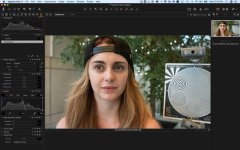
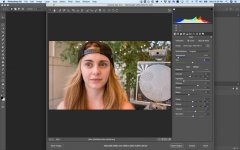
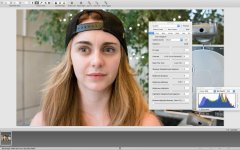
Here's screen shots of a BMD shot DNG from an Ursa Mini 4.6K open in C1, Irident and in PS.

I still can't fathom what you're talking about when you decry the basic controls of Blackmagic RAW and say it's not as good as an app like C1.

Well here it is. The DNG file open in C1. You can't do that with many other motion RAW files that I know of. How can you claim that the RAW controls are basic and then infer hidden processing compared to other apps when the other apps you mention also open the same files ?

JB

C1_Iri.jpgC1_BMD.jpgPS_bmd.jpg
 
To be clear.

Here's screen shots of a BMD shot DNG from an Ursa Mini 4.6K open in C1, Irident and in PS.

I still can't fathom what you're talking about when you decry the basic controls of Blackmagic RAW and say it's not as good as an app like C1.

Well here it is. The DNG file open in C1. You can't do that with many other motion RAW files that I know of. How can you claim that the RAW controls are basic and then infer hidden processing compared to other apps when the other apps you mention also open the same files ?

JB

View attachment 132661View attachment 132660View attachment 132662


I said the Resolve controls are 'basic' this means the cover some err basic controls needed to develop RAW. I'm not 'decry' (ing) them and this has nothing whatsoever to do with hidden processing. The very fact that 3 RAW apps can open the same file has nothing the do with it either unless you process them to produce the same output and compare the differences. The fact that the 3 examples you provided all look very different is an indication that RAW is not giving you an unprocessed starting point. Take a RAW file, set all the controls in a selection of RAW apps to default and then see the result and they will all look different depending on what hidden processing the app developer decides is a baseline. Then look at fine details and noise etc and compare. To sum up - RAW is not some sanctified or pure image untouched by anyone before you get your hands on it. Again - this does not mean RAW is no good or that RAW is not better than an internal codec or that Resolve can't handle it properly and I'm looking forwards to using RAW on the P4k in certain circumstances.
 
Brawley can't get past the negative connotation implied by your use of the term "hidden processing" and you are in fact nurturing the confusion by implying the possibility it could be deliberate manipulation to sweeten the image. I feel the app developer's baseline intent is more benign than that. That said, you are correct to say RAW is not pure and he acknowledged BMD RAW is a log transform. That's where the hidden processing would be and I'm going to change the term to a more benign "default processing." It is true the mathematical transform is unknown to us. No one knows what it is. Tiff 6.0, ISO12234-2, Adobe DNG and C1 formats all DO NOT CARE what it is. It's not necessary to know the details of the transform for compliance with DNG. It's only minimally necessary for even Resolve to know, just enough knowledge is put in so that it doesn't go far out of range when the image data is loaded. But because the log transform is an OETF, it is not sacrosanct and you can't rule out the possibility.
 
Camera processing and post processing is getting confused here. We must be careful not to conflate Resolve's image controls with some aspect of the P4K or the RAW file format. Just because BMD happens to make them both, doesn't make them the same.

The fact that the same image is processed differently by 3 different apps goes straight to JB's point.
 
The DNG file contains a linearisation table for the log encoding that happens.

So you know. There’s that.

If the critique is actually about how Resolve handles RAW...

Errr...

I guess tell that to majority of major studios and post facilities that continue to choose Resolve for final colour / post.

I know for a long time most preferred the Resolve software debayer over the Red Rocket debayer for finanoutput with RED files.

Tell us all, if Resolve is so basic please let us all know what the best motion RAW processor is that you’re using.

JB
 
I am not sure what the issue/criticism is here. :undecided

It is actually a good thing that raw is converted from linear to log when it is below 14 bits.
Feel free to insist on an option to get linear 12 bit raw, but I would not use it!
 
Last edited:
I guess tell that to majority of major studios and post facilities that continue to choose Resolve for final colour / post.

Tell them what? I was not criticizing the use of BM Log raw. It was brought up as a rebuttal. If you don't remember what that was then let's move on.

Tell us all, if Resolve is so basic please let us all know what the best motion RAW processor is that you’re using.
That's not my position. I am a huge fan of Resolve Studio and a current user.
 
Confirmed, you can record BRAW 5:1 to SD cards. Feedback indicates that even 12:1 compression looks great. Concerns about file size for workflow and archiving seem to be largely negated.
 
Companies like Panasonic and Sony would be wise to stop messing around with the LOG stuff and create a RAW ecosystem in their mirrorless cameras. It sounds like the new BRAW would not be as taxing as H.265 LongGOP material. So we seem to have encountered a crossroads. Innovate or someone else will.
 
The beta is first out for the Ursa Mini, but it is confirmed to be coming for the P4K, and at least one beta tester has confirmed using it on the P4K, including recording to SD.
 
Companies like Panasonic and Sony would be wise to stop messing around with the LOG stuff and create a RAW ecosystem in their mirrorless cameras. It sounds like the new BRAW would not be as taxing as H.265 LongGOP material. So we seem to have encountered a crossroads. Innovate or someone else will.
Confirmed. You can download clips and see for yourself. On my MBPr it uses significantly less CPU for playback than h265.
 
Wow. Blackmagic really has their act together. The title of this thread just went from hyperbole to legitimate statement. But then, September 25th is coming. We'll see the answering salvo from Panasonic. This is fun.
 
The chart suggest pretty meager cards for the 12:1, another thread said with current cards that 5:1 is possible? Just what I read, subject to verification. The bit rates were shown in the video when he started talking about the variable bit rate mode but I didn't study that specific portion as I'm not buying right now. Lot of things could change between when I'm ready to buy something and right now. Would love to see this in the Fuji XT3 along with "unlimited" record times, even if it cost an extra $200-$300usd as an optional purchase or a premium camera version.
 
Back
Top