Fuji X-T3 released

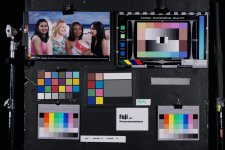
Thanks. Notice once again how high the saturation of yellow is even though this is an X-H1.
I am thinking of building some LUT's to take that aspect down on the X-T3, where it is even more present.
Traditionally, I am not a fan of LUT's but this distortion needs to be taken care of.
Besides 3D LUT creator are than any other apps out there that people prefer ?
Or perhaps a camera profiling app for video cams ? I know they exist for ICC profiling of stills cameras, but not necessarily for Video.

https://www.lightillusion.com/matchlight_ims.html
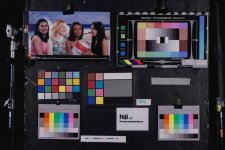
 
Alexa Mini (BT.709) and X-H1 (Eterna) side by side controlled test:

View attachment 134456

View attachment 134457

Red needs less green + less saturation/level, yellow needs more saturation+level+green, and slightly less contrast in the highlights:
XH1c.jpg

That's ~5 minute tweaks in Photoshop. Note dark skin tones too red and still more work needed. That said, the Fuji looks pretty good for skintones, where ETERNA looks like a style vs. trying to be accurate. "What the eye sees" accurate would be a great setting for all cameras.

I checked out the X-T3 and EOS R at Samy's a few days ago. The build quality and displays on the EOS R where very good, whereas the X-T3 the displays where dramatically lower quality as was the overall build quality and feel. That's fair for $1400 vs. $2300. Since the Fuji doesn't have a flippy screen, adding a high quality external monitor would balance the user experience a bit.

If Canon were to release a less video-crippled EOS R2 that would be very compelling. For video quality and video features, the Fuji far exceeds the Canon. For stills I'd pick the EOS R for FF, native Canon lens support, superior battery time, and better displays. A lot of folks jumped from the A7 III to the X-T3 for video. Will be interesting to see if folks jump back to the A7 III with the new ultra-fast eye-AF firmware upgrade due shortly. Seems almost like all the manufacturers are working together to keep people buying new cameras and switching brands back and forth :)
 
This is the result of X-H1 to Alexa conversion using Matchlight, with 600 sample points:

View attachment 134477

That looks really quite good. Nice job.
However, at $825, Matchlight is so much more expensive than 3D LUT Creator ($99) that it's just not going to happen.
Also it appears that one needs to purchase Lightspace in order to do format conversion. More $$.
3D LUT Creator also has a matching function. Would be interesting to compare the results from the two applications.
 
Last edited:
That looks really quite good. Nice job.
However, at $825, Matchlight is so much more expensive than 3D LUT Creator ($99) that it's just not going to happen.
Also it appears that one needs to purchase Lightspace in order to do format conversion. More $$.
3D LUT Creator also has a matching function. Would be interesting to compare the results from the two applications.

If you've got Photoshop: https://www.premiumbeat.com/blog/how-to-generate-easy-luts-in-photoshop/
Or the HALD method (special image pattern that represents a 3D LUT as a 2D image): https://generator.iwltbap.com/

I'd expect 3D LUT Creator to work fine too, as would Resolve.
 
If you've got Photoshop: https://www.premiumbeat.com/blog/how-to-generate-easy-luts-in-photoshop/
Or the HALD method (special image pattern that represents a 3D LUT as a 2D image): https://generator.iwltbap.com/

I'd expect 3D LUT Creator to work fine too, as would Resolve.

That is fantastic, because the best results I have ever achieved were from Adobe RAW developer in photoshop (for instance for ML), however the process was just painful for frame by frame processing of DNG's.
 
I'm not sure I understand.
I could ask a colorist to do some magic with the IMO unconvincing/untrue red/orange using "Matchlight" or "3D LUT Creator" and applicate the resulting custom LUT to whatever X-T3 footage, NO MATTER the varying light condition I would be shooting in?
That would be fantastic and I'd buy the X-T3 immediately.
Then, I would still have to shoot ETERNA or other profiles, to avoid the magenta problem in LOG, correct? That is something only Fuji can hopefully solve via firmware, right?
Thanks
 
I'm not sure I understand.
I could ask a colorist to do some magic with the IMO unconvincing/untrue red/orange using "Matchlight" or "3D LUT Creator" and applicate the resulting custom LUT to whatever X-T3 footage, NO MATTER the varying light condition I would be shooting in?
That would be fantastic and I'd buy the X-T3 immediately.
Then, I would still have to shoot ETERNA or other profiles, to avoid the magenta problem in LOG, correct? That is something only Fuji can hopefully solve via firmware, right?
Thanks

The magenta tint is in all materials including film sim and F-log. HLG has the least amount. F-log has magenta banding on top of that, in certain situations.
 
I'm not sure I understand.
I could ask a colorist to do some magic with the IMO unconvincing/untrue red/orange using "Matchlight" or "3D LUT Creator" and applicate the resulting custom LUT to whatever X-T3 footage, NO MATTER the varying light condition I would be shooting in?
That would be fantastic and I'd buy the X-T3 immediately.
Then, I would still have to shoot ETERNA or other profiles, to avoid the magenta problem in LOG, correct? That is something only Fuji can hopefully solve via firmware, right?
Thanks


Not exactly. I tend to make profiles for different lighting conditions. If you can shoot a chart in varying circumstances it becomes a very powerful tool to make 5-6 base LUT's as a starting point. However, even when you can't, in a new situation you can take a TIFF for instance of your problematic image and import it into 3D LUT creator and manipulate/customize the image. Then output the LUT to use for the rest of your footage. Or you can use that image and ask the application to do a color match with the TIFF from other footage and output a LUT for that footage. Basically a LUT is like a highly specific color correction that is application agnostic. It can be used in your NLE's, Photoshop or Davinci. Once you have been through a variety of circumstances, you begin to know what LUT is needed.
 
For those of you who are disappointed that DVXUser refuses to grant the X-T3 its own sub-forum here, if you are on FB, this Fuji page over there has a lot going on with 21k members, quite a few X-T3 owners, although it is decidedly much more consumer still photographer oriented than pro video user oriented. But if enough of us join over there, we can provide more video centric content.
https://www.facebook.com/groups/FujifilmXTcameras/
 
I don't know but none of my PMs of the past year have received any response of any kind.

Well, they appear like lightning if someone mentions something political, so I'll take one for the team here:

Impeach Trump!!

(Mods, please let us know what we need to do to in order to get a dedicated forum for the XT-3 here at DVXUser so we can start categorizing information by topic instead of trying to find it in this gigantic thread. It would be a huge help to the existing community and probably draw some new members as well!)
 
They do have the 'Other Cameras' section with 'The New Guys' and 'Other Other Cameras', but I guess it is always nice to have your own area and feel a part of a dedicated group.

However, if they do create a new one then that will open up suggestions for/comments about others (including the long-awaited ARRI section).
 
V2.10 firmware for X-T3 released:

http://www.fujifilm.com/support/digital_cameras/software/firmware/x/xt3/index.html

1. Recording over 4GB movie file as one file  Movie files are no longer split when the file reaches 4GB file size. The file is recorded as one file providing an SD memory card greater than 32GB is used (excludes 32GB).

2. Fix of slight defects.

F-log/film sim output mode 4K constant 1.18x crop issue is not fixed in this update.
 
Back
Top