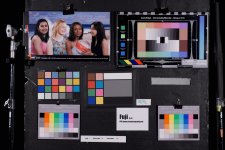
Fuji X-T3 released

Ninja V won't fix the colour discrepancy though.

I'm beginning to question if the X-T3 in-camera recording is actually the correct colour. Because I used a BBC tool to modify the metadata tags to BT.709 and it had no effect on the colour.

That Northface jacket in real life is actually more magenta than orange shown in the in-camera recording, and the grass is a bit too warm.

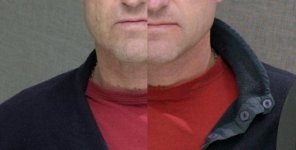
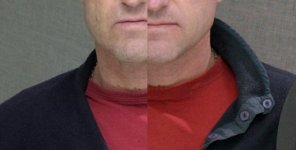
What I saw was not good in terms of the red's from the X-T3 compared to my F3's. The output is of course sharper from the Fuji and the skin has much more information. Which is excellent, but there is definitely a color issue. It's clear that I am going to have to profile the camera in order to pull better color out of it, but no, magenta red's are not acceptable.


Fuji X-T3 on the left, F3 on the right.

Screen Shot 2019-01-29 at 01.34.03.jpg

One thing that is positive is that the F3, like many cameras fails my tried and true moiré test (you can see some on the grey tuille background in the above example) but the X-T3 passes with ease.
 
Last edited:
I'm more concerned about the red in his skin tone than I am about the shirt. Skin tones on the fuji look light years better imo. Fuji skin tones are just fabulous!
 
For me, the skintones look nicer from the F3 in that above example. There's a healthier ruddiness to them.

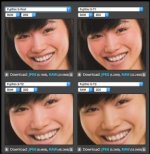
I've just thrown together a little comparison from playing around with various LUTs, conversions and transforms in Resolve. Everyone keeps raving about the results they're getting from Eterna, but for me, applying Fuji's Eterna LUT to FLOG footage in Resolve yields this pretty nasty, very muted and somewhat crushed result. Their FLOG to WDR LUT is a little better, but both seem to need a considerable boost in low-mid saturation and levels to bring them towards a conventional 709ish look.

Using Fuji's FGAMUT to BT.709 LUT is a big help though, and I found I could get a very pleasant result from simply doing the conversion to BT.709 and then boosting the saturation and curves manually.

Doing the FGAMUT to BT.709 conversion, and then dropping in a Sony Venice LUT does really nice things to the skintones (and seems to yield more accurate red tones in general). I really like this look for a near finished 709 finish, it's a little bit "poppy", but nicely so.

Adding an FLOG to Arri Rec709 LUT then boosting saturation and lifting the image with some curves yields a pleasant result. The skintones seems fairly natural here.

What do people think? Any favourites below?:


DCoQz11.jpg
 
I'm more concerned about the red in his skin tone than I am about the shirt. Skin tones on the fuji look light years better imo. Fuji skin tones are just fabulous!

The Fuji has a great deal more color information in the skin tones than many other cameras and things like highlights on a forehead retain more information. However, the sample in my previous post was not corrected on either camera in a meaningful way. As a colorist I know already though that the red's in the image from the X-T3 will never reach the levels of the F3 because there is already too much yellow in the face on the X-T3. This means there are crossing colors. The shirt is too blue and the skin is too yellow. A proper profile/remapping needs to be done on the camera. Even a BT.601 to BT. 709 transform will not yield the deep red's of the F3 in this situation. This is one of the reasons why that old camera was so good. Sony really optimized it.
 
Last edited:
By the way where can I get the BT.601 to BT.709 3D LUT from ?
Any links would be appreciated.

It's in the comments of one of those links posted earlier.

Or PM me your email and I'll shoot it through to you.

I now believe that the colours from external recordings are correct. Tried some high-end finishing tools (Assimilate Scratch, Baselight and Nucoda), in-camera and Ninja V recordings match perfectly and is consistent with how Ninja V looks in Premiere.
 
I now believe that the colours from external recordings are correct. Tried some high-end finishing tools (Assimilate Scratch, Baselight and Nucoda), in-camera and Ninja V recordings match perfectly and is consistent with how Ninja V looks in Premiere.


I have tried the transforms and the colors may be correct, but the red's are definitely an issue with this camera. They are not red they are magenta/blue. It looks like a profiling application is needed in order to optimize the spectrum. Currently it is impossible to correct the red's without either effecting skin tones too strongly or going constantly into secondaries. Further, I notice that the blues lack proper density.
 
I have tried the transforms and the colors may be correct, but the red's are definitely an issue with this camera. They are not red they are magenta/blue. It looks like a profiling application is needed in order to optimize the spectrum. Currently it is impossible to correct the red's without either effecting skin tones too strongly or going constantly into secondaries. Further, I notice that the blues lack proper density.

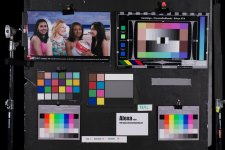
Rendering of saturated red/blue colours is an issue for all cameras, prosumer and high-end, except for ARRI cameras of course.

https://cmltests.net/Alexa-Mini-2018.html
 
Rendering of saturated red/blue colours is an issue for all cameras, prosumer and high-end, except for ARRI cameras of course.

https://cmltests.net/Alexa-Mini-2018.html

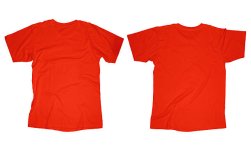
My F3 does saturated colors extremely well. I am still amazed. In my estimation less muddy than even the Alexa Classic. Of course it is "grainier" and a bit softer than 4k cameras today, but that actually can give it a film-like quality. The red shirt in my photo above is easily achieved.

What I like on the X-T3 is that the skin tones are really well supported with lots of chroma info. However, it is also clear from my tests that the issue is that the yellow level is far too high/saturated on this camera. It is almost double the level of saturation of the other colors. Thus reduction of the yellow pushes the red part of the spectrum towards magenta. From what I have seen many Fuji users have noticed too that it is overly present compared to previous models:

https://www.dpreview.com/forums/post/61677446

Screen Shot 2019-01-30 at 23.54.40.jpg
 
Last edited:
The red shirt in my photo above is easily achieved.

Colors are always so difficult to discuss because the brain is so complex. I guess that's why we have had color and film 'wars' since the beginning of cameras.

Like IMO, the red on the F3's shirt is not the proper color of red in my mind (hues/shades/etc aside).

P.S. You should also provide your personal opinion in this thread based on your career:

http://www.dvxuser.com/V6/showthrea...-colorist-is-paid&p=1986779729#post1986779729

Red.jpg
 
Colors are always so difficult to discuss because the brain is so complex. I guess that's why we have had color and film 'wars' since the beginning of cameras.

Like IMO, the red on the F3's shirt is not the proper color of red in my mind (hues/shades/etc aside).


I can assure you that the red shirt in the image I provided is the proper color, because the person in the image is me. :)
 
We can all only assure ourselves because that particular red is not the proper color of red in my brain.

Red Shirt.jpg

Red.jpg

P.S. Looks of course better than the Fuji, but just saying. Maybe I like my red brighter.

Red Shirt.jpg
 
Last edited:
For me, the skintones look nicer from the F3 in that above example. There's a healthier ruddiness to them.

I've just thrown together a little comparison from playing around with various LUTs, conversions and transforms in Resolve. Everyone keeps raving about the results they're getting from Eterna, but for me, applying Fuji's Eterna LUT to FLOG footage in Resolve yields this pretty nasty, very muted and somewhat crushed result. Their FLOG to WDR LUT is a little better, but both seem to need a considerable boost in low-mid saturation and levels to bring them towards a conventional 709ish look.

Using Fuji's FGAMUT to BT.709 LUT is a big help though, and I found I could get a very pleasant result from simply doing the conversion to BT.709 and then boosting the saturation and curves manually.

Doing the FGAMUT to BT.709 conversion, and then dropping in a Sony Venice LUT does really nice things to the skintones (and seems to yield more accurate red tones in general). I really like this look for a near finished 709 finish, it's a little bit "poppy", but nicely so.

Adding an FLOG to Arri Rec709 LUT then boosting saturation and lifting the image with some curves yields a pleasant result. The skintones seems fairly natural here.

What do people think? Any favourites below?:

Honestly I like the look of the camera when it's not transformed too much. I usually just use curves and saturation with no LUT.

Out of your examples my favorite is FLog to Eterna w/curves or Arri w/curves. The only difference between the two to my eye is saturation is higher in the former.
 
Alexa Mini (BT.709) and X-H1 (Eterna) side by side controlled test:

View attachment 134456

View attachment 134457

Thanks. Notice once again how high the saturation of yellow is even though this is an X-H1.
I am thinking of building some LUT's to take that aspect down on the X-T3, where it is even more present.
Traditionally, I am not a fan of LUT's but this distortion needs to be taken care of.
Besides 3D LUT creator are than any other apps out there that people prefer ?
Or perhaps a camera profiling app for video cams ? I know they exist for ICC profiling of stills cameras, but not necessarily for Video.
 
Last edited:
Back
Top