
Navigation
Install the app
How to install the app on iOS
Follow along with the video below to see how to install our site as a web app on your home screen.
Note: This feature may not be available in some browsers.
More options
You are using an out of date browser. It may not display this or other websites correctly.
You should upgrade or use an alternative browser.
You should upgrade or use an alternative browser.
FS700 Slog2 PP Reds look Orange
- Thread starter sandor82
- Start date

Mitch Gross
Veteran
To put it in perspective, other cameras that baked in the white balance include the ARRI D-21, the Phantom HD, and I believe the Dalsa Origin. RAW means not deBayered. That's it.
paulcurtis
Veteran
IMHO baking white balanced data through reduced bit depth (and the FS7 has had issues in the past with banding and bit depths) may cause more problems. The cameras Mitch quotes are all recording greater RAW bit depths AFAIK.
cheers
Paul
cheers
Paul
The easiest and most practical approach I've found so far is to shoot an extra stop lower than what'd you'd normally shoot. If you overexpose a shot on SLog2 and you're shooting anything Red, the red object or subject will be orange. No matter what LUT i've put on an overexposed shot, the red object is always leaning on the orange side. If I shoot a bit underexposed, the red objects in the shot appear correct once I apply a LUT. Definitely not the ideal situation, but that's my work around.

Jim Arthurs
Well-known member
The easiest and most practical approach I've found so far is to shoot an extra stop lower than what'd you'd normally shoot. If you overexpose a shot on SLog2 and you're shooting anything Red, the red object or subject will be orange. No matter what LUT i've put on an overexposed shot, the red object is always leaning on the orange side. If I shoot a bit underexposed, the red objects in the shot appear correct once I apply a LUT. Definitely not the ideal situation, but that's my work around.
I've not found that to be the case... I shot this 1 stop over-exposed, recorded to UHD ProRes... and no color adjustments beyond lift/gamma/gain using the appropriate Convergent/Nick Shaw LUT in Resolve...
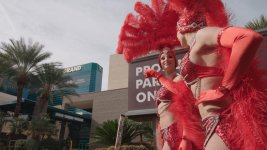
Regards,
I've not found that to be the case... I shot this 1 stop over-exposed, recorded to UHD ProRes... and no color adjustments beyond lift/gamma/gain using the appropriate Convergent/Nick Shaw LUT in Resolve...
Regards,
Jim, your reds in that shot do look true as I expect they were in person. I find the built-in (provided?) 7Q LUT for "slog2 -1 & -2 stops" also renders true reds, but the image is very basic and contrasty. ...if only there was a LUT for just the gamut correction...
I'm been at a similar place with the Reds looking Orange without a colour space conversion (gamut) applied. Question to all who are more knowledgable with LUTs & colour science:
- Is it possible to have a custom LUT made that just effects the Gamut, but no Gamma/Exposure/Look change? It could take the "FS700-Slog2" and convert to 709 colour space, along with another that outputs more of a "standard slog2"
- Apply that as a primary node, and layer a secondary LUT that only effects the Gamma/Look?
This would allow for everyone to easily correct the weird/tricky "FS700-unique-slog2" Gamut, then easily make/use/find LUTs which can be used to take the 709 or Slog2 to their personal desired "color look/gamma". Also, using the gamut-altering LUT as a primary, and your custom secondary, you could easily save a custom single LUT to use on the 7Q for monitoring on set.
Am I off track with this method of thinking? (Fingers crossed this could be a plausible option!)
***Added: maybe this would be as simple as taking one of the CD provided -1/-2 stop LUTs with good reds, and adding an exposure bump of +1/+2 to offset the exposure change? (Ideally less back/fourths the better, starting from scratch, but maybe that makes no difference as it's all eventually math?)
Last edited:
This is the issue I've been trying to address for a while. Take a look at the thread I started a while back (link below)...you'll see myself and Jon Betz have come up with LUTS that do improve the colour inaccuracies of SLOG2 in the FS700 (look further into the thread for LUTS you can download - the last ones from Jon Betz I think are the best). They're not perfect, but they are definitely more accurate than many other SLOG2 LUTs, when it comes to colour accuracy across ALL colours. I'm still hoping to improve further.
http://www.dvxuser.com/V6/showthrea...-for-good-skin-tones-for-Odyssey-7Q-amp-FS700
http://www.dvxuser.com/V6/showthrea...-for-good-skin-tones-for-Odyssey-7Q-amp-FS700
This is the issue I've been trying to address for a while. Take a look at the thread I started a while back (link below)...you'll see myself and Jon Betz have come up with LUTS that do improve the colour inaccuracies of SLOG2 in the FS700 (look further into the thread for LUTS you can download - the last ones from Jon Betz I think are the best). They're not perfect, but they are definitely more accurate than many other SLOG2 LUTs, when it comes to colour accuracy across ALL colours. I'm still hoping to improve further.
http://www.dvxuser.com/V6/showthrea...-for-good-skin-tones-for-Odyssey-7Q-amp-FS700
Awesome! I wish I had seen that thread sooner...
Just tested it out, and managing to slightly tweak the -1stop version of Jon Betz's LUT, to use as a baseline primary with lower contrast, then using another LUT for a basic film look (ImpluZ). Reds do look very close to accurate! Just a little over saturated, but easy to adjust on each shot.
I'll see if I can get some reliable results across a bunch of lighting scenarios, and post them up when I'm back from the next few weeks on location. Thanks Jonathan!
Jim Arthurs
Well-known member
I don't see them as any sort of universal replacement... Here's what I'm talking about... using the 2 stop LUT's on the same clip... no other adjustments other than flopping out the LUTs...
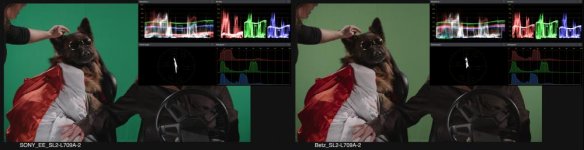
(larger image so you can read the scopes)
http://ftp.datausa.com/imageshoppe/outgoing/SonySLOG/SL2_BetzVSshaw_2.jpg
Reds are certainly exaggerated with a strong push to orange to expand them, but as you can see on the scope, they weren't off in the first place with the original LUTs...
Regards,
(larger image so you can read the scopes)
http://ftp.datausa.com/imageshoppe/outgoing/SonySLOG/SL2_BetzVSshaw_2.jpg
Reds are certainly exaggerated with a strong push to orange to expand them, but as you can see on the scope, they weren't off in the first place with the original LUTs...
Regards,
AaronChicago
Member
I just use Colorista or Resolve to shift the 'hue' of red away from orange.

fatman
Active member
reading this thread, I guess I've noticed it. The way I work because I have fast turn-around times is that I look at the LUT in the 7q just to see if I'm satisfied in a 'ball-park' kind of way. In FCPX I've created different colour correction profiles that now serve 80% of what I'm doing and add some minor tweaking.
Here is my most recent segment I shot of a boxer (I do a lot of boxing) - do you guys think my reds are "orange"? I shot 4k pro res in the 7Q, slog2 on the fs700 and use vintage 70s and 80s canon FD/FL lenses. and again just simple FCPX colouring other than the very opening which was tiny corrections in resolve because I shot that RAW DNG (although not slog)
There is a lot of red in this segment which is why I'm posting it...
https://www.youtube.com/watch?v=xll6ztRyYrY
hmmm.. actually watching it myself looking at the heavybag - it could be a a bit 'redder' ... not sure, some of my other stuff the reds are 'deeper', but maybe it is a bit orange there, I'll have to keep an eye on that. IMO I don't think it's enough for someone just watching randomly to take notice (I hope
Here is my most recent segment I shot of a boxer (I do a lot of boxing) - do you guys think my reds are "orange"? I shot 4k pro res in the 7Q, slog2 on the fs700 and use vintage 70s and 80s canon FD/FL lenses. and again just simple FCPX colouring other than the very opening which was tiny corrections in resolve because I shot that RAW DNG (although not slog)
There is a lot of red in this segment which is why I'm posting it...
https://www.youtube.com/watch?v=xll6ztRyYrY
hmmm.. actually watching it myself looking at the heavybag - it could be a a bit 'redder' ... not sure, some of my other stuff the reds are 'deeper', but maybe it is a bit orange there, I'll have to keep an eye on that. IMO I don't think it's enough for someone just watching randomly to take notice (I hope
Last edited:
dmitrizigany
Veteran
Yes, they look orange. Only looked quickly, but I saw no objects that a viewer would know to be red... So in that clip it doesn't really matter. Had there been a can of coke in the frame somewhere, then it would have been more obvious.