FS7: FS7 slog3 s-gamut3.cine A cam; A7RIII HLG3 Rec2020 (sat-7 black +5) B cam

rudo_fr

Well-known member
Here is my way to match FS7 (cineEI slog3 S-gamut3.cine and A7RIII HLG3 Rec2020: i made with lutcalc lut, to convert HLG3rec2020 to Slog3-S-gamut3.cine then you apply same slog3 lut on two cameras.
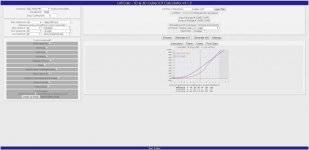
lutcalc HLG3Rec2020toSlog3-S-gamut3.cine.jpg

here the link:
http://rudproductions.com/HLG3-Rec2020ToSlog3-Sgamut3cineX33.zip

profil A7RIII (HLG3, REC2020, details-7, black level +5, sturation -7) place your zebra at 90% for exposing and expose just a litle under to be safe.

i found shooting a7RIII in HLG3 have better DR better grading than shooting in slog3 or cine4 mode this is the best way i found to match FS7slog3 and A7RIII.
 
Last edited:

Thanks Rudo,
Did you try this at different color temps ? If not was it daylight or tungstun. And was the A7 also on Preset as the FS7 must have been?
 
Yes i tried on different color temp, i shoot only in this hlg3 mode since 1 year with my A7RIII without problem and very happy with my kojicolor slog-cine.3 2383@1400iso lut apply on it. Yes i try to have same wight balance on A7 and Fs7. To me it is the best color and matching solution until sony give us slog3 10bits with better codec bandwish on A7. i just discovert that +32 saturation and less saturation during post can do cleaner image. I don't know why perhaps it help codec with small bandwish...
 
Thanks - I will definitely try this out. Very interesting and surprising that high saturation in camera gave better results in Post.
 
Looks like a perfect match. I'd like to see more colors in the shot to feel completely safe but this looks great. Did you do much post correction?
 
I did just little white balance (because FS7 have only three preset in cineei mode) and apply same solg3 lut on cameras no more.
I would say in general than FS7 MK I is little more magenta and A7RIII more green.
I will try do to same test with more colors but in général, i'm very happy to match those cameras with this pipeline. This is far better than apply same rec709 lut on A7RIII, i never found colors match as well as transform HLG3 to Slog3 then apply same slog3 luts on two cameras.
I hope Sony will improuve A7 codec in futur models (xavc-i 10bits with same fs7 bandwish) to simplify color matching.
 
One thing very important is to apply luts with colorista not lumetri (lumetri have problem with saturation reduction apparently and in general bring too much errors problems with gpu render when color grading)....
 
I tried but don't like interface and i work faster on adobe for the kind of jobs i do.
Resolve is very good color grading software, all tools you need are include and there is free version ! in premiere, i need some special tools (plugins) like 3d lut creator to have same level of grading and for apply lut another plugin colorista because lumetri have too much errors with GPU.
Here an other simple exemple of matching FS7 and A7RIII with a color chart this time: (nothing complex only WB and my luts)
http://rudproductions.com/COLORSFs7A7RIII.zip
I noticed one difference in the blue color chart but nothing impossible to match with hue in PP or special tool (match) in 3d lut creator to have perfect color chart matching.
 
Here the result of A7RIII PP (with my HLGtoSLOG3) it is a little video test name back to the street (covid19).
https://vimeo.com/422393746/e1d82cd754
i added noise and vignette no more. i think it is near the look i could reach with my Fs7 (no banding and colors i like).
Of course Fs7 is far better camera than A7 but that did the job.
 
Last edited:
Can someone comfirm me than in HLG PP and auto iso mode A7RIII run normally when iso is set to min 125 to max 800 or min 800 to max 10000?
(expose a scene and put the cap on lense to see the iso auto test)
i mean there is flash in black level if i try in iso auto mode iso min 640 to iso max 1250.
So, it looks like there is two auto iso mode in HLG, first 125 - 800 and the other 800-10000 if we don't want see flash problem on black level, like there was gain switch.
here exemple:
https://vimeo.com/rudlaga/review/426375361/22951cb1ac
i noticed this problem during a shooting where iso was accidentally in auto. Hope someone can confirm me that.
 
Last edited:
Back
Top