FS7: FS7 II - Does raw really make any difference? (qualitywise)

Not to search through long thread, could you explain me how RAW data can have log curve?
RAW data is the measured value of voltage produced by photo-sites of the camera sensor, without any processing or manipulation.

To maximize the tonal range of a sensor, log curve can be applied to deliberately remove parts of the image data.
Alexa sensor is 14-bit linear, internal processing is 16-bit and ARRIRAW data is efficiently stored as 12-bit log to retain 14(+) stops of latitude.
To create "16"-bit RGB image, applying reverse curve is a part of performed colour science, followed by final step of debayering.
And all of that with just 1/3 of the required bandwidth. Primary goal of RAW was not safety net for bad DP.

To go back to the FS7 12-bit linear < 12-bit log claim, it's not that simple.

Sony use floating point for storing data in 12-bit linear RAW, otherwise it wouldn't be possible to fit 14 stops.
Limitation is that amount of data available for the shadows is very small.
Data rounding used to retain the whole latitude of the sensor in 12-bit linear resulted in the coarser luma steps in the first two to three stops.
Solution to this is to overexpose up to 2 stops.

Log version has problems above middle grey and it gets worse and worse since each brighter stop has the same limited amount of data.
And without enough light footage will be noisy.

To conclude, 12-bit for "Real World" examples is just fine, for vfx get 16 bit.


I can't explain the math to you. I just make pretty pictures. I'll see if I can dig up the thread, which went into a lot of technical details.
 
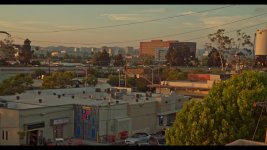
OK, so here is a CDNG as recorded during my early test (hence the extremely boring subject) of FS7->Shogun CDNG workflow:

https://mega.nz/#!9QQkTIDJ!9_rjEtf3dnYfK5I71bbCvtFLH8Dt3TwsdOGy-K11iEw (not ETTRed - hence more noise in shadows than necessary)

Please note that I was so preoccupied with choosing a strongly back-lit scene I forgot to even set my camera level on the tripod :) Even if the WB is baked-in, I can still manipulate it among all the other parameters in Camera RAW setting of Resolve project settings, as well as inside the project timeline using the RAW controls of the Color page.
Piotr
 
Last edited:
OH, and BTW: none of the dng files posted earlier in this thread can even be displayed in Resolve (14Beta5), they both are "Media Offline" no matter how I try - why do you think is that? My guess is I need the whole sequence; otherwise a single dng file can only be opened in Photoshop or similar applications (none of which I have access to) - true? Sorry for lame doubts - I have no experience with RAW :)

Piotr

PS. I'd really appreciate answering my above questions by the more experienced people here :)
 
Last edited:
Dennis has detected the problem right and the solution is the same: ETTR and rate that signal as 11-12 stop max.

But the tables are wrong, Sony uses floating point for storing data in 12-bit and 16-bit linear RAW.
 
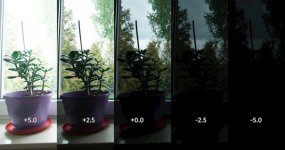
strip.jpg
I downloaded the FS7/Odyssey CDNG file that was previously linked on this thread. I developed it in photoshop with +5 stops of exposure compensation all the way down to -5 stops.
Although there is clear noise and artifacts, the image on the left is pretty amazing considering the FG plant is basically black as exposed in the uncompensated version.
Looking at the histogram for each, there is no clipping in the highlights on the original DNG. It probably could have been ETTR a bit more, providing even better noise performance in the shadows.

For people coming from stills photography the CDNG RAW (Sony uses all-caps) controls are everything that you would expect to have. In my tests with the FS5 there are only microscopic differences in an image that was shot at 3200k and pushed to 5600k and one that was natively shot at that color temperature.
For some projects the hassle of generating 1TB for every 48 minutes of footage is not realistic. For others, I truly believe it's the way to get the most from the camera.
 
Just to clarify: the dng frame downloaded has been FS7/Inferno, not Odyssey. Thanks @SamED for confirming what I'm seeing here :)

Piotr
 
OH, and BTW: none of the dng files posted earlier in this thread can even be displayed in Resolve (14Beta5), they both are "Media Offline" no matter how I try - why do you think is that?
Just tried the file uploaded by SamEd and this one works fine in DaVinci 14 Beta 5 for me.

You can pull a lot of shadows out of that video!

samed_1.1.1.jpg
 
Yep - beautiful scene, and lots of information there. Even more confused now why Resolve will not display it for me - it's always offline here... Unlike my own CDNG sequences; these are always online and display just fine!

And to add to @SamED's comments: yes the Inferno's RAW CDNG is "pretty decent" - but considering the huge file sizes, I'd decided it's not worth it with the IQ of Inferno's DHxHR (encoded from the same FS7"s RAW SDI output with S-log2/3 applied by Inferno) not being much worse. Anyway - as I stated many times before - both CDNG and DNxHR I'm getting with XDCA's RAW SDI output justified its hefty price tag for me...

Piotr
 
Last edited:
Thanks guys... I realise I should have used a different wording to my question. I hindsight, latitude would have been the proper word. Still, Im still not sure I want to throw the extra money at the add ons. I wish they hadn't crippled the output system so you could bypass the need of the XDCA unit and simply attach the Inferno to the SDI outs :/

Although... pulling almost 5 stops with that little noise :o and that highlight recovery.
 
Last edited:
I wish they hadn't crippled the output system so you could bypass the need of the XDCA unit and simply attach the Inferno to the SDI outs :/

Exactly; not only is the FS7's own SDI-out HD only, but even the 'less-pro' HDMI-out - although UHD capable - it's 10bit 4:2:2 only up to 30fps :( Sad, but this has been done on purpose to make us buy the silly expensive XDCA module.

Piotr
 
Back
Top