FS7: FS7 Green Screen Shoot

I heard from Alistair Chapman that rec709 is best for green screen rather than customEI. It gives the most information on the green channel and so provides a better key.

The logic is that each of the 7 stops in rec709 gets more bandwidth in the 10bits of information, rather than having than having to split it between 14.
 
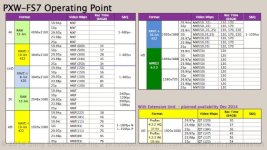
And if folks want the data rates for the FS7...

View attachment 96877

That's more like it. The one starcentral posted didn't make much sense to me because it only said "up to ---mbps", which isn't helpful in the least.

So yeah, from that chart you can see that 24fps XAVC-I UHD is 240mbps. XAVC-1 HD at 24fps is 89mbps, which is about a 48% higher data rate (relative to what 1/4 of UHD would be, in order to equalize the two).
 
So what settings did you end up shooting with?
I have a shoot this coming week - and based on this thread, and elsewhere, I plan on shooting in hypergamma 1 to 4 (any recommendations to which one would be best?) as they are rec709 compliant, and keep the iso around 800 Xavc-I in 4k manual wb.
The client most likely wont want slog3 and having to grade. Does this seem reasonable to you guys? Or does anybody have alternative suggestions?
 
The best recommendation is not to use gammas 1-4. Use 7 or 8 since they provide more dynamic range, in terms of dynamic range almost as good as slog2/3 and unknown to most the same range is slog1 ie. F3, F35.
 
Last edited:
I would go for the least compression as you can, and suggest overexposing by 1-2 stops which later when adjusted in post to correct levels will give you better noise levels.

In all honestly I would consider hypergamma. Depending on who's doing post and their experience, slog and green screen can be a bad combo.

Being a bottom feeder I have not played with green screen in a while but I attended this week's Moviola webinar on green screen and want to play with it in order to add different backgrounds for my vidcasts. So why is slog a problem? If one shoots Slog3 and then applies the LC709A lut in Resolve that usually gets one close to something usable for most situations.

Thanks,
Robert
 
slog for green screen is really only a problem if the people in post don't know how to work with it.

True with LC709-A you can just toss that on top and away you go.

Still the general recommendation (not hard fast rule) is to overexpose by 1-2 stops so that you improve the signal-to-noise ratio and thus have a cleaner image to work with in post. This is true with any camera regardless of the codec, dynamic range, or gamma curve.

Best thing to do is test it with some bracketing and your post guys in advance so there are no surprises or unexpected results. For that reason, many people just feel safer avoiding slog all together.
 
slog for green screen is really only a problem if the people in post don't know how to work with it.

True with LC709-A you can just toss that on top and away you go.

Still the general recommendation (not hard fast rule) is to overexpose by 1-2 stops so that you improve the signal-to-noise ratio and thus have a cleaner image to work with in post. This is true with any camera regardless of the codec, dynamic range, or gamma curve.

Best thing to do is test it with some bracketing and your post guys in advance so there are no surprises or unexpected results. For that reason, many people just feel safer avoiding slog all together.

Good info, thanks for taking the time to help:-)

PS: I am my post guys, but the OP hopefully has someone better.
 
The best recommendation is not to use gammas 1-4. Use 7 or 8 since they provide more dynamic range, in terms of dynamic range almost as good as slog2/3 and unknown to most the same range is slog1 ie. F3, F35.

Thank you Dennis. Most helpfull. I'll look into HG 7 or 8 - my reason for disregarding them to begin with is their base iso of 1600 - instead of hg1-4 which I thing is 800 - so mor clean image for key..
I am re-considering slog-3 tho - rating it around 1000 so to overexpose a bit - and then provide the editor with the 709A Lut - they edit in adobe cc so applying lut should be a breeze. Reason to do so Is also I really like color rendition and skin tones ets in slog 3.. I do however NOT have the opportunity to test stuff out with him.. What I decide i'd want to be sure works for a clean key.
 
Here in Lala land we shoot log for green work. Works beautifully. The highest end green screen work you see on TV is all shot LogC on Alexa.

The compositor probably would apply a LUT before pulling the key, to put the 10 bits in a more useful range for tweaking with the software pulling the key (usually Keylight)

I would think by now most plugs like Keylight are prepped for log footage and can internally apply a log transform to pull the key via checkbox, even though it doesn't show you the transform. FCPX does this in it's Keyer via a checkbox called "Fix Log Footage".
 
The best recommendation is not to use gammas 1-4. Use 7 or 8 since they provide more dynamic range, in terms of dynamic range almost as good as slog2/3 and unknown to most the same range is slog1 ie. F3, F35.

Here in Lala land we shoot log for green work. Works beautifully. The highest end green screen work you see on TV is all shot LogC on Alexa.

The compositor probably would apply a LUT before pulling the key, to put the 10 bits in a more useful range for tweaking with the software pulling the key (usually Keylight)

I would think by now most plugs like Keylight are prepped for log footage and can internally apply a log transform to pull the key via checkbox, even though it doesn't show you the transform. FCPX does this in it's Keyer via a checkbox called "Fix Log Footage".

Good to know thank you.. The Alexa does however allow for lower iso than the 2000 on the fs7 though.. Anyways, I am starting to lean towards going log...
 
And if folks want the data rates for the FS7...

View attachment 96877

I wonder if anyone else has noticed that the REC TIMES shown in that chart are way off. By almost 30 minutes in some cases. I spoke to Sony about this awhile ago and they said it was the conservative numbers Japan makes them use. So, don't use that chart to estimate your record times. Put an empty card in the camera and see what it says to get a real picture of the true record times for whatever format you choose.
 
Back
Top