starcentral
Veteran
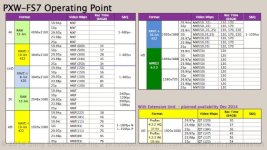
Just in case folks want to see data rates from Sony (although these are from F5/55)

Follow along with the video below to see how to install our site as a web app on your home screen.
Note: This feature may not be available in some browsers.

I would go for the least compression as you can, and suggest overexposing by 1-2 stops which later when adjusted in post to correct levels will give you better noise levels.
In all honestly I would consider hypergamma. Depending on who's doing post and their experience, slog and green screen can be a bad combo.
slog for green screen is really only a problem if the people in post don't know how to work with it.
True with LC709-A you can just toss that on top and away you go.
Still the general recommendation (not hard fast rule) is to overexpose by 1-2 stops so that you improve the signal-to-noise ratio and thus have a cleaner image to work with in post. This is true with any camera regardless of the codec, dynamic range, or gamma curve.
Best thing to do is test it with some bracketing and your post guys in advance so there are no surprises or unexpected results. For that reason, many people just feel safer avoiding slog all together.

The best recommendation is not to use gammas 1-4. Use 7 or 8 since they provide more dynamic range, in terms of dynamic range almost as good as slog2/3 and unknown to most the same range is slog1 ie. F3, F35.

The best recommendation is not to use gammas 1-4. Use 7 or 8 since they provide more dynamic range, in terms of dynamic range almost as good as slog2/3 and unknown to most the same range is slog1 ie. F3, F35.
Here in Lala land we shoot log for green work. Works beautifully. The highest end green screen work you see on TV is all shot LogC on Alexa.
The compositor probably would apply a LUT before pulling the key, to put the 10 bits in a more useful range for tweaking with the software pulling the key (usually Keylight)
I would think by now most plugs like Keylight are prepped for log footage and can internally apply a log transform to pull the key via checkbox, even though it doesn't show you the transform. FCPX does this in it's Keyer via a checkbox called "Fix Log Footage".